57
6 The Fat Channel
6.8 Fat Channel Screens
StudioLive™ Series III
Owner’s Manual
6.8 Fat Channel Screens
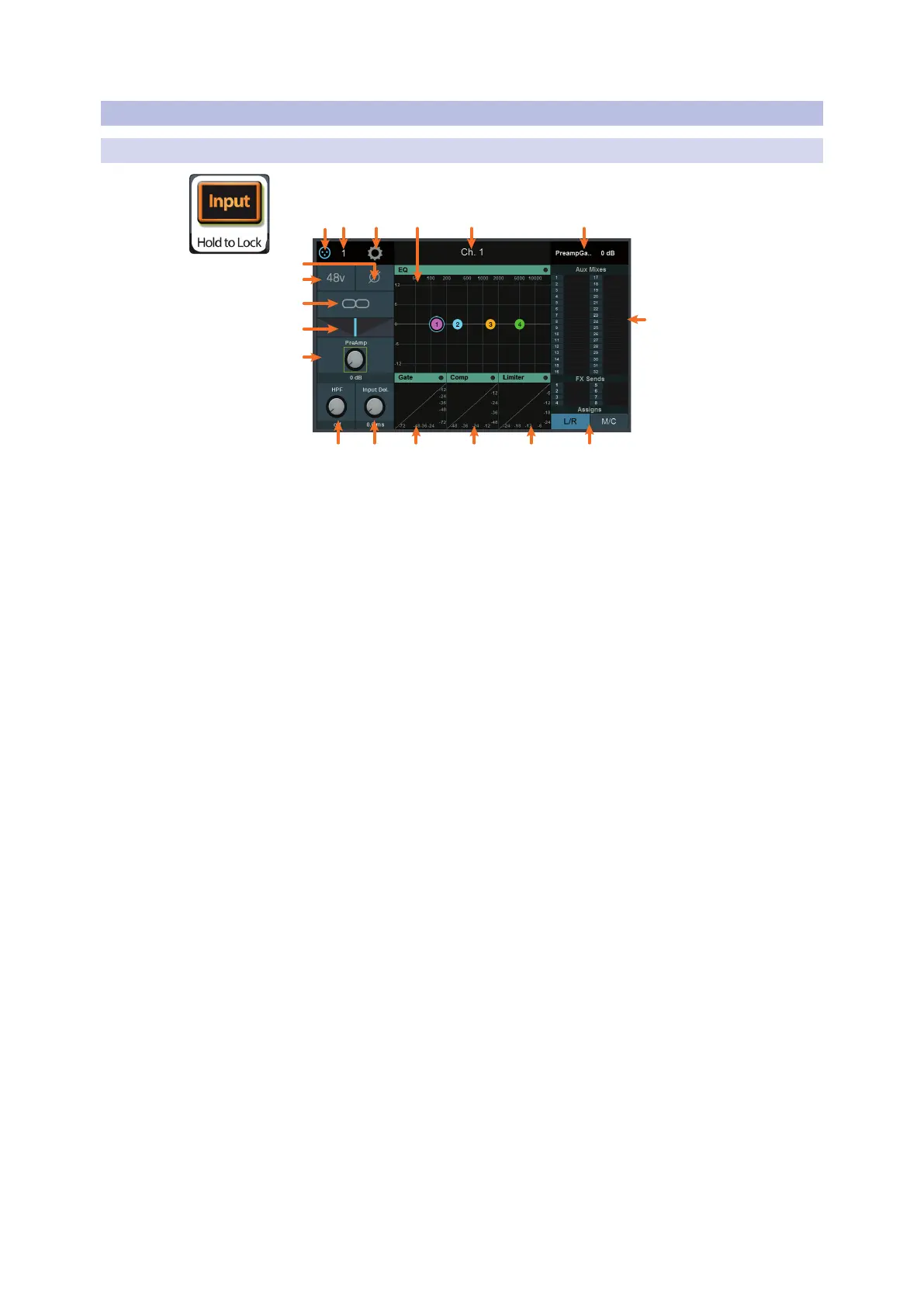
6.8.1 Channel Overview
While an Input channel is selected and Input mode is active, the Channel Overview is
shown on the Touch Display:
5
6
7
8
4
7
1. Signal Source. Displays whether this channel is receiving signal from an analog
or digital source. Press to open the Input Source screen. For more information,
see Section 6.10.1.
2. Input Source Number. Displays the number of the input source assigned to the
current channel.
3. Settings Button. Touch to access additional channel or bus settings.
4. EQ. Displays the EQ overview. Touch to open the EQ Screen. See Section 6.6 for
more information.
5. Name. Displays currently selected channel or bus name.
6. Current Parameter. Displays currently controlled parameter and its value.
7. Aux and FX Send Levels. Displays the send levels for current channel. Touch this
area to open Channel Bus Sends screen. See Section 6.7 for more information.
8. Assignments. Use these controls to assign/unassign the current channel to the
Main bus and either the Mono/Center bus (StudioLive 64S) or the four dedicated
Subgroups (all 32-channel models).
9. Limiter. Displays the Limiter overview. Touch to open the Limiter Screen.
10. Compressor. Displays the Compressor overview. Touch to open the Compressor
Screen. See Section 6.8.4 for more information.
11. Gate. Displays the Noise Gate overview. Touch to open the Noise Gate Screen.
See Section 6.8.3 for more information.
12. Delay. Sets the amount of alignment delay applied to the input channel or bus.
Touch to enable manipulation by the Master Control encoder. See Section 13.6
and 13.7 for more information.
13. HPF Frequency. Sets the High Pass Filter cut-off frequency. Touch to enable
manipulation by the Master Control encoder.
Note: The Main stereo and Mono bus on the StudioLive 64S provides a toggle
between Low Pass Filter and High Pass Filter behavior.
14. Preamp Gain. Sets the preamp gain. Touch this knob to enable manipulation by
the Master Control encoder.
15. Pan. Sets the pan position. Touch to enable manipulation by the Master Control
encoder.
16. Link. Links or unlinks the channel to the adjacent channel or bus to create a
stereo pair.
17. +48v. Touch to enable/disable phantom power.
18. Polarity Invert. Touch to enable/disable polarity invert.










 To Next Page