122
13 Resources
13.1 Networking Overview
StudioLive™ Series III
Owner’s Manual
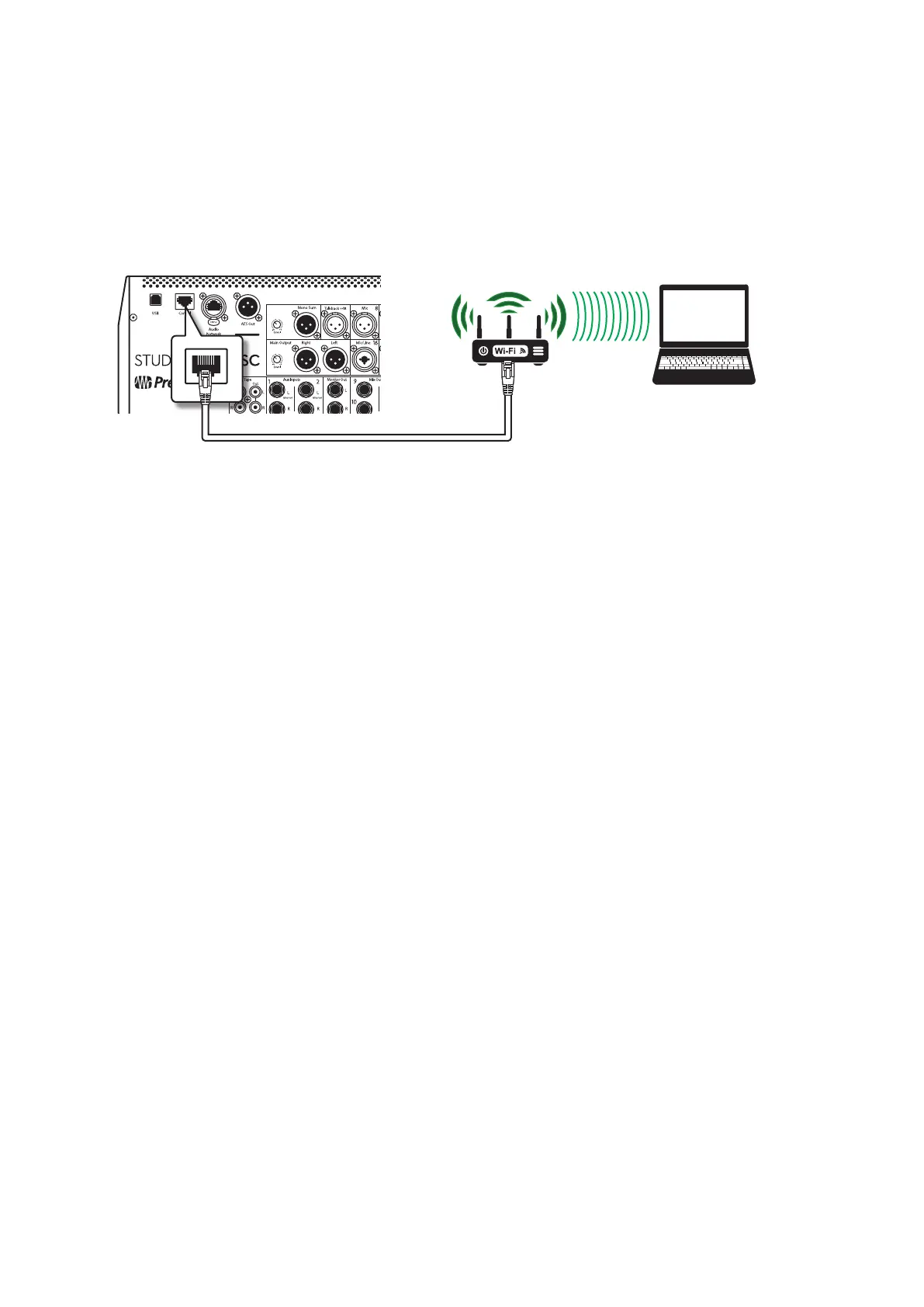
1. Connect standard CAT5e or CAT6 Ethernet cables from your computer’s Ethernet
port to an Ethernet router, and from the router to the Control port on the
StudioLive’s rear panel.
2. Launch Universal Control on the computer (macOS or Windows) that is
connected to the router.
3. When Universal Control launch window appears. Tap on your mixer’s icon to
launch UC Surface.
For more information on UC Surface, see the UC Surface Reference Manual.
Laptop
Ethernet cable
Using a wireless router, you can also connect your computer wirelessly:
Windows 7+
1. Click on the network icon in the notification area to open the Connect to
Network Control Panel.
2. Select the name of the wireless network you set for your wireless router.
3. Enter the password.
4. Click Connect.
macOS 10.8 and later
1. On the Menu bar click on the Wireless Status icon.
2. Select the name of the wireless network you set for your wireless router.
3. Enter the password.
4. Click Join.
Note: Information on connecting your iOS device to the wireless network can be found in
the Networking for StudioLive Remote Control Reference Guide.
See Section 9.4.4 for information on customizing IP settings.










 To Next Page