- 58 -
1
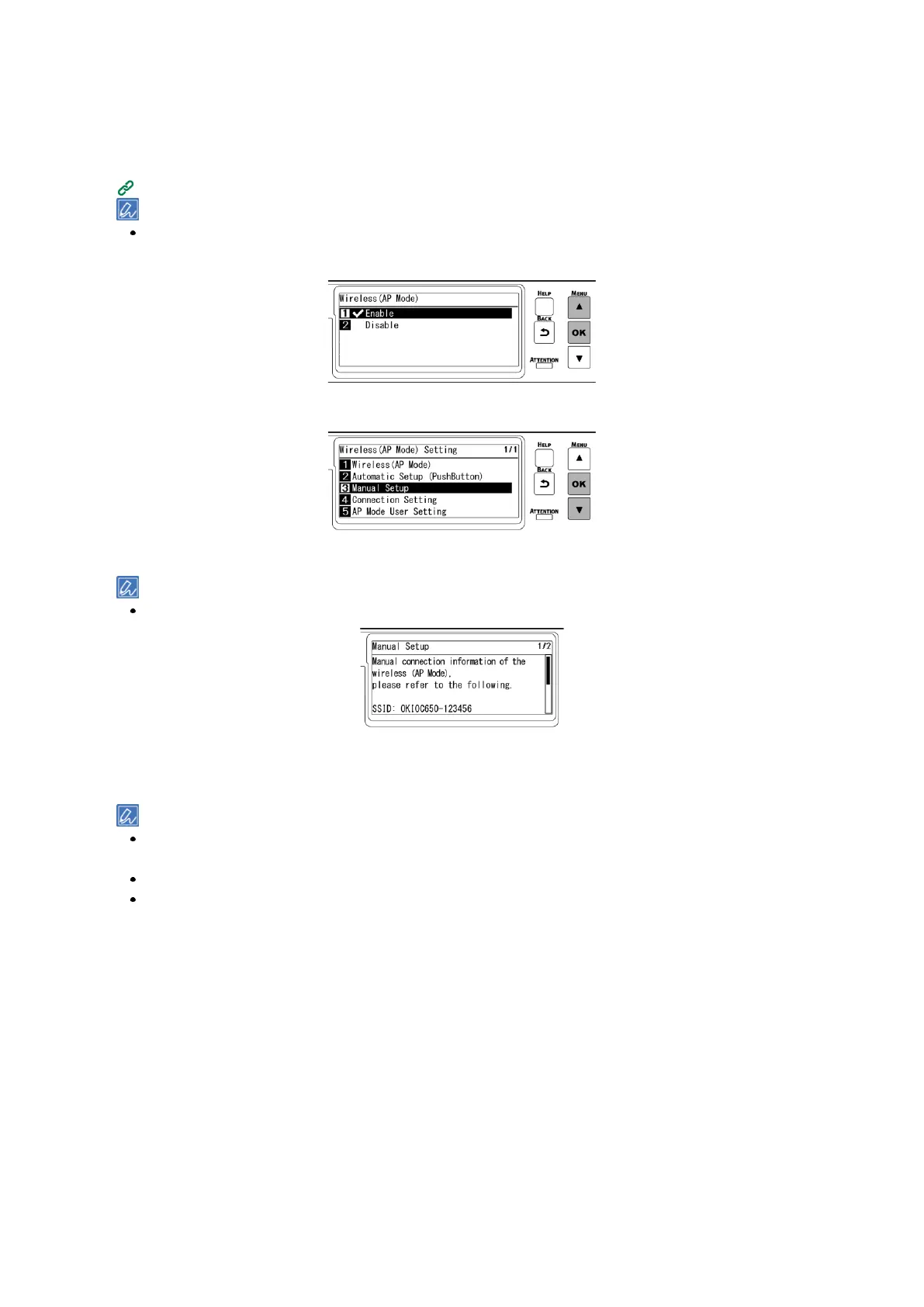
Press the scroll button ▼ on the operator panel several times to select [Wireless(AP Mode)
Setting], and press «OK».
2
Input the admin password using the numeric keypad, and press «OK».
"Cannot be used simultaneously with wireless(infrastructure)." will be displayed for about 5 seconds.
3
Press ▲ to select [Enable], and press «OK».
4
Press ▼ several times to select [Manual Setup], and press «OK».
5
Check that [SSID] and [Password] of this machine are displayed.
The screens shown here are examples, and they may differ from the actual display.
6
Input [SSID] and [Password] of this machine confirmed in Step 5 in the wireless terminal to
connect.
If the wireless terminal is set to obtain the IP address automatically, you can communicate by connecting to this
machine in the AP mode and allocating the IPv4 address automatically to the mobile terminal.
The factory default IP address is [192.168.110.100].
If you cannot connect, see "Troubleshooting for wireless LAN connection ".
Then, go to "Installing software on a PC ".
When using a mobile device, go to "Printing from a mobile device ".















 To Next Page