- 378 -
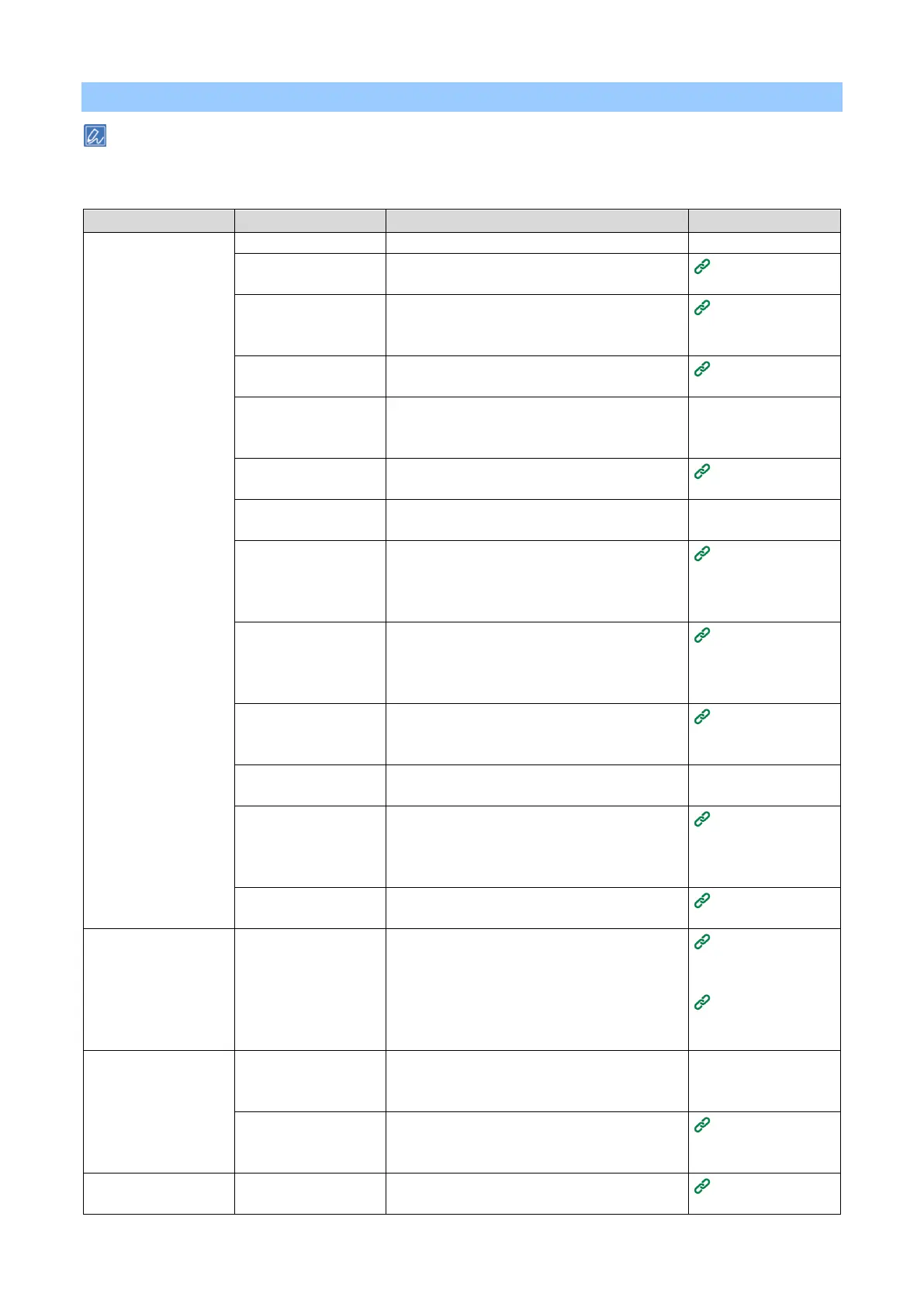
Troubleshooting for the paper
Please check the following explanation and "Frequently Asked Questions (FAQs)" on the website or your
smartphone application.
If the problem persists, contact your dealer.
Paper jams occur
frequently.
Multiple sheets of
paper are pulled
in
simultaneously.
The paper is
pulled in an
inclined direction.
Install it on a stable and flat surface.
The paper is either too
thin or too thick.
The paper is either too thin or too thick. Use
the paper applicable to this machine.
The paper is moist or
charged with static
electricity.
Use the paper stored at appropriate
temperature and humidity.
The paper is wrinkled,
folded or curled.
Use the paper applicable to this machine.
Straighten the paper if it is curled.
The paper has had its
reverse side printed.
Already printed paper cannot be printed again
from Tray 1/2/3/4.
Print from the MP tray.
The paper is not
aligned yet.
Shuffle the paper well, and load the paper with
the top, bottom, left and right aligned.
Load only one sheet of
paper.
Load multiple sheets of paper.
Additional paper is
loaded in the tray
while the existing
paper is kept as it is.
Remove the existing paper in the tray, and load
the paper again together with the new one with
the top, bottom, left and right aligned.
The paper is not
loaded straight.
Align the paper with the paper guide and paper
stopper of Tray 1/2/3/4.
Align the paper with the manual feeder guide of
the MP tray.
The envelope is
loaded in a wrong
orientation.
Load the envelope again correctly.
Envelopes are sticked
together.
Shuffle the envelopes well, or stack them one
by one.
Load paper with a
paper weight of 221-
256 g/m
2
, envelope or
labels in Tray 1/2/3/4.
Load paper with a paper weight of 221-256
g/m
2
, envelope or labels in the MP tray.
Paper applicable
to each tray
The rear output tray is
not closed properly.
Firmly close the rear output tray.
Paper jams occur
frequently.
The paper feed roller
is dirty with paper
dust.
Clean the paper feed roller.
Cleaning paper
feed rollers
(Trays 1-4)
Cleaning the
paper feed roller
(MP tray)
[Paper Source] in the
printer driver is
selected incorrectly.
Check the paper tray, and select the correct
tray from [Paper Source] in the printer driver.
Manual feeding is
specified in the printer
driver.
Disable [Feed paper individually] in the printer
driver.
Printing one
sheet at a time
manually
Paper cannot be fed
from Tray 2/3/4
Tray 2/3/4 is not set up
in the printer driver.
Set up Tray 2/3/4 in the printer driver.
Setting the printer
driver















 To Next Page