Device Manual CANlink wireless
About the device
PROEMION GmbH | Phone: +49 661 9490-600 | Fax: +49 661 9490-666 | info@proemion.com | proemion.com | Version 1.0 6
© 2016RM MICHAELIDES● VX.X ● Device Manual CANlink 5000 series © 2016RM MICHAELIDES● VX.X ● Device Manual CANlink 5000 series © 2016 PROEMION GMBH > 1.0 EN > Device Manual CANlink wireless 3000 series
1.1 Important device information
1.1.1 Device elements
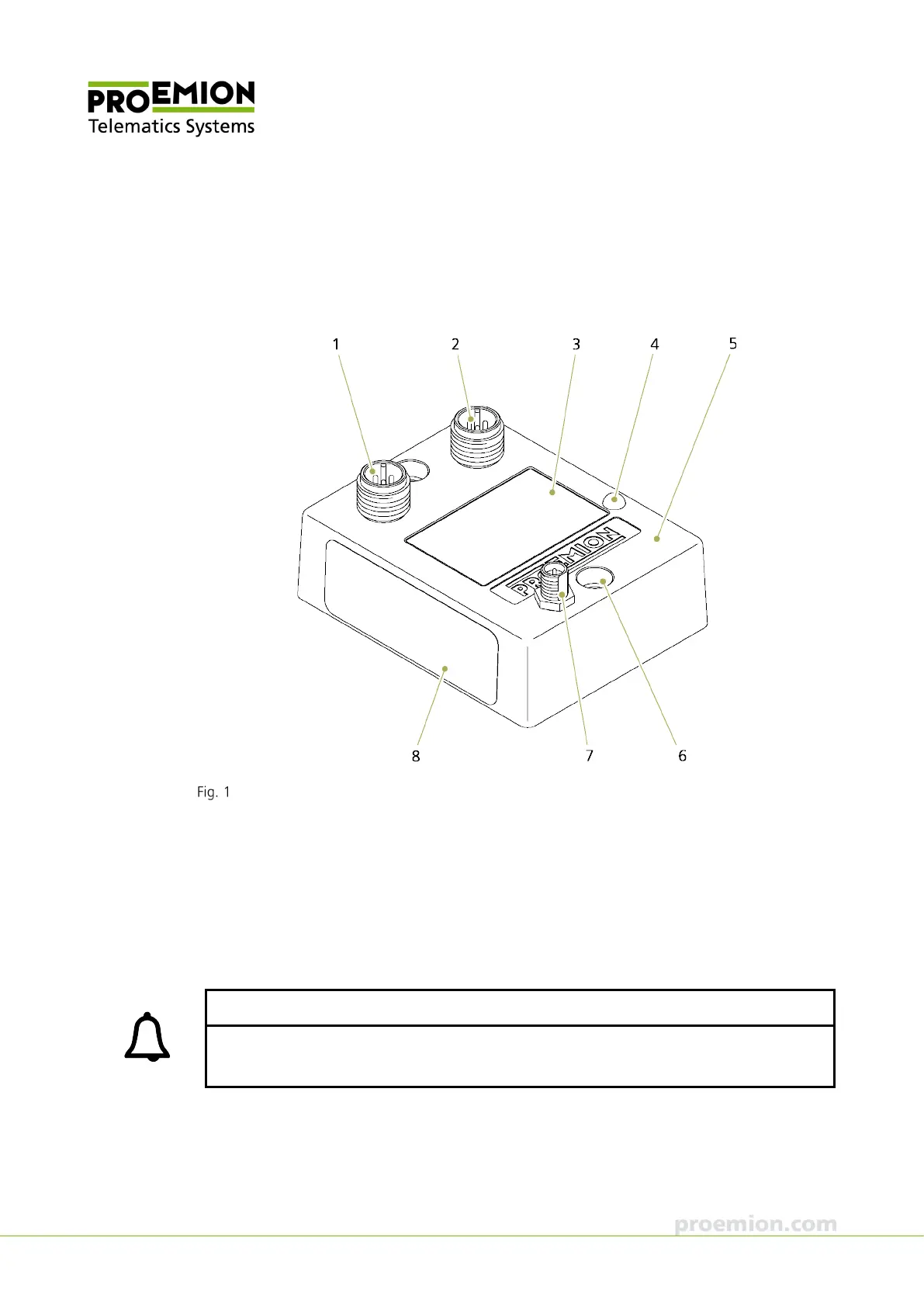
Overview of CANlink wireless 3002
1. 5 pin: CAN / Power
2. 5 pin: RS232
3. Front film
4. LED
5. Housing
6. Mounting holes
7. RF antenna connector
8. Type label
INFORMATION
The 3001 model variant does not feature an external antenna connector. The antenna is
integrated in the device.



 To Next Page