Device Manual CANlink wireless
About the device
PROEMION GmbH | Phone: +49 661 9490-600 | Fax: +49 661 9490-666 | info@proemion.com | proemion.com | Version 1.0 7
© 2016RM MICHAELIDES● VX.X ● Device Manual CANlink 5000 series © 2016RM MICHAELIDES● VX.X ● Device Manual CANlink 5000 series © 2016 PROEMION GMBH > 1.0 EN > Device Manual CANlink wireless 3000 series
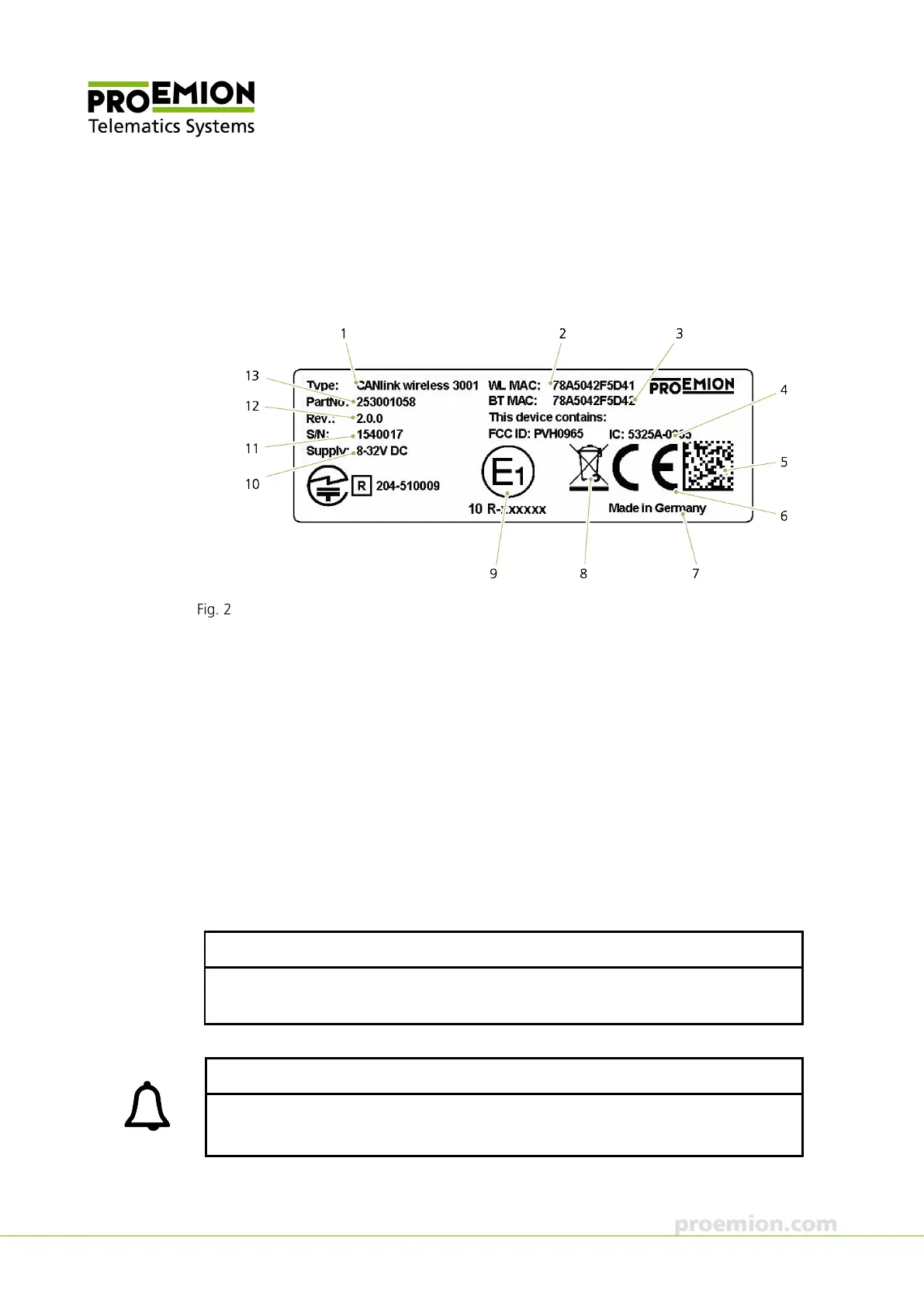
1.1.2 Type label
The device type label is located on the rear of the housing and provides the following
information:
CANlink wireless 3001 type label
1. Device name and type
2. WLAN MAC address
3. Bluetooth MAC address
4. Certifications
5. Traceability code
6. CE mark
7. Country of origin
8. Disposal symbol
9. ECE certification mark
10. Power supply
11. Serial number
12. Hardware version
13. Article number
NOTICE
Use of solvents on the product label can remove or destroy product information.
Keep solvent-containing substances away from the type label.
INFORMATION
The device's type label contains important information.
Do not remove the type label.



 To Next Page