Device Manual CANlink wireless
Getting started
PROEMION GmbH | Phone: +49 661 9490-600 | Fax: +49 661 9490-666 | info@proemion.com | proemion.com | Version 1.0 78
© 2016RM MICHAELIDES● VX.X ● Device Manual CANlink 5000 series © 2016RM MICHAELIDES● VX.X ● Device Manual CANlink 5000 series © 2016 PROEMION GMBH > 1.0 EN > Device Manual CANlink wireless 3000 series
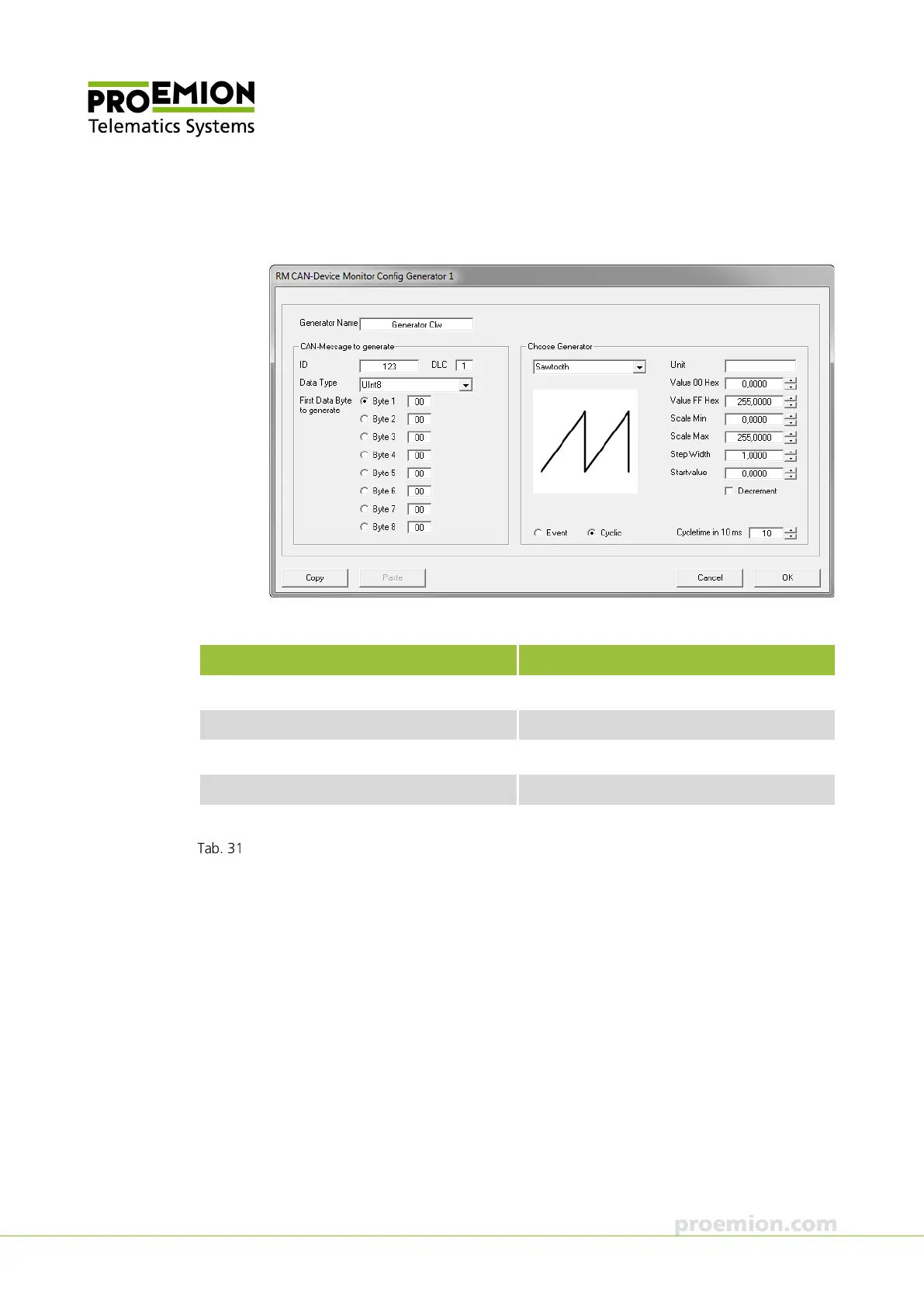
29. Choose VIEW → GENERATOR from the menu.
This opens the RM CAN-D
EVICE MONITOR GENERATOR 1 window.
30. Enter the following parameters for the generator:
Name Entry
Generator Name Generator Clw
ID 123
Data Type UInt8
First Data Byte to generate Byte 1
Choose Indicator Sawtooth, Cyclic, Cycletime 10 ms
Generator Clw parameters
31. Click the OK button to confirm the parameters.
32. In the G
ENERATOR CLW window, click on the SEND button.
This starts the G
ENERATOR CLW.
33. Switch to the first instance of RM CAN-Device Monitor.
34. In the G
ENERATOR CV window, click on the SEND button
This starts the G
ENERATOR CV.



 To Next Page