Home
ProJet
3D Printers
1000
Page 98
ProJet 1000 - Page 98
199 pages
Manual
Save Page as PDF
To Next Page
To Next Page
To Previous Page
To Previous Page
Loading...
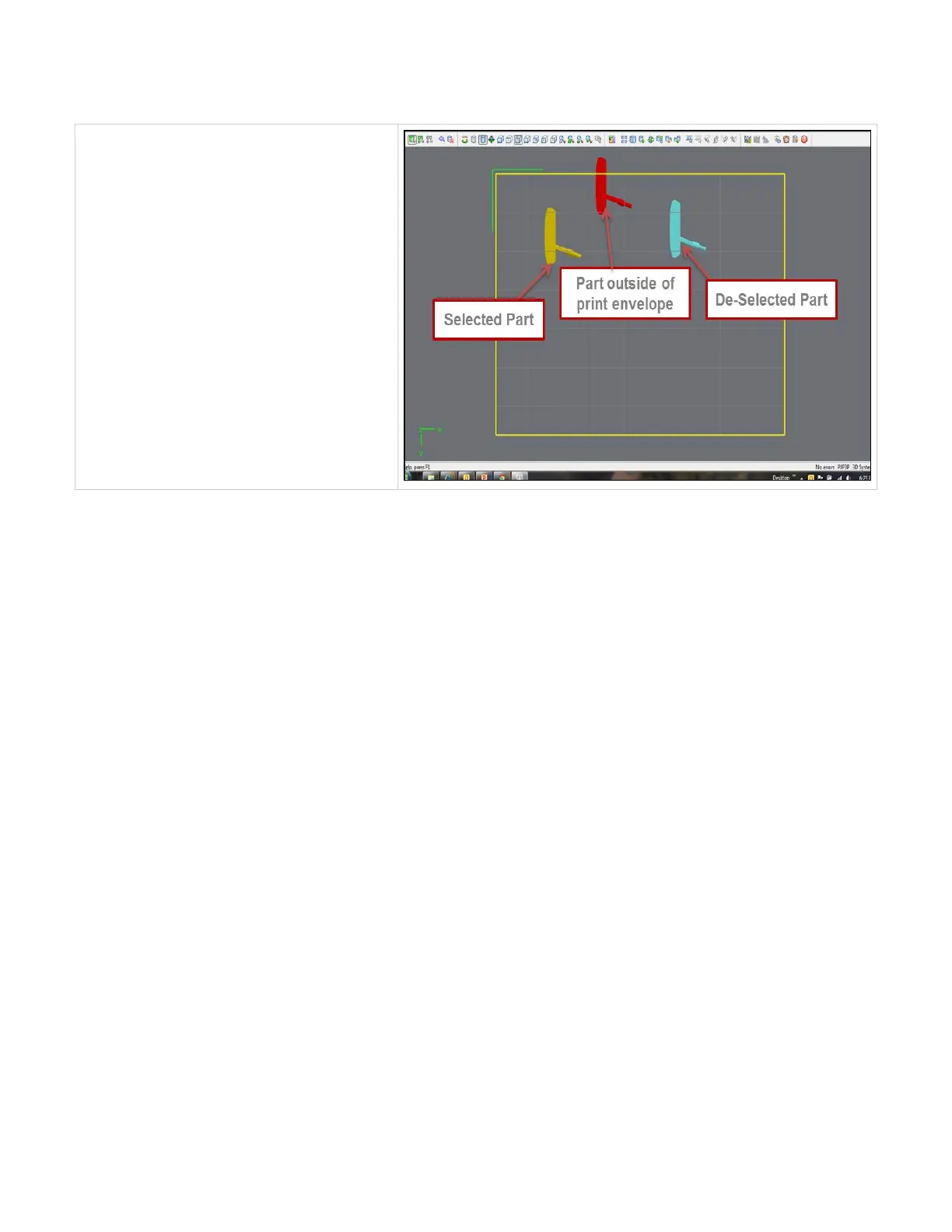
Part Colors in the Viewing Area
Parts are displayed in shades of green or blue when
they are within the build envelope, and in red when they
are not. Selected parts are displayed in yellow within the
build envelope, and in orange when not
97
99
Table of Contents
Main Page
Table of Contents
1
Projet™ 1000 & 1500 Table of Contents
3
Air Filter Replacement
4
Introduction
5
About this Guide
6
Copyright
7
Features & Benefits
8
Safety Symbols & Definitions
10
Safety Guidelines
11
General Safety Guidelines
12
Housekeeping
13
Protective Eye Wear & Clothing
14
Printer Safety Guidelines
15
High Voltage Potential & Electrical Safety
16
Shuttle Plate Pinch Point
17
Ultraviolet (UV) Safety
18
Visi-Jet® FTI Material Safety Guidelines
19
Visijet® FTI Material Cartridge Procedure
20
Visijet ® FTI Material Cartridge Removal
21
Visijet® FTI Material Disposal
22
Visijet® FTI Material Handling
23
Visijet® FTI Material Safety
24
Visijet® FTI Material Usage
25
System Requirements
26
Client's Computer & Network Interface
27
Electrical
28
Operating Environment & Workspace
29
Projet™ 1000 & 1500 Printer Dimensions
30
Space Requirements
31
Visijet® FTI Material Cartridges
32
Familiarization
33
System Operation
34
System Overview
35
Printer Installation
36
What Is Included with the Printer
37
Uncrating Printer
38
Leveling Printer
41
Printer Preparation
42
Cleaning Image Mirrors
43
Print Pad and Print Platform Installation
45
Removing Print Pad from Platform
46
Material Tray Cover Installation
47
Material Tray Gasket Installation
49
Material Tray Installation Instructions
50
Coater, Scraper Bar Installation
51
Material Cartridge Installation
52
Resin Blotter Installation
53
Printer Preparation for Material Color Change
54
Network and System Setup
58
Basic Printer Network Information
59
Network Setup for Online Printer Registration
60
Network Setup for Offline Printer Registration
61
Printer Network Configuration & User Profile
63
User ID and Password
64
Print Preview Installation
65
Update Software
66
Projet™ Client Software Overview
67
Alerts
68
Create New Print
69
Diagnostics
70
Current Status
71
Elevator Motion
72
Routines
73
Sensors and Output
74
Shuttle Motion
76
UV Shutter Motion
77
Email Settings
78
Help
79
Home Page
80
Network Identification Settings
81
Printer ON-OFF
82
Printer User Account
83
Prints Queue
84
Print Tracking (TSV Report)
85
Software Updates
86
Operations
87
Print Process & Previewing Print
89
Create a New Print
90
Submitting a Print to Print Preview
91
Previewing Prints
93
Print Preview
94
Preview Browser Overview
99
Save a Print
141
Delete a Print
142
Part Removal & Cleaning Procedure
143
Shutting down System
144
Alert Messages
145
Cartridge Alerts
146
Cartridge Empty
147
Cartridge Low
148
Cartridge very Low
149
Imager Alerts
150
Imager Output Is Low
151
Print Alerts
152
Print Aborted
153
Print Complete
154
Printer LED Status Lights
155
User Interface Control Panel LED Operation
156
Maintenance
157
Cleaning Image Mirrors
158
Clean Image Plane & Material Trap
159
Cleaning Outer Surfaces
160
Preventative Maintenance Check List
161
Air Filter Replacement
162
Replacement Parts
163
Returning Printer for Repair
164
Error Messages
165
Elevator Error Messages
166
Imager Error Messages
167
Material Cartridge Error Messages
168
Shuttle Error Messages
169
Troubleshooting
170
Printer Hardware
171
User Diagnostics
172
Material Tray Cure Routine
173
Perform Low Material Tray Fill
178
Perform New Material Tray Fill
179
Perform Routine Maintenance
180
Start Coat Test
181
Visijet® FTI Material
182
Spare Parts Locator
183
Other Documents
184
Projet™ 1000 & 1500 Quick Reference Guide
185
Projet™ Parts Finishing Systems User Guide
186
Visijet® FTI Material Safety Data Sheet (MSDS & SDS)
187
Service & Support
188
Contacts
189
How to Order Parts
190
Service Support
191
Online Help
192
Frequently Ask Questions (FAQ)
193
Getting Help
195
Glossary of Terms
196
Index
197
Related product manuals
ProJet MJP 2500
44 pages
ProJet MJP 2500W
26 pages



 To Next Page