8.4.4 Setting up the PAA20+inputs for Barco Alchemy ICMP servers.
IMPORTANT: This chapter only applies for PAA20+ devices with firmware
version 4.3.3 or higher. If you want to use this functionality and your device
has a lower version, please upgrade it.
Barco Alchemy (ICMP) server has a set of ASCII control messages we can
use to control certain playback or automation functions. These messages and
their description can be found on the APPENDIX I: COMMANDS FOR
BARCO ALCHEMY (ICMP) remote player management of this document.
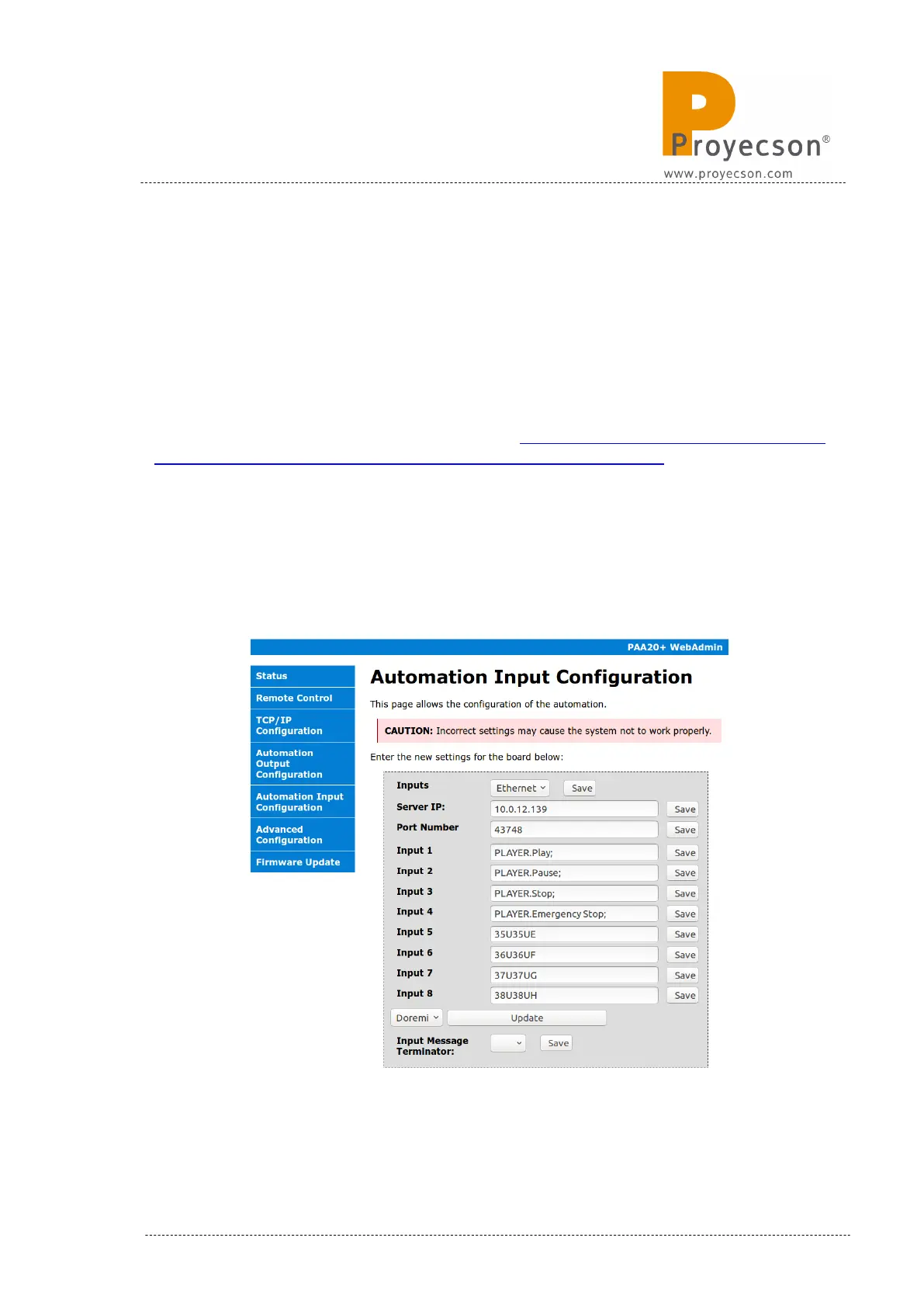
Using the “Automation Input Configuration” menu it is possible to send these
commands to the Alchemy from the PAA20+ every time we have a Input ac-
tivation (via front panel button, rear input connector or web interface).
Figure 8.4.4A shows the way to set these messages and TCP/IP options:
Figure 8.4.4A
INSTALLATION MANUAL: PAA20+ V 2.0 (10/2021) 87



 To Next Page