8.4.3 Setting up the output cues for Barco Alchemy ICMP servers
using xml library
There is another way to set-up the cues for the PAA20+ in a Barco ICMP
server, using the “PAA20p_Alchemy_V01.xml” file available in the FTP:
ftp://manual:proyecson@ftp3.proyecson.com/manual/paa20+ to create the
PAA20+ device, cue group and cue library in the server. Using this method
you can use the PAA20+ outputs with the Barco Alchemy ICMP server.
To do so you must follow these steps:
1. Download the “PAA20p_Alchemy_V01.xml” file from the ftp site.
2. Connect with the projector devices using the Barco Communicator
software.
3. Log in as “Service Technician”.
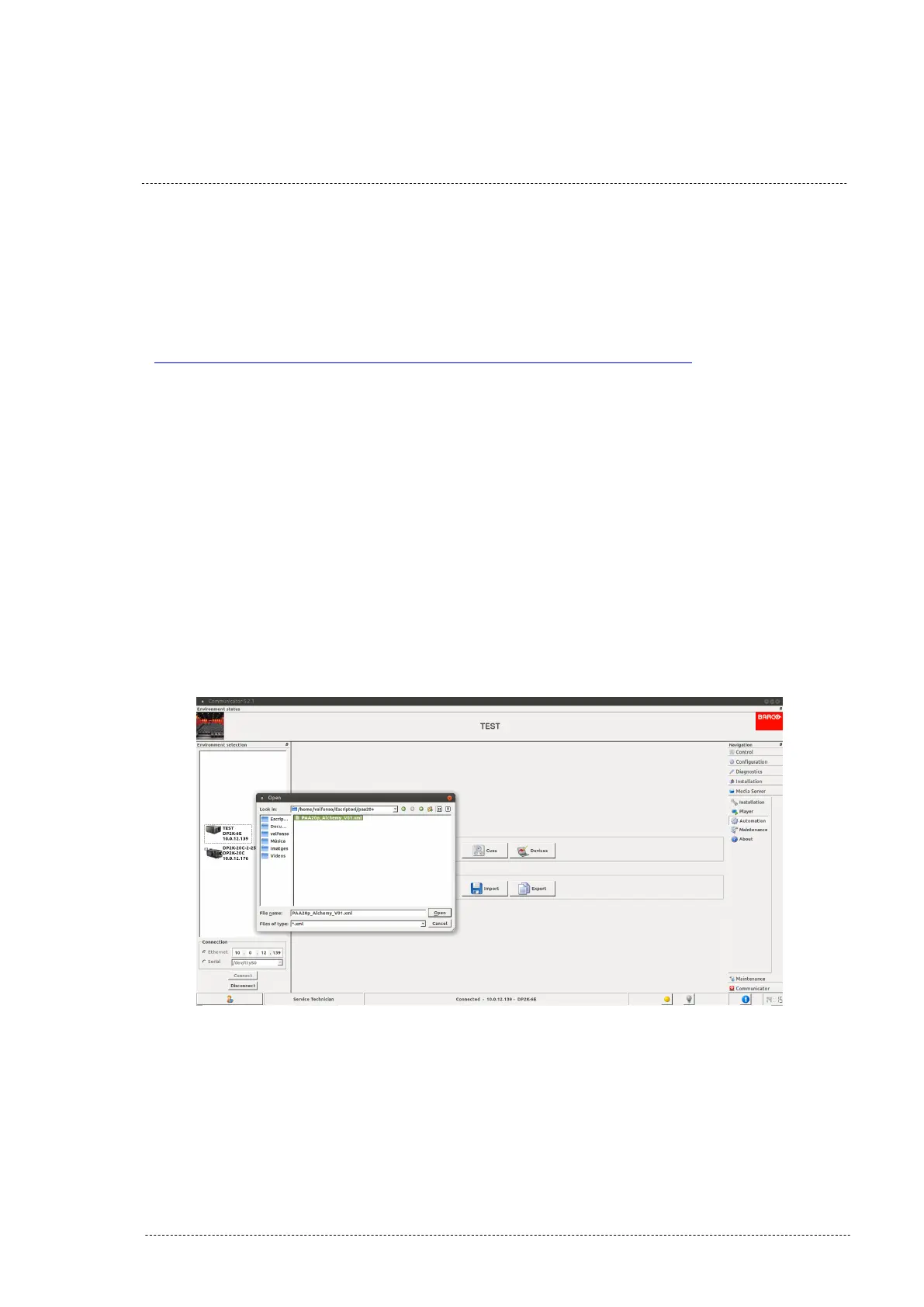
4. In "Media server -> Automation" menu click on the "Import" button.
5. Using the pop-up explorer, select the "PAA20p_Alchemy_V01.xml" file
as you can see in the Figure 8.4.3A.
Figure 8.4.3A
INSTALLATION MANUAL: PAA20+ V 2.0 (10/2021) 84



 To Next Page