32
ESP-LXME Controller
Adjust By Month
Select Months to Adjust
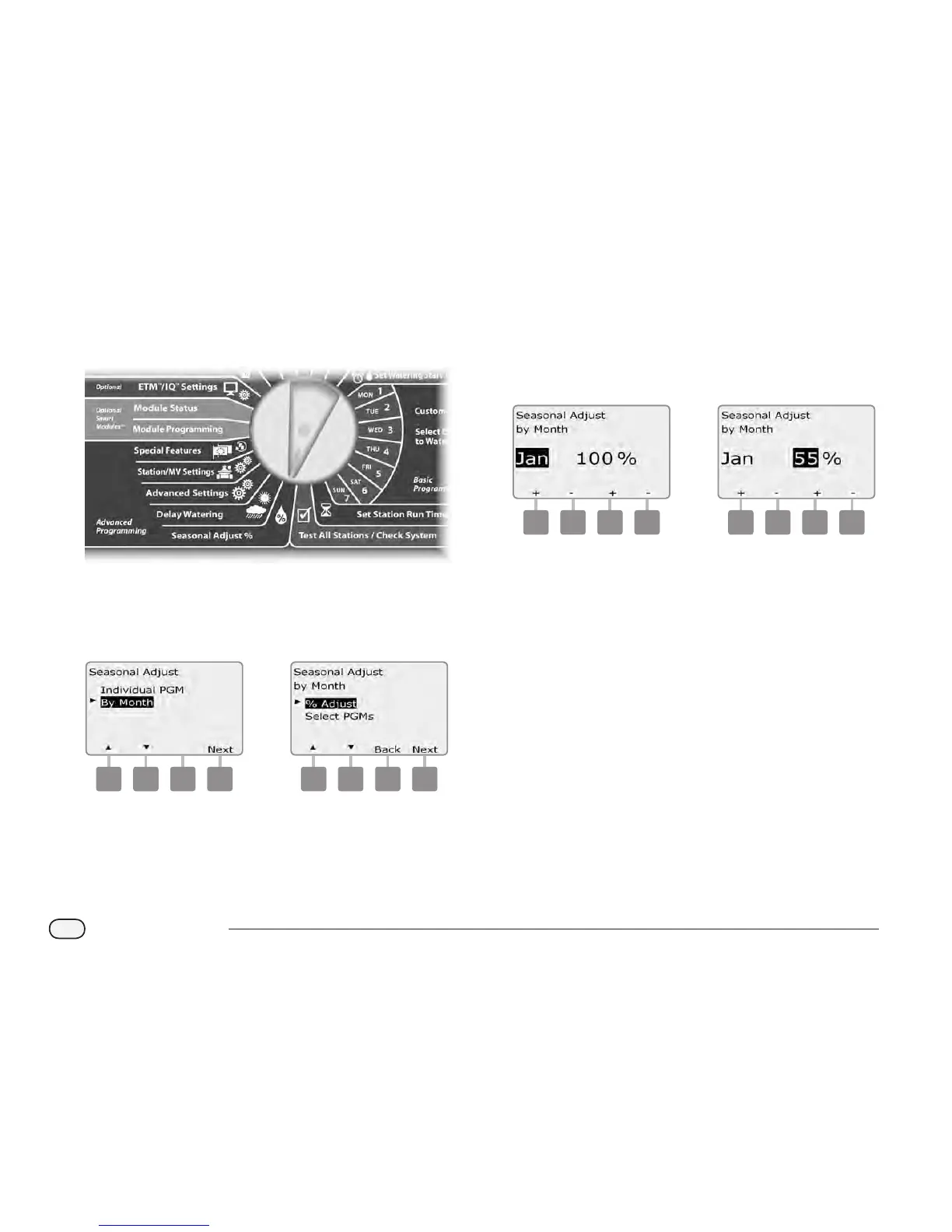
Turn the controller dial to Seasonal Adjust %.
A
The Seasonal Adjust screen appears. Press the Down Arrow button
to select By Month; then press Next.
B
The Seasonal Adjust by Month screen appears with % Adjust
selected; press Next.
1 2
C
Press the + and – buttons on the left to select the month you
would like to adjust.
D
Press the + and – buttons on the right to set the Seasonal
Adjustment percentage (from 0 - 300% ).
Press and HOLD buttons to accelerate settings for percentages.
3 4
Repeat this process to set Seasonal Adjustments for other months
as desired. Then change the Program Select switch and repeat
this process to set Seasonal Adjustments By Month for other
programs as desired.
NOTE: The % Adjust will automatically change to the new
month’s percentage setting on the rst day of the month.


 To Next Page
 Loading...











