77
ESP-LXME Controller
Section F - Options & Special Features
Set Language
You can set the ESP-LXME controller to one of six supported languages;
English, Spanish, French, Portuguese, Italian or German. Changes to the
default language aect all screens and menus.
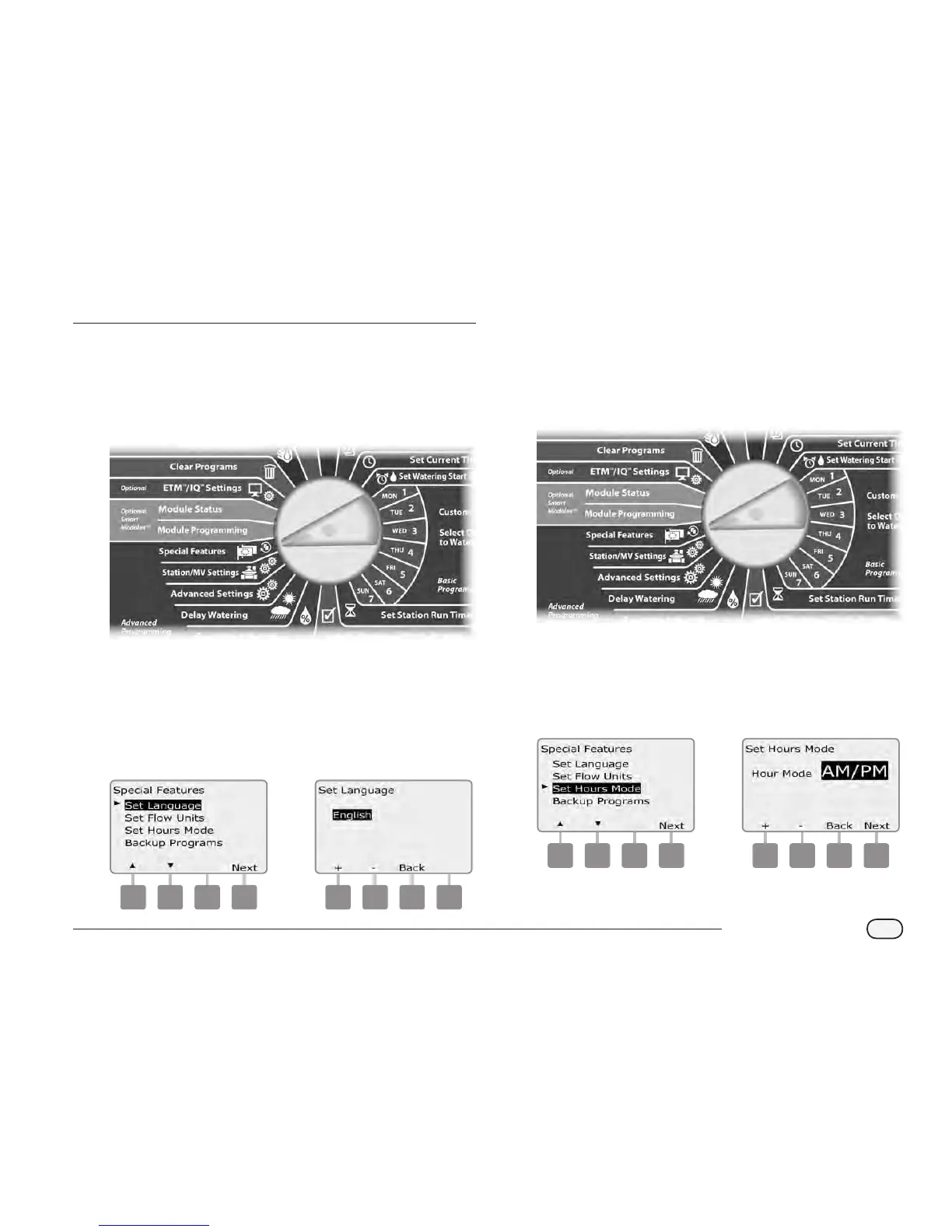
Turn the controller dial to Special Features.
A
The Special Features screen appears with Set Language selected;
press Next.
NOTE: If the controller is set to a language you do not speak, Set
Language is the top item on the Special Features main menu.
B
The Set Language screen appears. Press the + and – buttons to
select the desired language.
1 2
Set Hours Mode
You can set the ESP-LXME controller to display time in one of three
hours modes: Auto (default for your region), AM/PM or 24 Hour.
Turn the controller dial to Special Features.
A
The Special Features screen appears with Set Language selected.
Press the Down Arrow button to select Set Hours Mode; then
press Next.
B
The Set Hours Mode screen appears. Press the + and – buttons to
select the desired hours mode.
1 2



 To Next Page
 Loading...











