78
ESP-LXME Controller
Backup and Recall Programs
The ESP-LXME controller comes standard with a simple to use backup
programs feature.
Backup Programs allows you to save your programs as Contractor
Default and then recall them at a later time. It also includes a Delayed
Recall feature that lets you save a normal irrigation schedule as the
Backup and then restore it later automatically. This may be useful for
new seed or sod where frequent irrigation can be programmed to
occur until a set date when Delayed Recall automatically returns the
controller programming to the normal irrigation schedule.
CAUTION: The Backup Programs feature saves and restores ALL
irrigation programming in ALL programs (A, B, C & D).
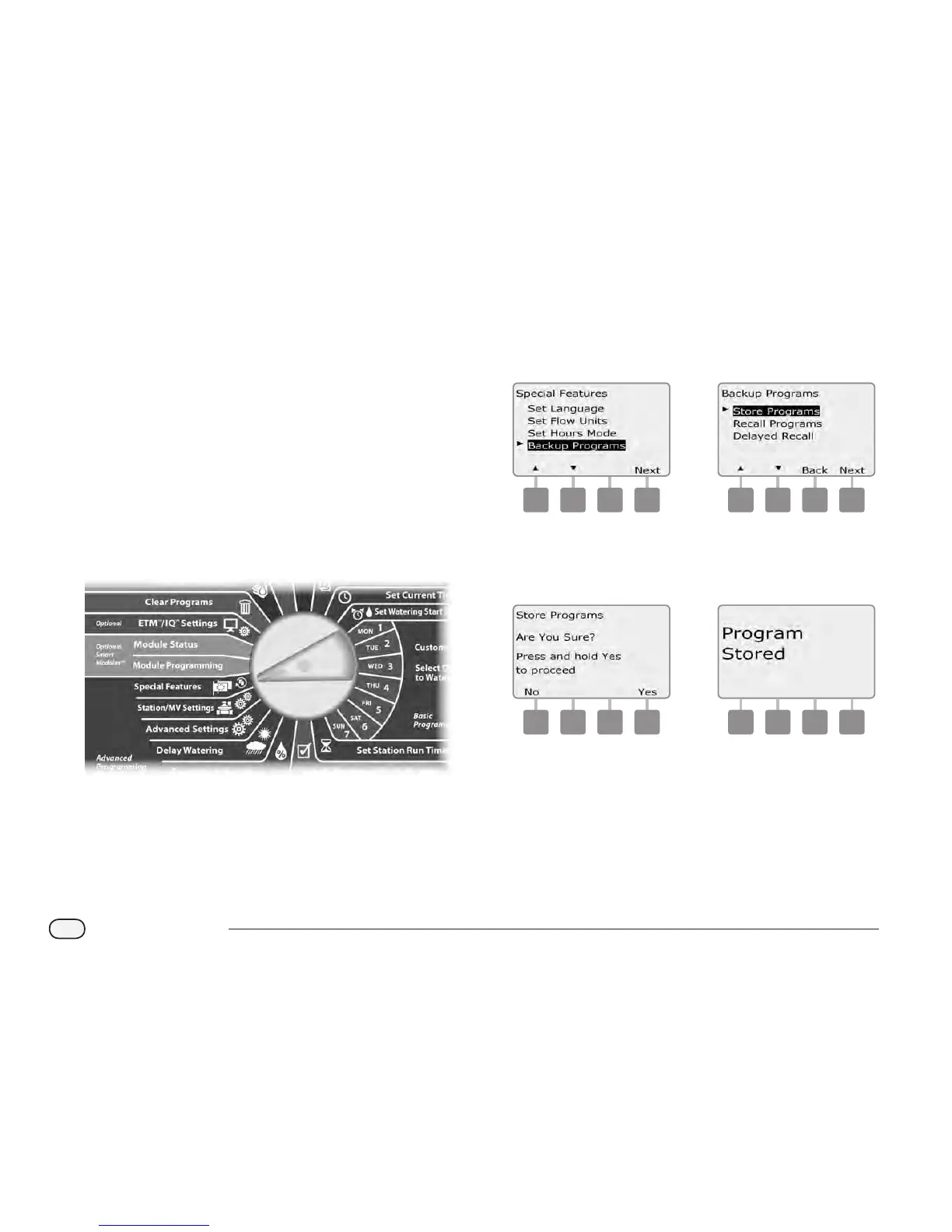
Store Default Programs
Turn the controller dial to Special Features.
A
The Special Features screen appears. Press the Down Arrow
button to select Backup Programs; then press Next.
B
The Backup Programs screen appears with Store Programs
selected; press Next.
1 2
C
A conrmation screen appears. To Store Programs, press and hold
down the Yes button for four seconds. If you’re not sure, press No.
D
A conrmation screen appears.
3 4


 To Next Page
 Loading...












