70
ESP-LXME Controller
Module Status
View and Clear Flow Alarms
Occasionally a ow condition in excess of your SEEF settings or below
your SELF settings will be detected. If your controller is set up to issue
alarms for these conditions, the alarm light will illuminate and detailed
descriptions of the Flow Alarm conditions will be created.
View Station Flow Alarms
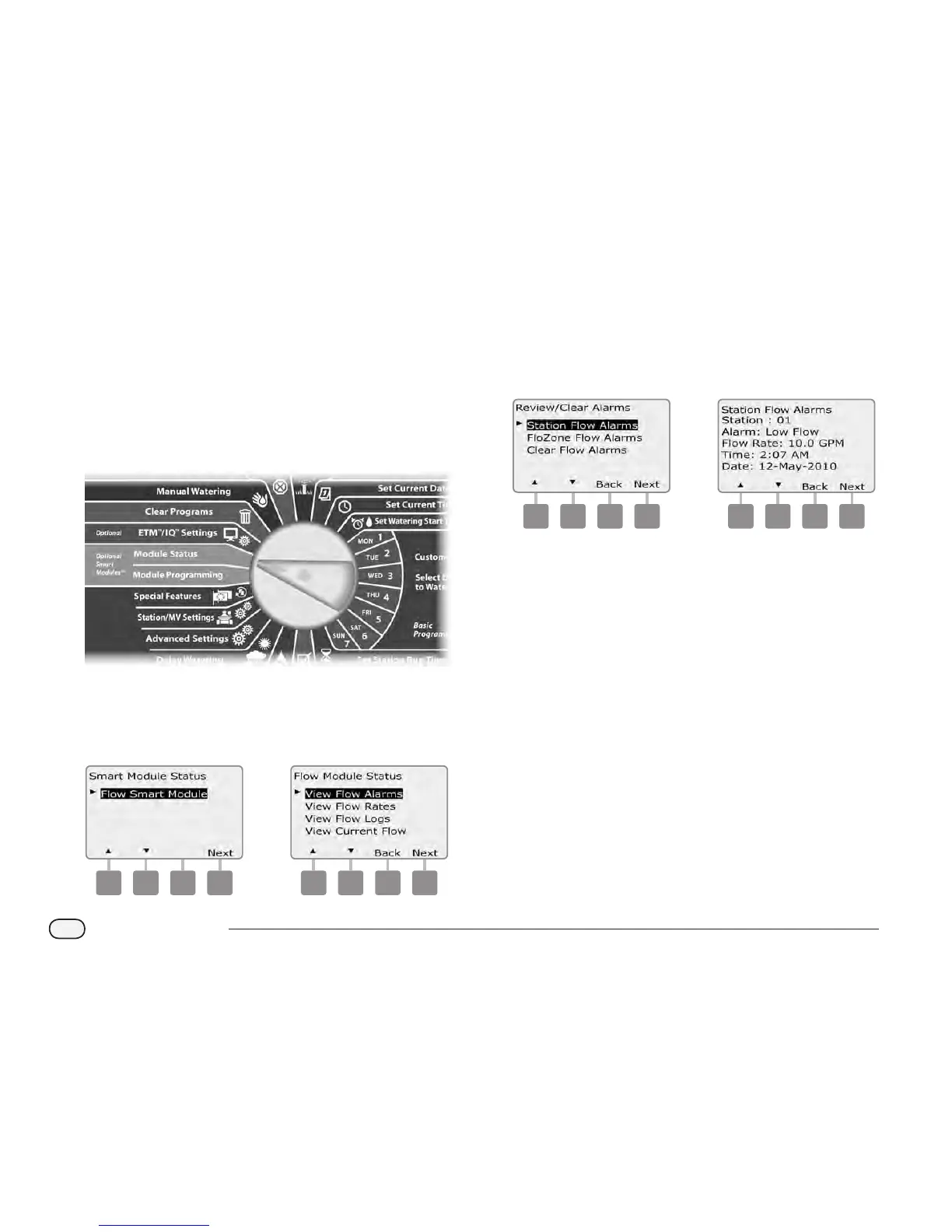
Turn the controller dial to Module Status.
A
The Smart Module Status screen appears with Flow Smart Module
selected; press Next.
B
The Flow Module Status screen appears with View Flow Alarms
selected; press Next.
1 2
C
The Review/Clear Alarms screen appears with Station Flow Alarms
selected; press Next.
D
The Station Flow Alarms screen appears. Press the Up and Down
arrows buttons to view the Flow Alarms. Stations with Flow Alarm
conditions will display “Yes”- only alarmed stations will be shown.
3 4



 To Next Page
 Loading...











