35
ESP-LXME Controller
Calendar Day Off
You can schedule certain days of the year as Non-irrigation, such as
holidays when landscape may receive heavy use.
The ESP-LXME controller can be programmed to suspend irrigation on
a particular calendar date, up to 5 dierent days of the year.
NOTE: Calendar Day O dates can only be selected 365 days
in advance. Then once a Calendar Day O has passed, it will
be removed from the list and must be reprogrammed for the
following year if desired.
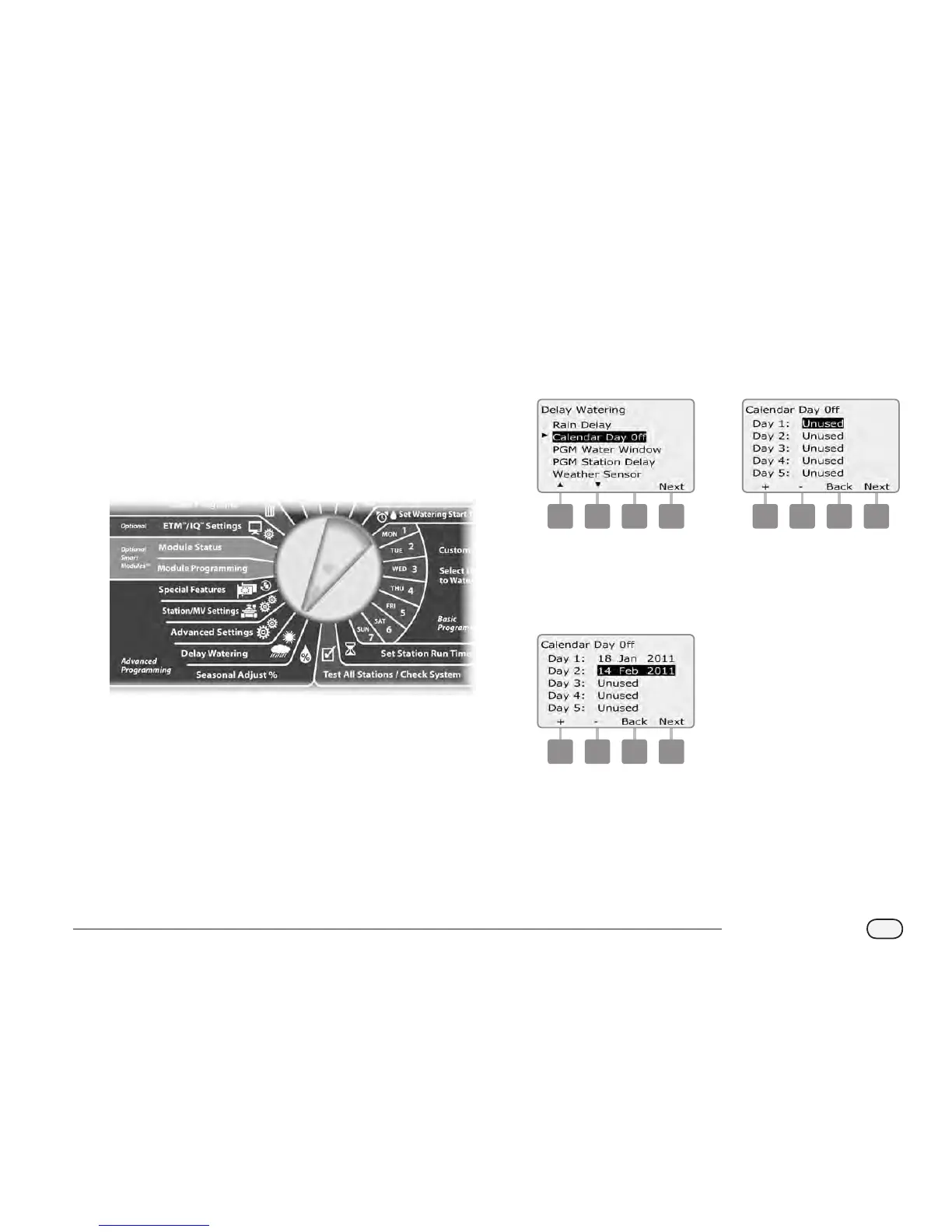
Turn the controller dial to Delay Watering.
A
The Delay Watering screen appears. Press the Down Arrow button
to select Calendar Day O; then press Next.
B
The Calendar Day o screen appears, showing (up to 5) scheduled
calendar days o in chronological order. Unprogrammed days will
show as Unused.
1 2
C
Press the + and – buttons to set the Calendar Day O date as
desired. Press the Next and Back buttons to select other days as
desired.
Press and HOLD buttons to accelerate settings for dates.
3
NOTE: Calendar Day O aects ALL programs and stations,
including non-irrigation stations. Consider not using this feature
if any of your programs include essential functions such as door
locks or sports eld lighting.



 To Next Page
 Loading...











