55
ESP-LXME Controller
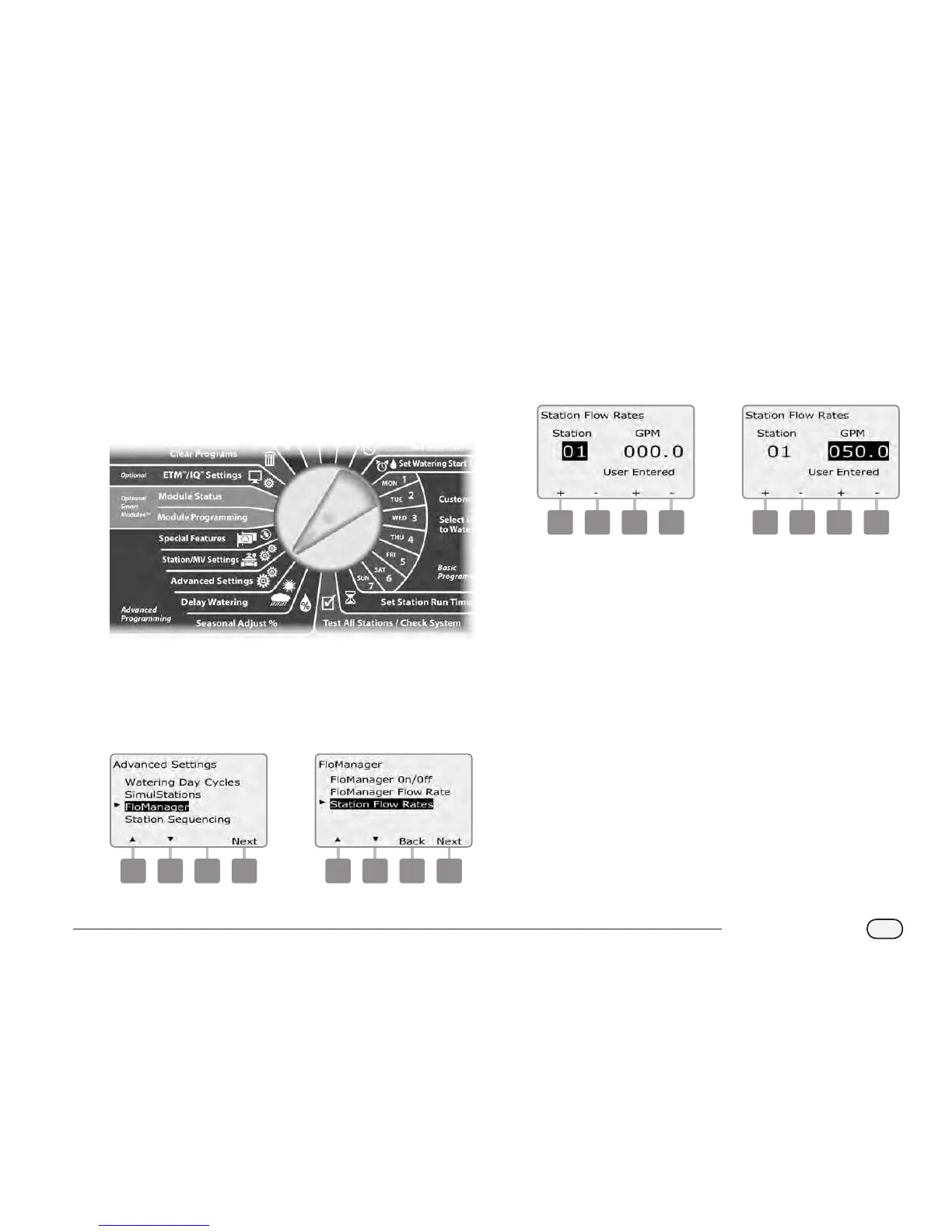
Set Station Flow Rates Manually
Flow rates for each station can be entered manually.
NOTE: If the optional FSM-LXME Flow Smart Module is installed
then ow can be learned automatically. This is the easiest, most
accurate method to enter ow readings. See Learn Flow section
for more details.
Turn the controller dial to Advanced Settings.
A
The Advanced Settings screen appears with Watering Day Cycles
selected. Press the Down Arrow button to select FloManager;
then press Next.
B
The FloManager screen appears with FloManager On/O selected.
Use the Down arrow to select Station Flow Rates; then press Next.
1 2
C
The Station Flow Rates screen appears. Press the + and - buttons
on the left to select the desired station number.
D
Press the + and - buttons on the right to enter the Flow Rate for
the selected station.
Press and HOLD buttons to accelerate settings for Flow Rate.
3 4
Repeat this process to manually set up Flow Rates for additional
stations as desired.



 To Next Page
 Loading...











