84
ESP-LXME Controller
Manual Watering
The ESP-LXME controller allows you to manually start a station, a
program, or to open a Normally Closed Master Valve (NCMV) to provide
water to your irrigation system for manual watering.
Start Station Manually
NOTE: Manual Watering > Start Station will pause currently
running programs.
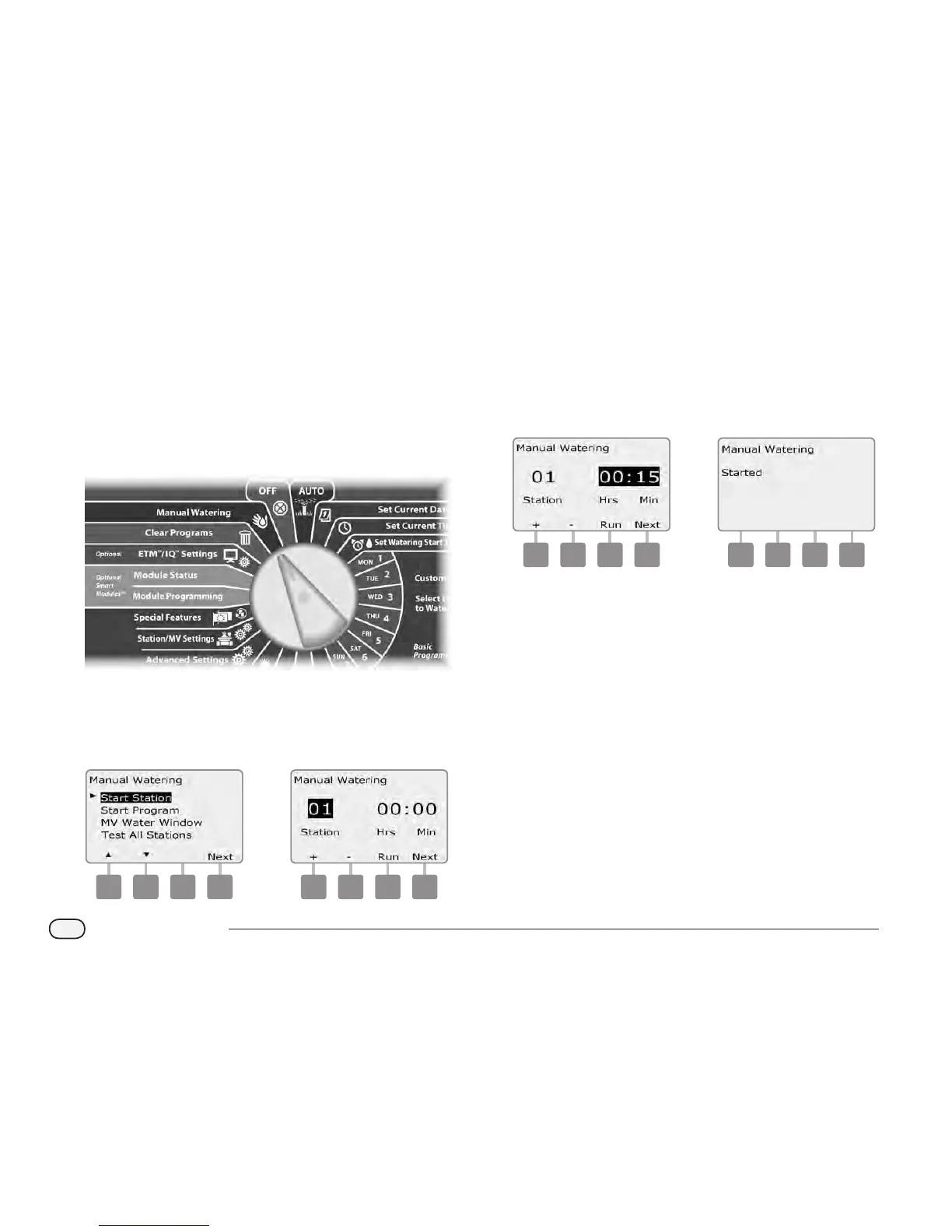
Turn the controller dial to Manual Watering.
A
The Manual Watering screen appears with Start Station selected;
press Next.
B
The Manual Watering screen appears. Press the + and – buttons
to enter the station you want to run manually; then press Next.
1 2
C
The Station Run Time will default to the Program Run Time. Press
the + and – buttons to adjust the station Run Time (from 0 hours,
1 minute to 12:00 hours). Press the Run button to start irrigation
for that station.
Press and HOLD buttons to accelerate settings for hours and
minutes.
D
A conrmation screen appears.
3 4
Repeat this process to manually water other stations.
NOTE: Stations will run sequentially in the order in which they
were selected.
NOTE: To view the Station while running, turn the controller dial
to AUTO position. You can use the Adv button to advance to the
next station and the + and – buttons to increase or decrease the
Run Time of the current station.



 To Next Page
 Loading...











