41
ESP-LXME Controller
C
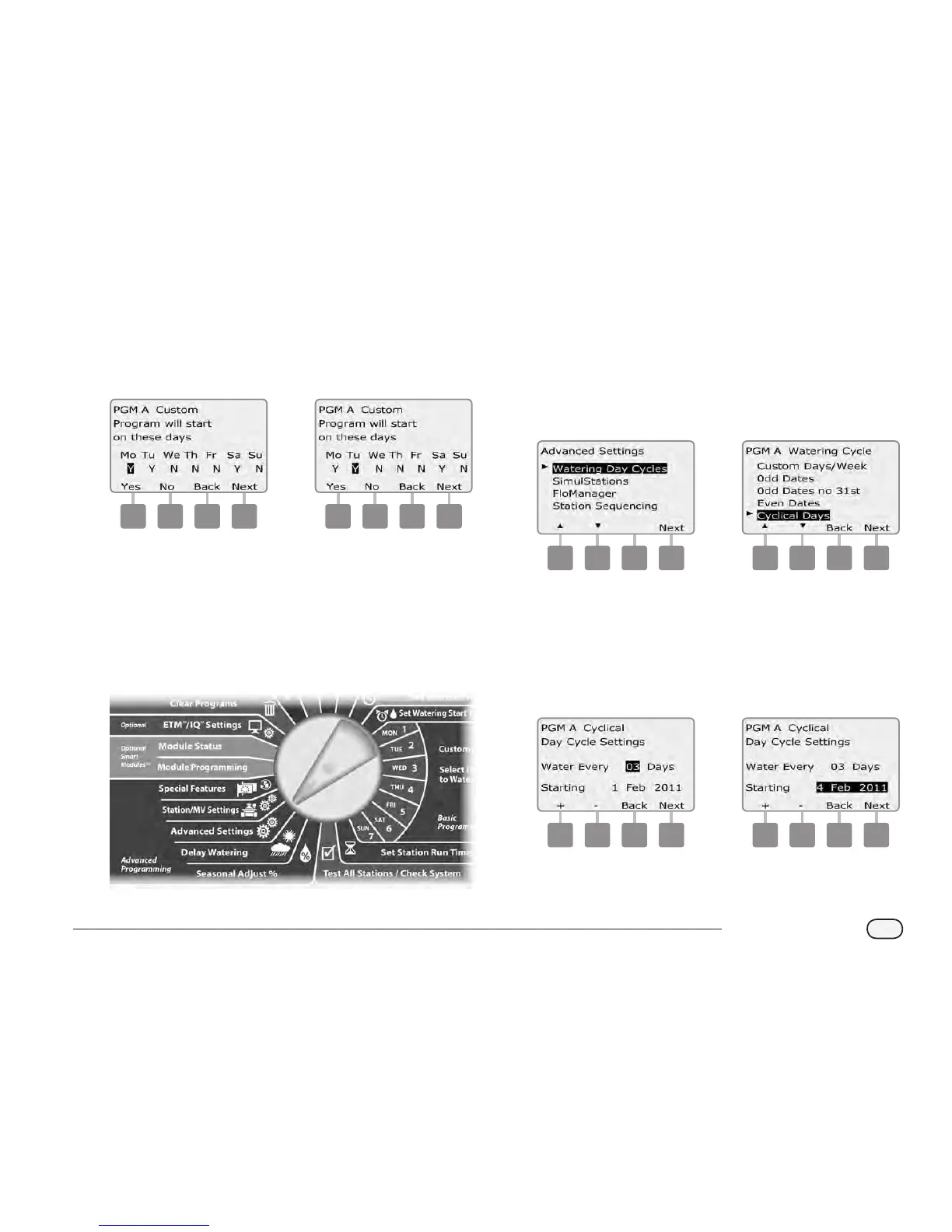
The Custom screen appears. Press the Yes button to allow
irrigation to start on a given day or press No to prevent irrigation
from starting.
D
Press the Next and Back buttons to navigate through the days of
the week and repeat the selection process as desired.
3 4
Change the Program Select switch and repeat this process to set
Watering Cycles for other programs as desired.
NOTE: Watering day selections carry over to Watering Days dial
positions and vice-versa. See Section B, Select Days to Water for
more details.
Cyclical Days
Turn the controller dial to Advanced Settings.
A
The Advanced Settings screen appears with Watering Day Cycles
selected; press Next.
B
The Watering Cycle screen appears. Press the Down Arrow button
to select Cyclical Days; press Next.
NOTE: If the desired program is not selected, use the Program
Select switch to change it. See Section B, Program Select Switch
for more details.
1 2
C
The Day Cycle Settings screen appears. Press the + and – buttons
to set the watering day cycle (from 1 to 30 days). For example, set
to 03 if you want to water every third day; then press Next.
D
Press the + and – buttons to set the rst date for the Watering
Cycle to begin; then press Next.
Press and HOLD buttons to accelerate settings for dates.
3 4



 To Next Page
 Loading...











