65
ESP-LXME Controller
Learn Flow Automatically (Custom Stations)
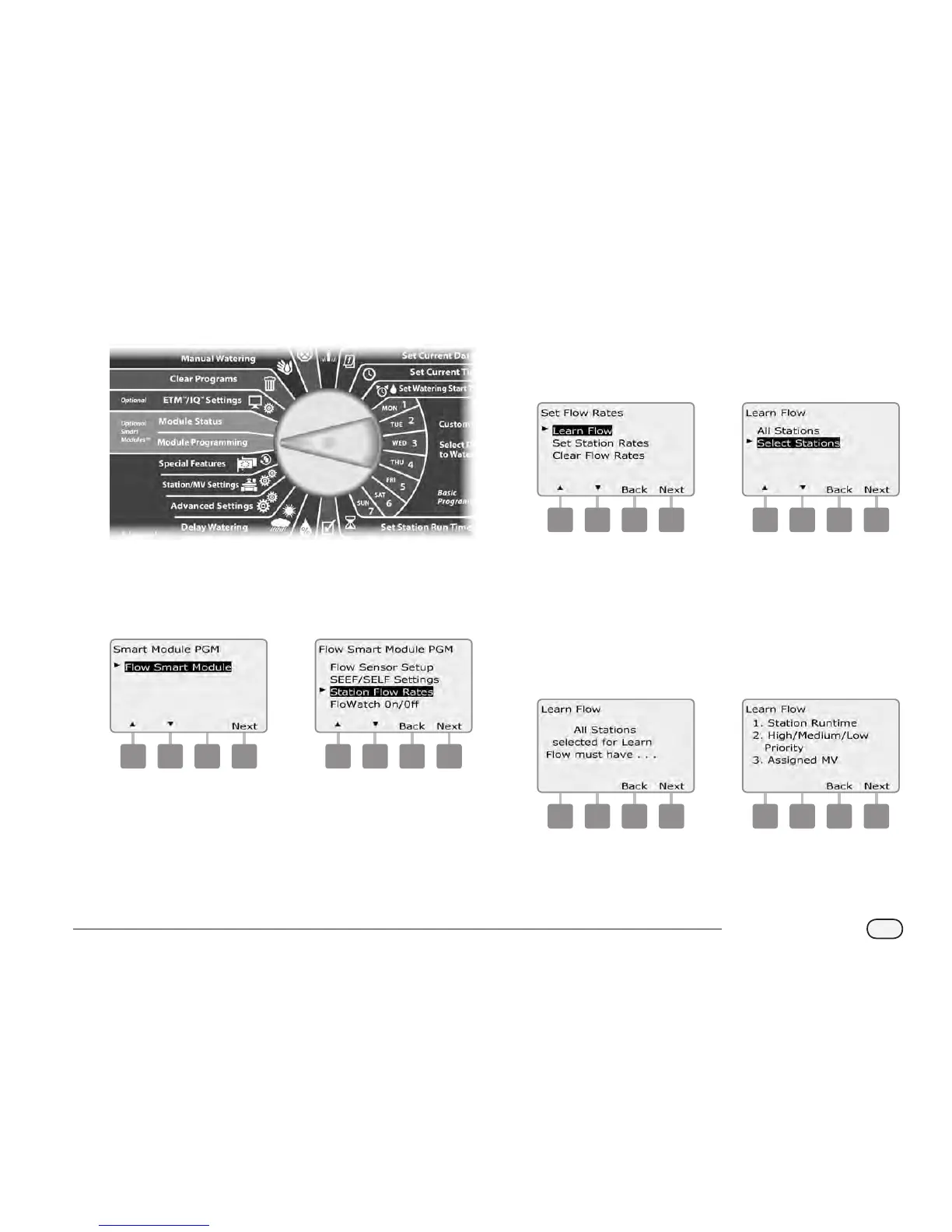
Turn the controller dial to Module Programming.
A
The Smart Module PGM screen appears with Flow Smart Module
selected; press Next.
B
The Flow Smart Module PGM screen appears. Press the Down
arrow to select Station Flow Rates; press Next.
1 2
C
The Set Flow Rates screen appears with Learn Flow selected; press
Next.
D
The Learn Flow screen appears. Press the Down Arrow to choose
Select Stations; then press Next.
3 4
NOTE: Ensure you have runtimes set up for all stations included
in a Learn Flow exercise prior to setting up a Learn Flow. If stations
without run times are included in a Learn Flow exercise, the
controller will issue an error message and cancel the Learn Flow
exercise.
E
A Learn Flow conrmation screen appears; press Next.
F
A second Learn Flow conrmation screen appears; press Next.
5 6



 To Next Page
 Loading...











