Secon 10
Integra 3™ Troubleshoong
Research Instruments Ltd
10
For any issues not covered below, please contact your distributor or the
RI service team directly (see page 71 for RI contact details).
The sness of the Fine
Control Lever is too ght
or too loose
Lever sness not
adjusted
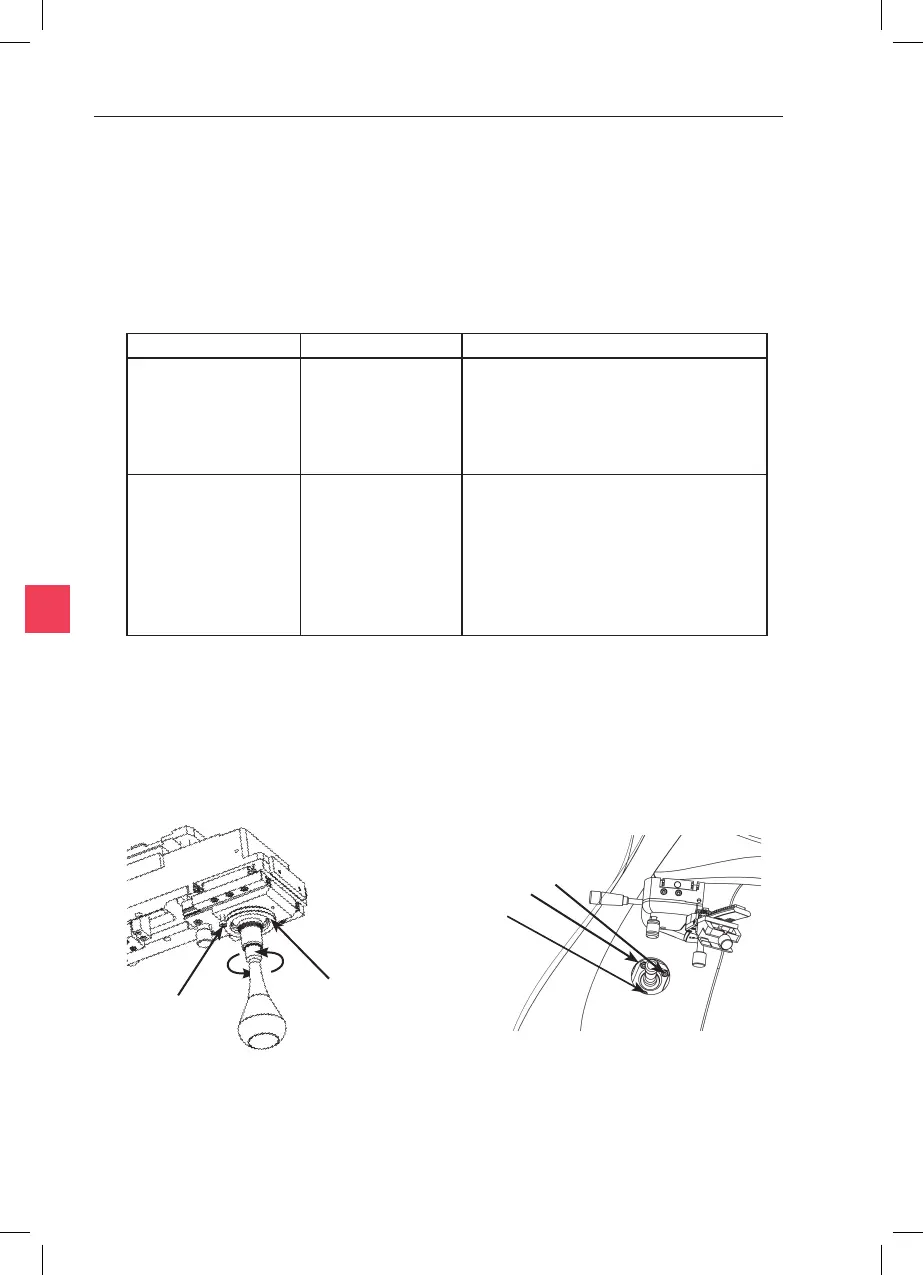
Select the green-ended hexagon driver from
the tool kit provided. Loosen the locking
screw, then adjust the lever’s resistance by
turning an-clockwise to loosen or clockwise
to ghten.* (See Figure 10-1)
The sness of the
Coarse Control Lever is
too ght or too loose
Lever sness not
adjusted
Select the green-ended hexagon driver from
the tool kit provided. Insert the driver into
a screw head located around the Coarse
Control Lever and slightly ghten or loosen
the screw (less than one turn). Test the lever
acon. If it is not to your liking, insert the
driver into a dierent screw head and loosen
or ghten. ** (See Figure 10-2)
* When adjusng the resistance, turn the adjuster by the smallest possible amount. If any problems occur
contact the RI service team.
** The screw must not be too loose or lost moon will be introduced.
Tighten/Loosen
these three
screws.
Figure 10-1 Figure 10-2
Locking Screw
Adjustor



 To Next Page