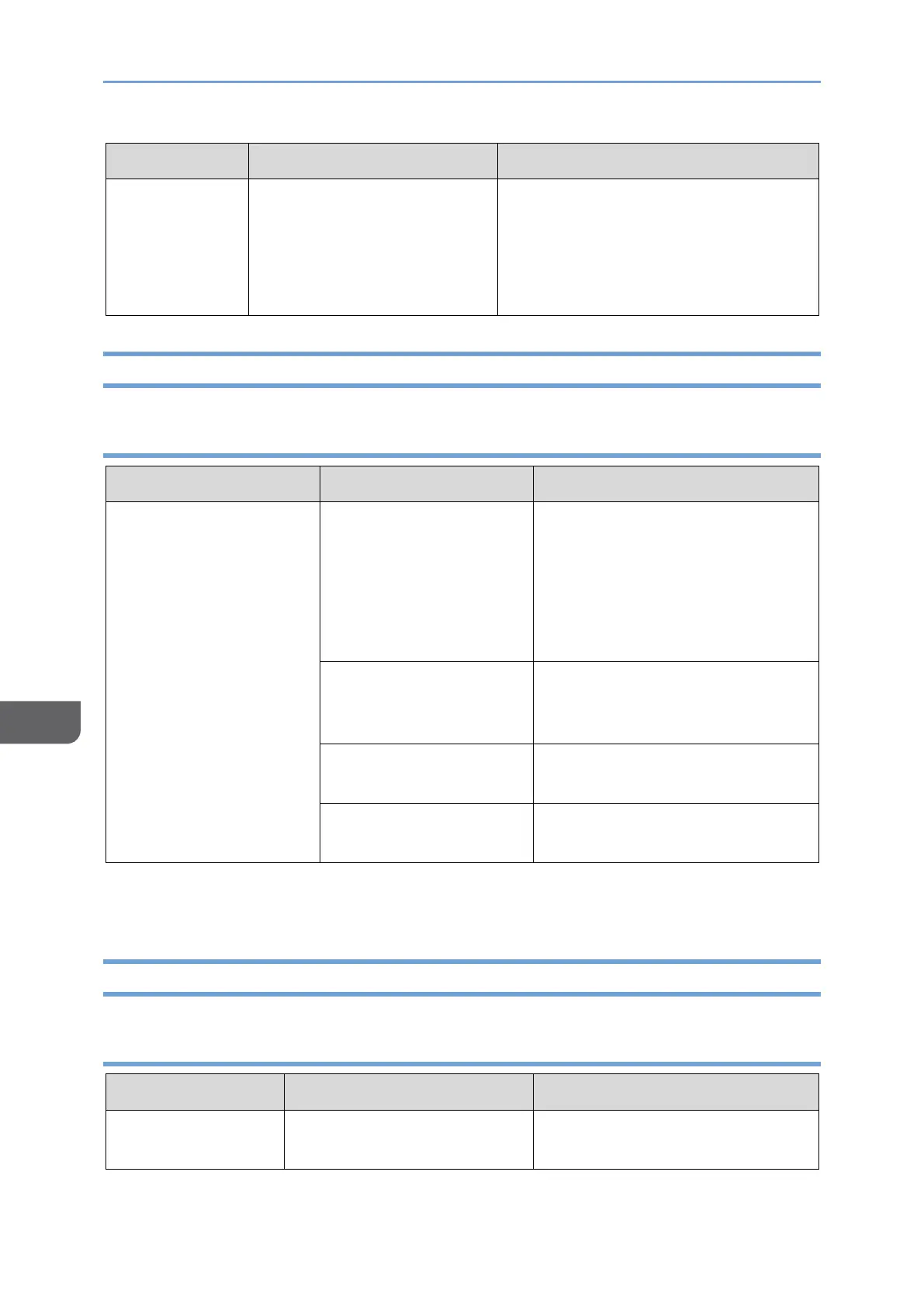
USB Type-A to USB Type-C
conversion cable is being
used.
This machine cannot be used with a
Type-C conversion cable from a USB
Type-A port.
Use a cable with only USB Type-C
cable terminals.
Problems Related to Pass-through Charging
150/150BW model
Device connected to this
machine not working
with pass-through
charging
The power consumption
of the connected device
is too high.
Pass-through charging is not
possible from this machine.
Pass-through charging is
available only for devices that
can be used with a maximum
output of 25 W.
USB PD charger output
is insufficient.
Replace with a USB PD charger
with an output of at least 20 W
and 9 V, 15 V, or 20 V.
The USB Type-C cable is
not properly connected.
Reconnect the USB Type-C
cable.
A problem with USB
Type-C cable.
Replace the USB Type-C cable.
Problems Related to Touch/Stylus Pen Operation
150 model
The OS or device does not
support touch operation.
Check whether the OS or the
device supports touch operation.



 To Next Page