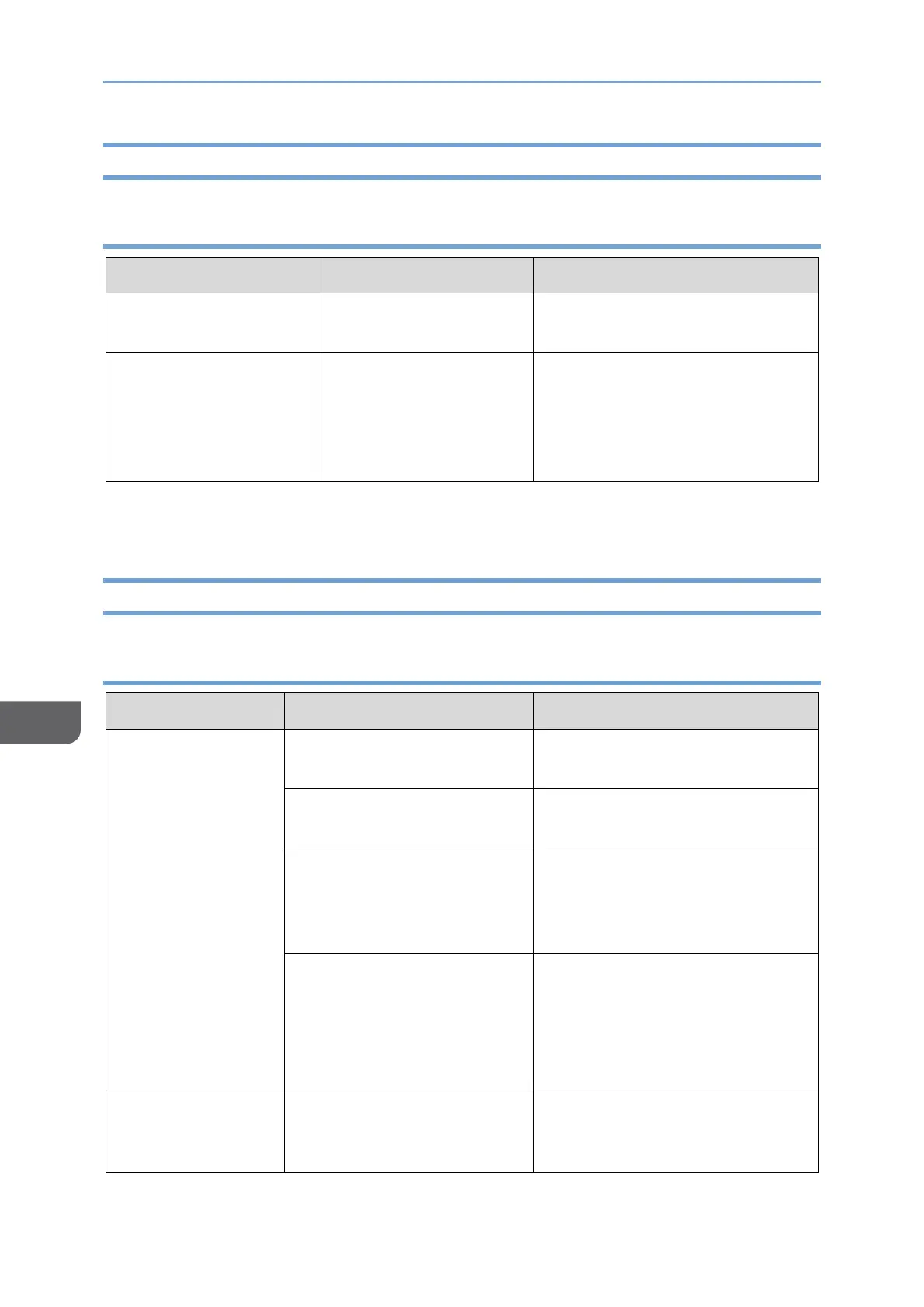
Problems Related to RICOH Monitor Multicast for Windows
150 BW model
An error has occurred in
the application.
Restart the application and
reconnect.
Touch operation is not
reflected from the
RICOH Monitor that
allowed touch
operation.
An error has occurred in
the application.
Restart the application and
reconnect.
Problems Related to Firmware Updates
150BW model
Unable to connect
this machine to a
computer
The USB Type-C cable is not
properly connected.
Reconnect the USB Type-C
cable.
A problem with USB Type-C
cable.
Replace the USB Type-C cable.
The connected device does
not support DisplayPort
Alternate Mode (DP Alt
mode).
Use a device that supports
DisplayPort Alternate Mode.
USB Type-A to USB Type-C
conversion cable is being
used.
This machine cannot be used
with a Type-C conversion cable
from a USB Type-A port.
Use a cable with only USB Type-
C cable terminals.
Unable to connect
this machine to a
computer
Blocked by Windows firewall










 To Next Page