When You Cannot Use the Machine As You Want
139
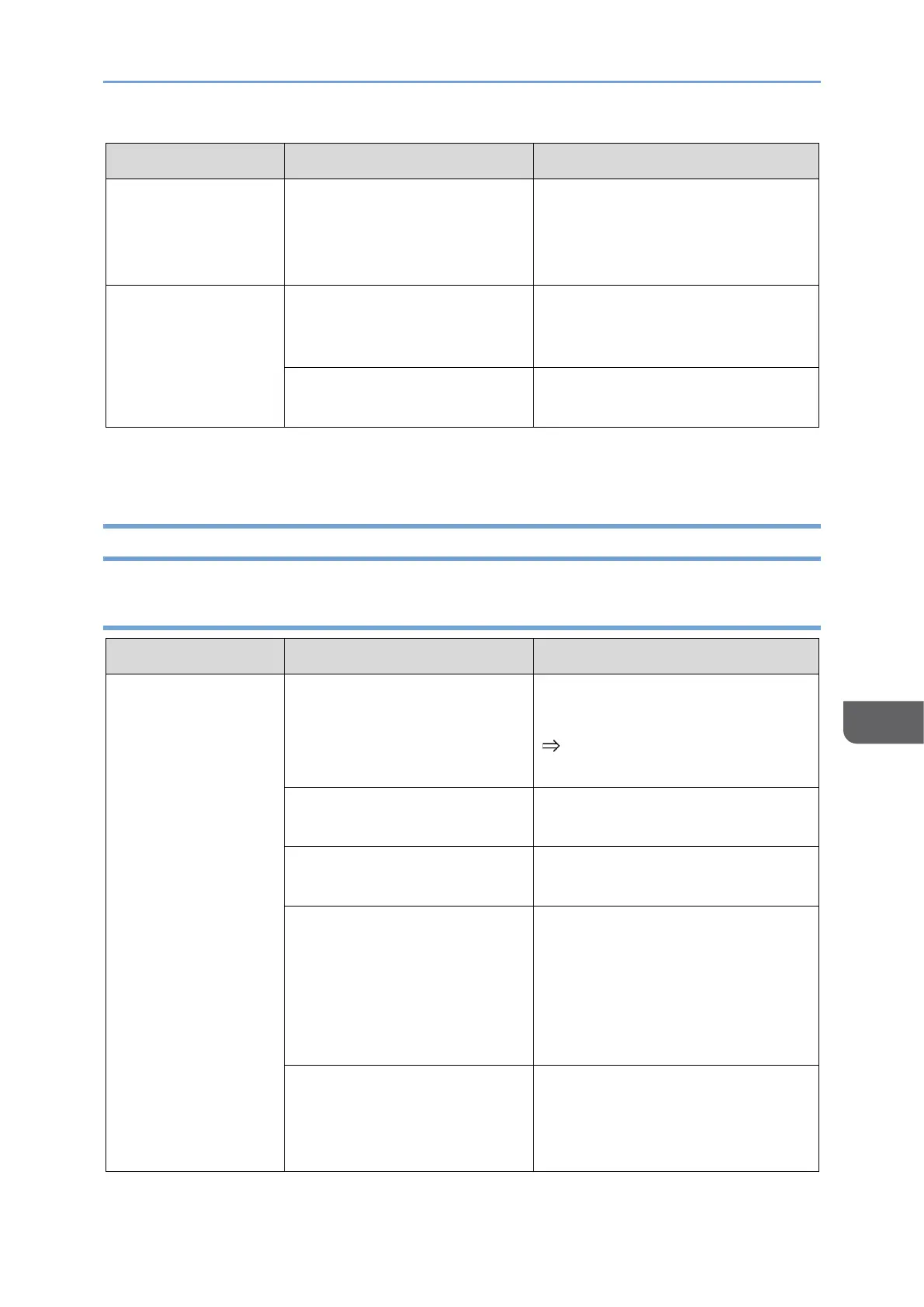
Reacts when not
touched (when
wired connection is
used)
Dust or water droplets are
adhering to the screen of
this machine.
Check the screen surface for dust
or water droplets.
Reacts when not
touched (when
wireless connection
is used)
Dust or water droplets are
adhering to the screen of
this machine.
Check the screen surface for dust
or water droplets.
The network signal condition
is poor.
Check the network status and
reconnect.
Problems Related to Images
150 model
This machine is turned OFF.
Turn ON the power of this
machine.
page 29 "Turning On and Off
the Power"
The USB Type-C cable is not
properly connected.
Reconnect the USB Type-C
cable.
A problem with USB Type-C
cable.
Replace the USB Type-C cable.
Insufficient power is being
supplied to this machine
from the connected device.
Check the specifications of the
device and confirm that the
output power is 7.5 W or higher.
If the output is less than 7.5 W,
connect a USB PD charger to this
machine.
The connected device does
not support DisplayPort
Alternate Mode (DP Alt
mode).
Use a device that supports
DisplayPort Alternate Mode.










 To Next Page