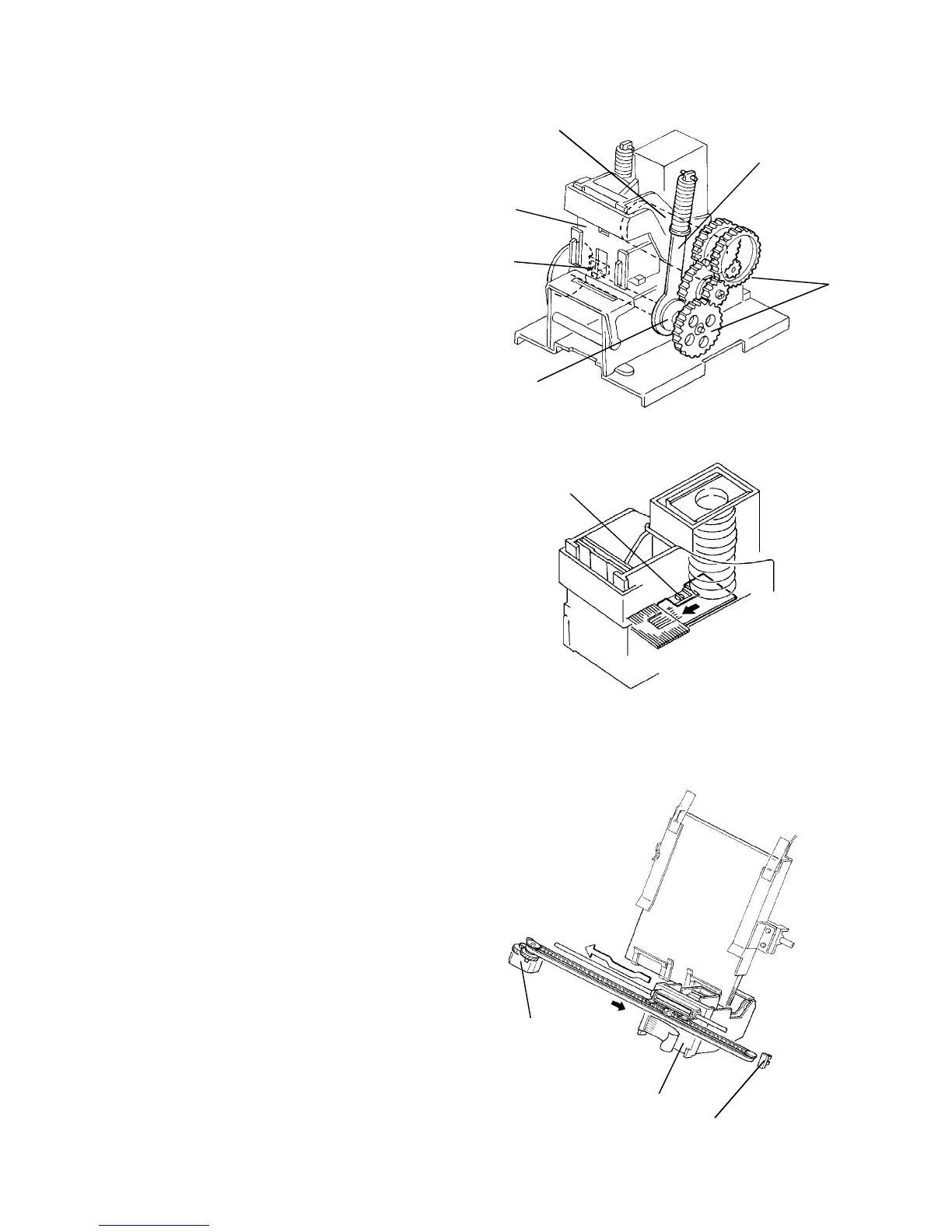
2.17.10 Stapler
The staple hammer [A] is driven by the staple motor [B]
via gears [C], two eccentric cams [D], and two links [E].
After all copies are stacked in the jogger tray, the stack
is held by the jogger fences. Soon after this, the staple
motor starts rotating to staple the copy stack. When the
cams complete one rotation, the stapler hammer home
position sensor [F] turns on, detecting the end of the
staple operation. The staple motor then stops.
There is a reflecting photosensor [G] in the stapler unit
to detect staple end conditions.
2.17.11 Stapler side to side movement
Customers can select one of the following three different
staple modes:
Staple 1: Top left
Staple 2: Bottom left
Staple 3: Top/Bottom left
The stapler drive motor [A] (stepper motor) moves the
stapler [B] from side to side. When the Start key is
pressed, the stapler moves from its home position to the
staple position.
If the staple mode 3 is selected, the stapler moves to the
front staple position first, then moves to the rear staple
position. However, for the next copy set, it staples in the
reverse order; that is, at the rear side first and then at
the the front.
After the job is completed, the stapler moves back to its
home position. (The stapler home position sensor [C] is
actuated.)
The staple position can be changed using user tool [11].
[G]
[E]
[C]
[B]
[A]
[F]
[D]
[C]
[B]
[A]













 To Next Page