1.2 Copier Installation
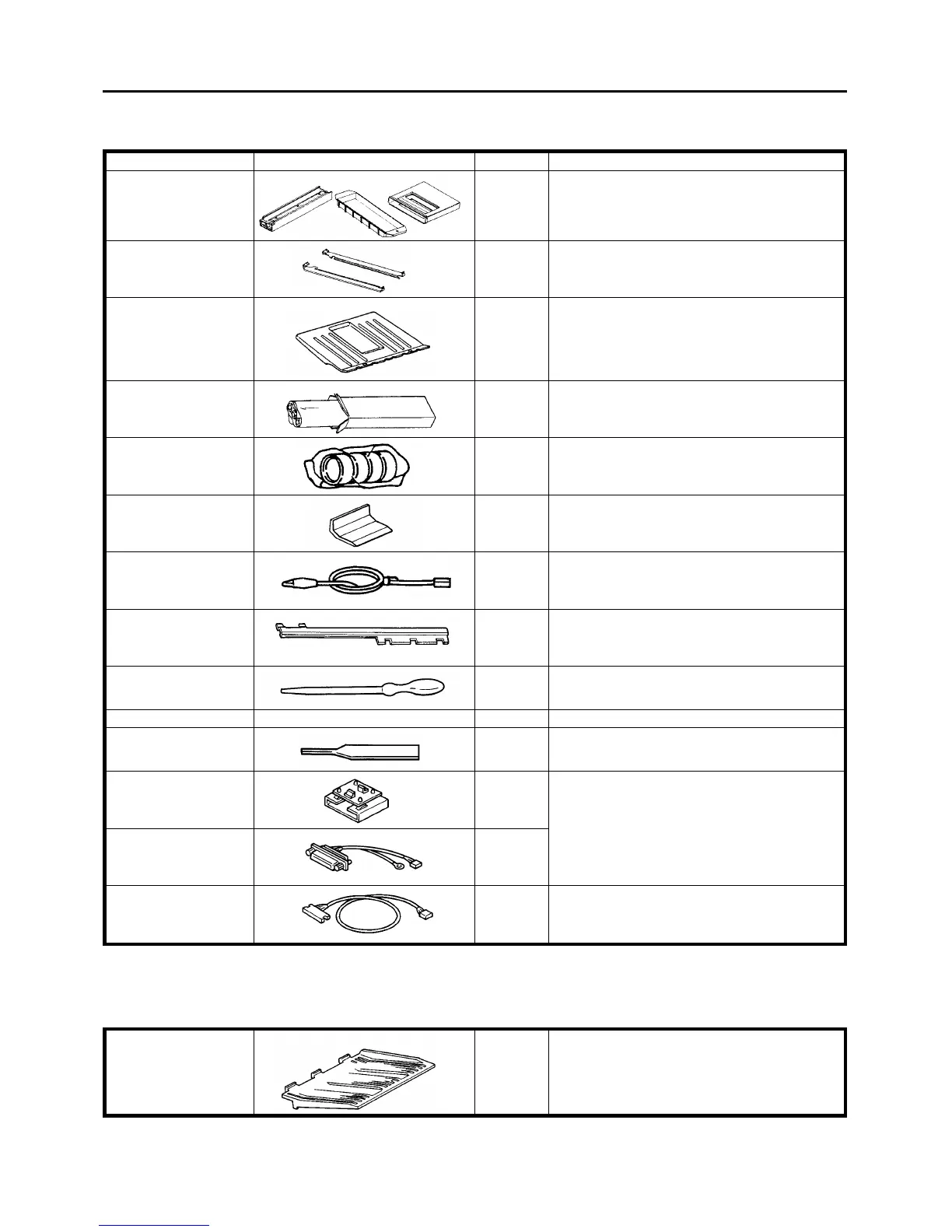
1.2.1 Accessory list
Name Diagram Quantity Use
Developer vessel
Cleaning carrier vessel
Cleaning carrier magnet
1 of each To collect the developer and cleaning carrier.
Vessel rail
2 To set the developer vessel.
Original stacker
1 To receive originals from the ADF.
OPC belt
1
Leveling shoe
4 For the docking position adjustment.
Original back fence
1 To install on the original stacker.
Development unit
grounding harness
1 To avoid damage of the image density sensor board
when a vacuum cleaner is used.
Tray fences fixing plate 3 To fix the paper tray side fences.
Syringe
1 To apply silicon oil in the fusing unit.
Plated screw M 4 x 8 4 To secure the vessel rails.
Counter reset key
1 To reset the total counter to 0.
Printer interface board 1 To connect a printer using service tool [6]. These
parts are needed when the optional printer
connector unit is installed. Keep these parts for
future use.
Short printer harness
1
Long printer harness
1 To connect a printer using service tool [6].
NOTE
When the optional finisher is not used, the sub-tray (P/N-A0291460) must be ordered and used.
Sub-tray 1 To receive copies fed out. (Not required when the
sorter is used.)
1 July 1994 Copier Installation
1-3













 To Next Page