Configuring the Details of the Registered Information
92
7
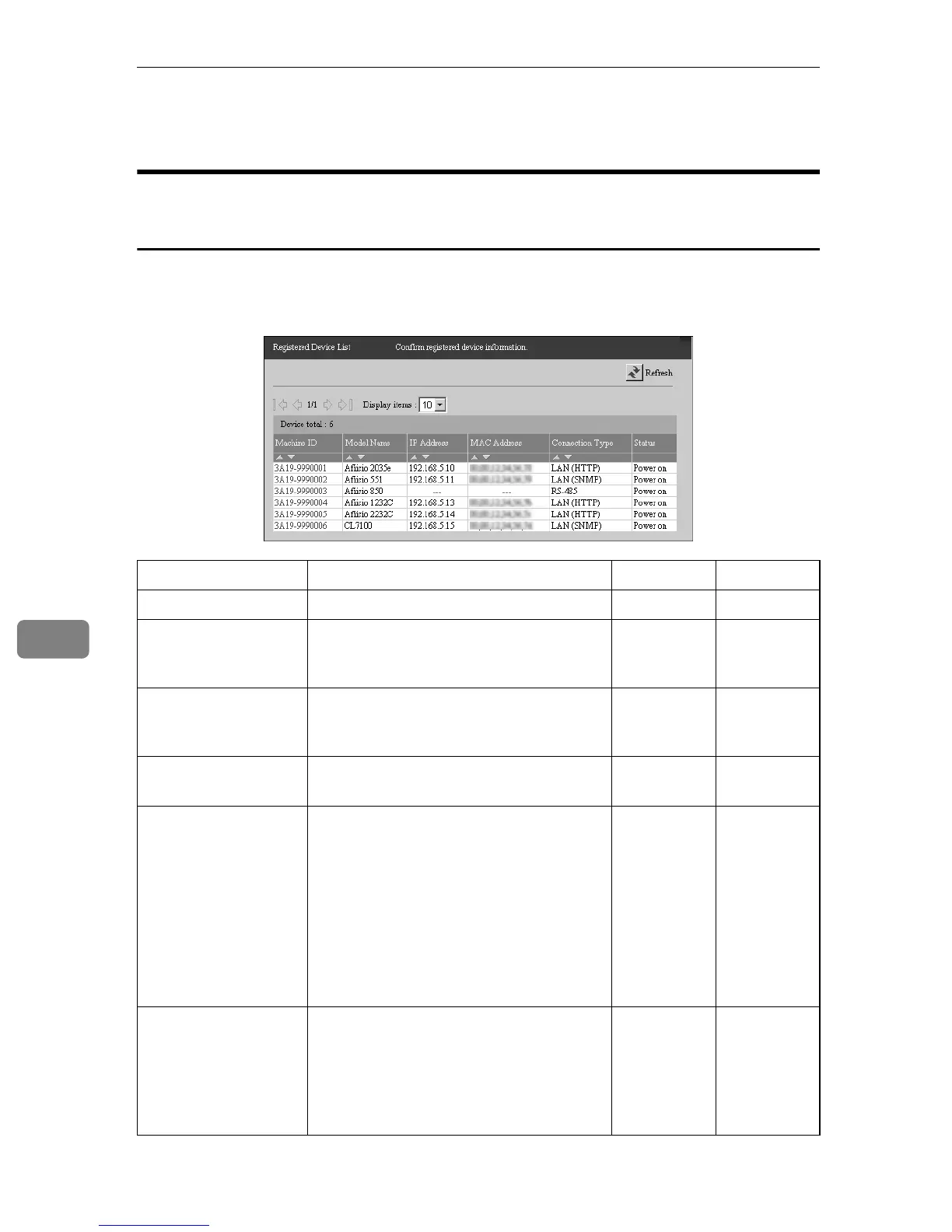
Registered Device List
When using the “Internet encryption communication (HTTPS)”
Method
This is the list of image I/O devices managed by the equipment. Click [Device
Management] - [Registered Device List] to show the screen. Click [Refresh] to show
the latest information.
†: Confirmation Only ❍: Able to Click
Items Descriptions Admin Registrant
Machine ID The machine ID for the device. ❍❍
Model Name The model name of the device. If the
equipment could not collect the model
name, it will be shown with “---.”
††
IP Address The IP address for the device. “---” will
be shown for the devices connected by
RS-485.
††
MAC Address The device's MAC address. "---" is dis-
played for devices connected by RS-485.
††
Connection Type The connecting type of the device.
• LAN (HTTP): Devices connected on a
network from which information is
collected by the HTTP protocol.
• LAN (SNMP): Devices connected on
the network from which information
is collected by the SNMP protocol.
• RS-485: Devices connected to OA I/F
by RS-485 cable.
††
Status Shows the current status of the devices.
• Power on
• Disconnected
• Power off
• Suspended
††



 To Next Page