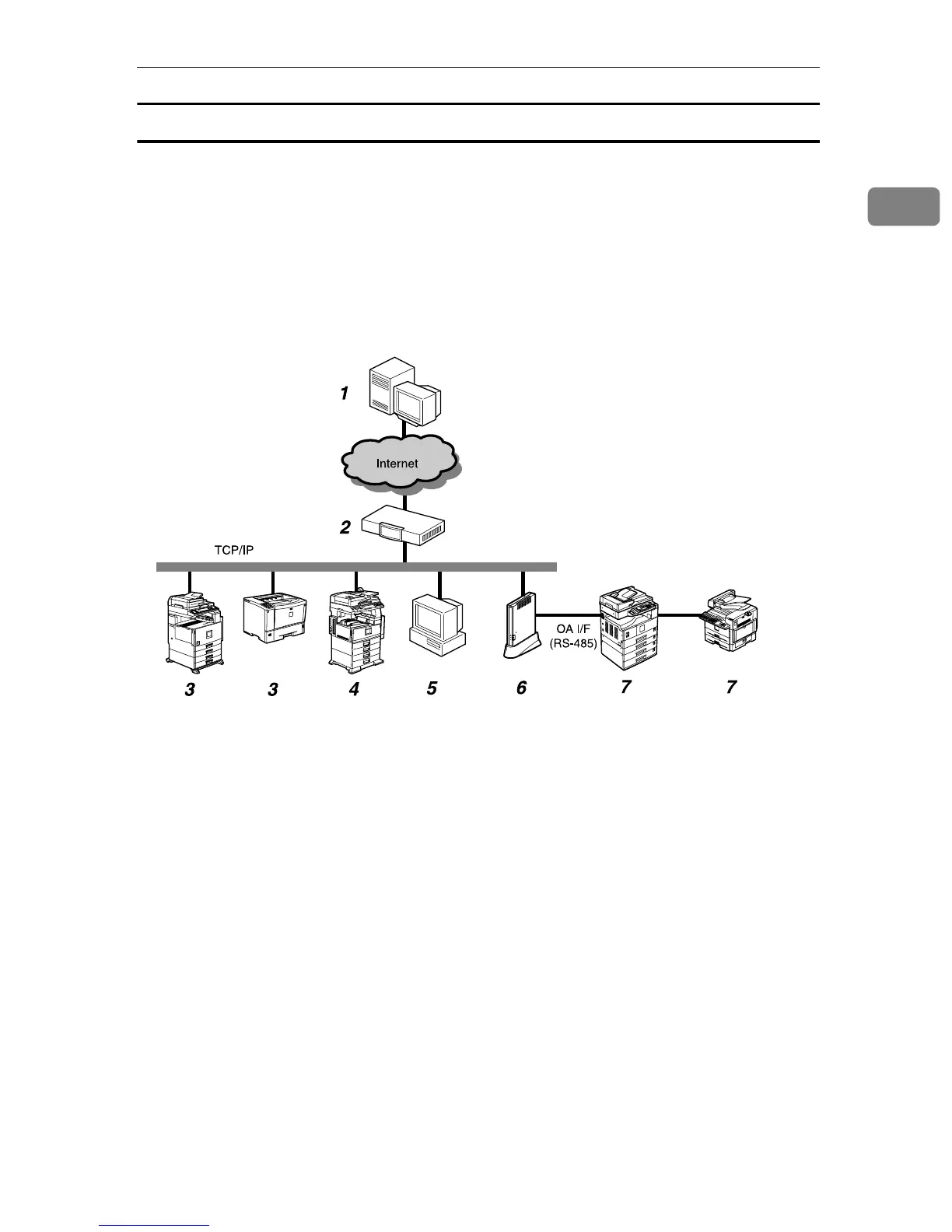
Outline of the System
3
1
Always Connected Method
If your network is connected to the internet, the equipment will communicate
with the Communication Server using that environment. Here, we call it the “Al-
ways connected” method.
When you use the “Always connected” method, the following two items must
be cleared: 1. Your environment is arranged to be able to access websites outside
of your network; and 2. When using proxy certification, the account and pass-
word for the equipment is available.
1. Communication Server
Information sent for various services will
be aggregated to this server.
2. Proxy Server and/or Firewalls
You are able to use your proxy server and
firewalls. When using proxy, Basic and
Digest authentication are supported and
automatically decided.
3. Registered Image I/O Devices on
the Network
This equipment can manage digital MFPs
and printers by communicating with the
Communication Server. The equipment
can manage a maximum of 100 devices,
including “7. Image I/O Devices Regis-
tered without the Network.” The “Auto
Discovery” function works with these
devices as well. Ask your service repre-
sentative for the compliant devices, as the
equipment cannot manage some devices.
4. Non Registered Image I/O Devic-
es on the Network
This equipment can collect information
from non-registered digital MFPs and
printers and send it to the Communica-
tion Server by using the “Auto Discovery”
function. The equipment cannot collect in-
formation from some devices. The Auto
Discovery enables you to control informa-
tion of as many as 500 devices.
5. Computer for Administration
This computer administers the equip-
ment by use of the RC Gate Monitor.
6.
This Equipment (Remote Commu-
nication Gate Type BN1)
Intermediates managed image I/O de-
vices and the Communication Server.
Sends various information from other de-
vices to the Communication Server, and
receives software to update the devices.
AAA317S



 To Next Page