Appendix
110
8
If Problems Described in Error Messages Persist
Contact your service representative if problems described in error messages per-
sist.
When the Office or Devices are Moved
Registration to the Communication Server is required in the following cases.
Contact your service representative.
• When your office has moved (The equipment has moved)
• When managed devices are moved (Except Auto Discovery)
• When managed devices are newly connected (Except Auto Discovery)
• When managed devices are deleted (Except Auto Discovery)
To Return the RC Gate
Contact your service representative when you no longer require the equipment.
Your service representative will collect it and, for security purposes, erase any
information it has stored.
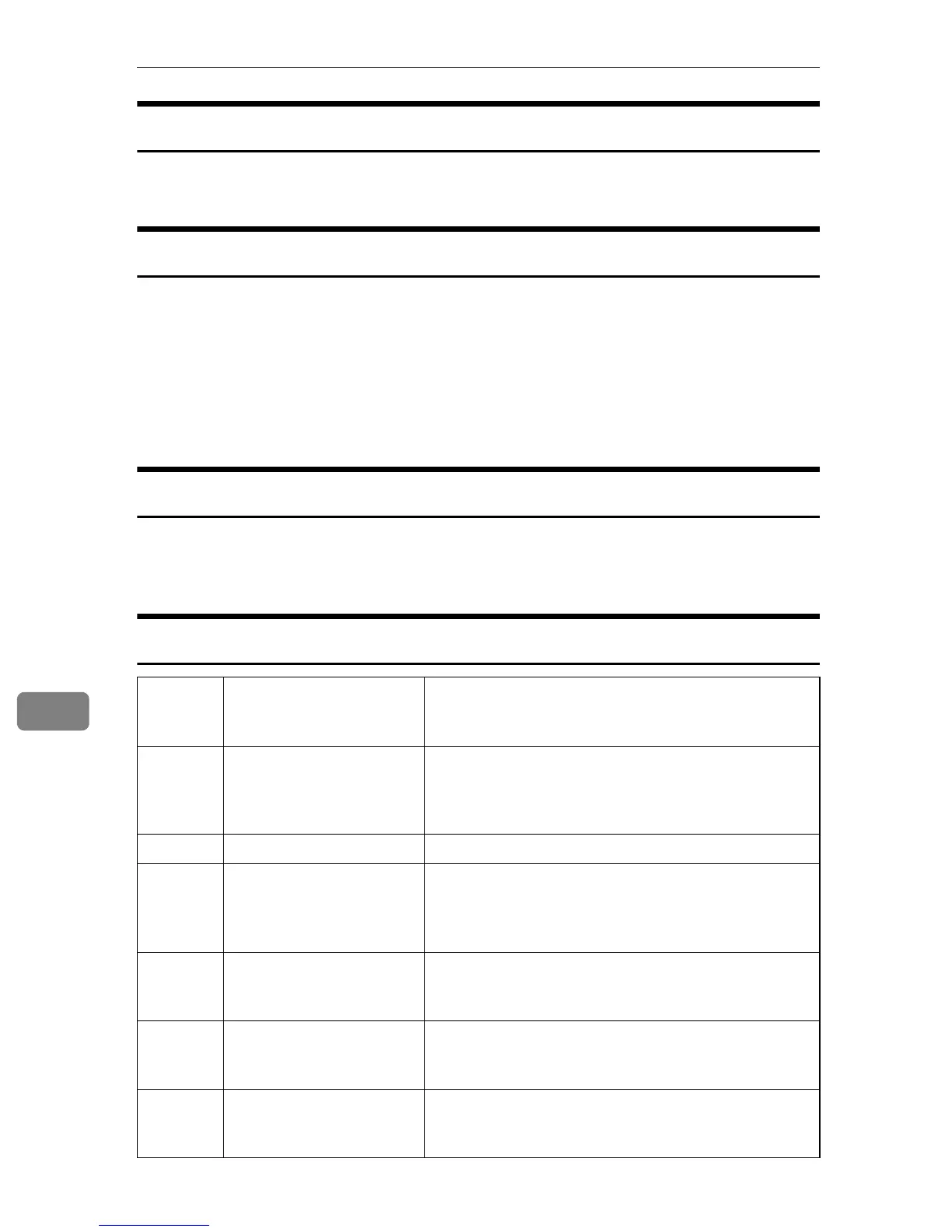
Error Codes
Web UI
Error
Code
Cause Solution
-1703 Cannot register RC Gate. Check whether or not the RC Gate is already regis-
tered. If the "Auto Discovery Setting Wizard" button is
displayed on the Top screen of RC Gate wizard, it is al-
ready registered.
-2202 Cannot locate device. Check the OA I/F (RS-485) cable is connected.
-2303 Internal application error Repeat the operation. If the problem persists, reboot
(disconnect and then reconnect RC Gate's power
cord), and then repeat the operation. Contact your ser-
vice representative for details.
-2320 Cannot register device. Check the number of registered devices does not ex-
ceed the maximum. Up to 100 devices can be regis-
tered per RC Gate.
-2323 No search range entered
when searching for the
managing devices.
Enter the search range before proceeding to the next
page.
-2324 No device selections made
when device information
requested.
Make selections and register the device.



 To Next Page