1
1. About the Remote
Communication Gate
Outline of the System
There are 2 methods of communication between the equipment and the Com-
munication Server. They are the E-mail (SMTP) method and the Internet encryp-
tion communication (HTTPS) method. The following describes the outline of the
system for each method.
E-mail (SMTP) Method
In this method, collected information is sent to the Communication Server auto-
matically by E-mail. To use this method, an environment which enables to send
E-mail with the SMTP protocol is required.
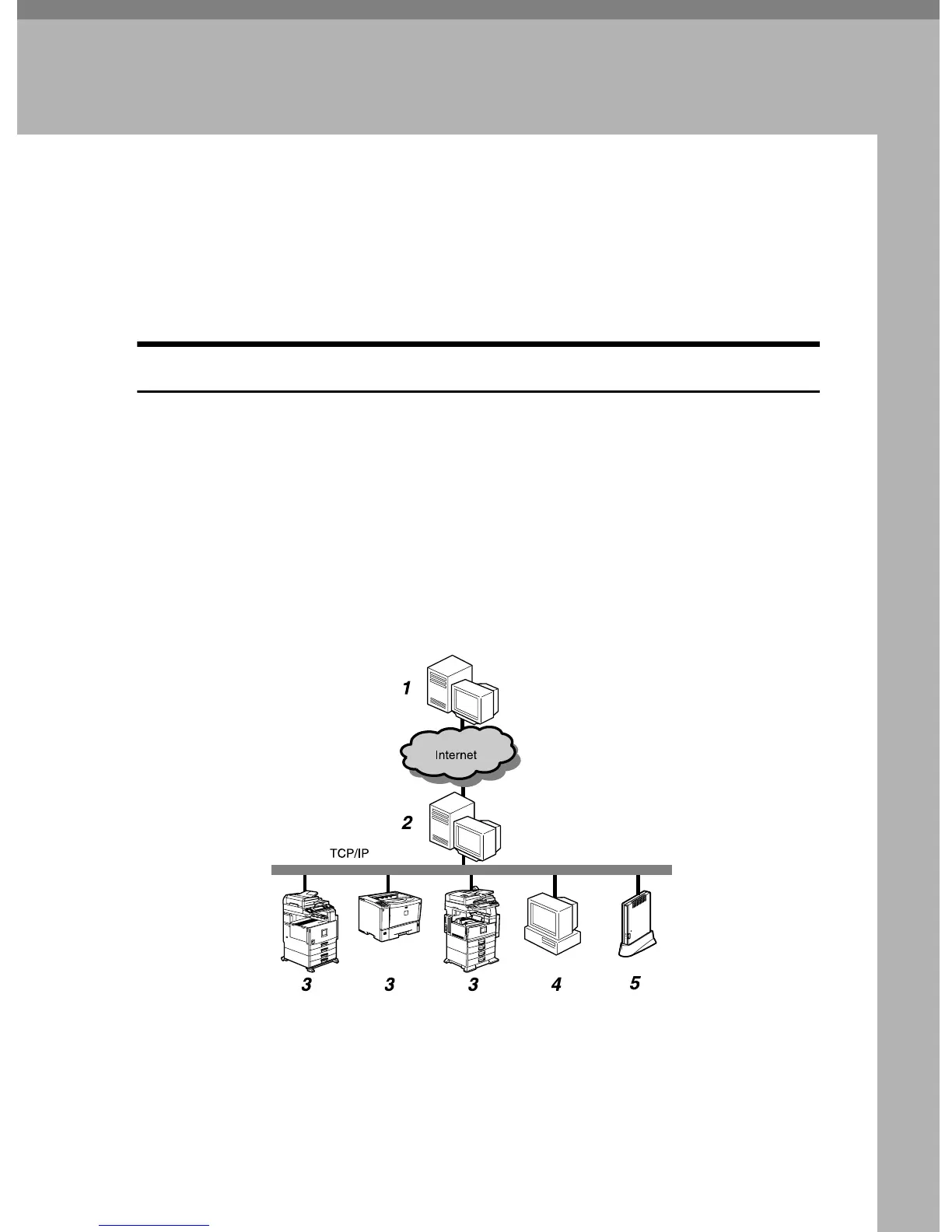
With “E-mail (SMTP)” method, the equipment will search the image I/O devic-
es on the network. This is called “Auto Discovery. ” The searched information
will be sent to the Communication Server. You are able to receive our advice ac-
cording to the sent information. For example, for a better image I/O device lay-
out.
E-mail is encrypted by S/MIME for secure communication.
1. Communication Server
Information sent from the equipment by
E-mail will be aggregated to this server.
2. SMTP Server
SMTP Server responds by E-mail. You
are able to use the system if your environ-
ment is able to use E-mail with the SMTP
Protocol. This server can be the server of
your ISP, and does not have to be the
server on your local network.
AAA319S



 To Next Page