Troubleshooting
111
8
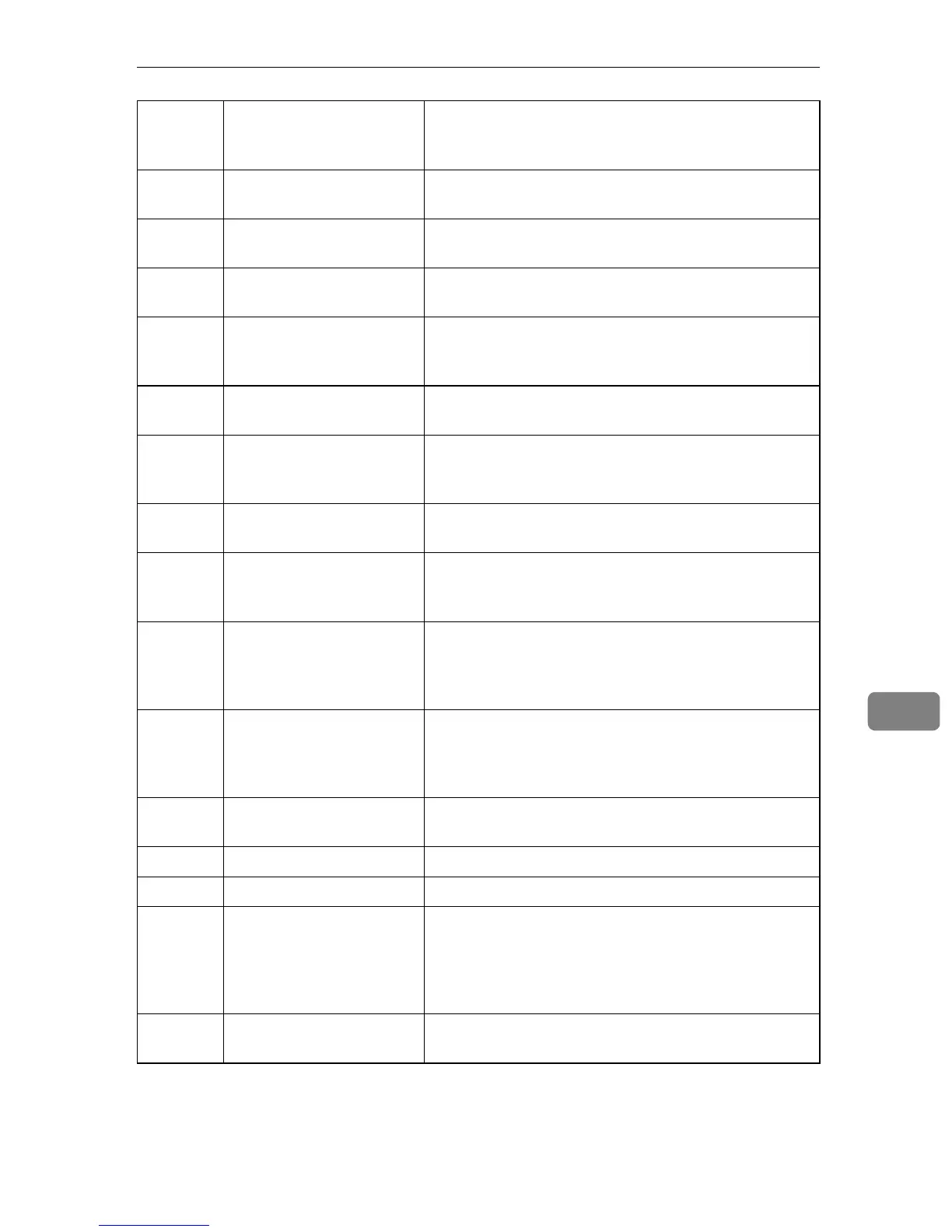
-2325 Device registered with no
device selections made.
Make selections and register the device.
-2340 RC Gate cannot connect to
Communication Server.
Check the RC Gate to Communication Server connec-
tion (supplied LAN cable).
-2341 RC Gate Wizard does not
appear.
Set the computer's Cookie setting to "Enable Cookies"
(Internet Options - Privacy - Details)
-2343 Cannot log in to RC Gate. Check whether login has already been performed. If it
has, check the entered password is correct. Contact
your service representative for details.
-2385 Cannot connect via dial-
up.
Check the entered country code is correct. Contact
your service representative for details.
-2391 Cannot register device. The device is already registered to another RC Gate.
To register, it is necessary to return the device. Contact
your service representative for details.
-2398 Cannot register RC Gate. Check the entered Request No. is correct. Contact your
service representative for details.
-2603 RC Gate cannot connect to
Communication Server
(connection error).
Check the RC Gate to Communication Server connec-
tion (supplied LAN cable).
-2604 RC Gate cannot connect to
Communication Server
(server command recep-
tion error).
Check the RC Gate to Communication Server connec-
tion (supplied LAN cable).
-2605 RC Gate cannot connect to
Communication Server
(server command recep-
tion error).
Check the RC Gate to Communication Server connec-
tion (supplied LAN cable).
-2620 Proxy authentication er-
ror.
Check the Proxy setting is correct.
-2670 PPP communication error. Check the telephone line is connected
-2671 PPP authentication error. Check the telephone line is connected
-5309 RC Gate cannot connect to
Communication Server /
Unable to send e-mail to
administrator from RC
Gate.
Check the mail server setting is correct.
-5310 Processing - cannot begin
new operation.
Another communication is being processed. Wait a
short while, and then try again.
Web UI
Error
Code
Cause Solution



 To Next Page