Page 28
Additional Common User Operations at the LCD/Panda
Keypad
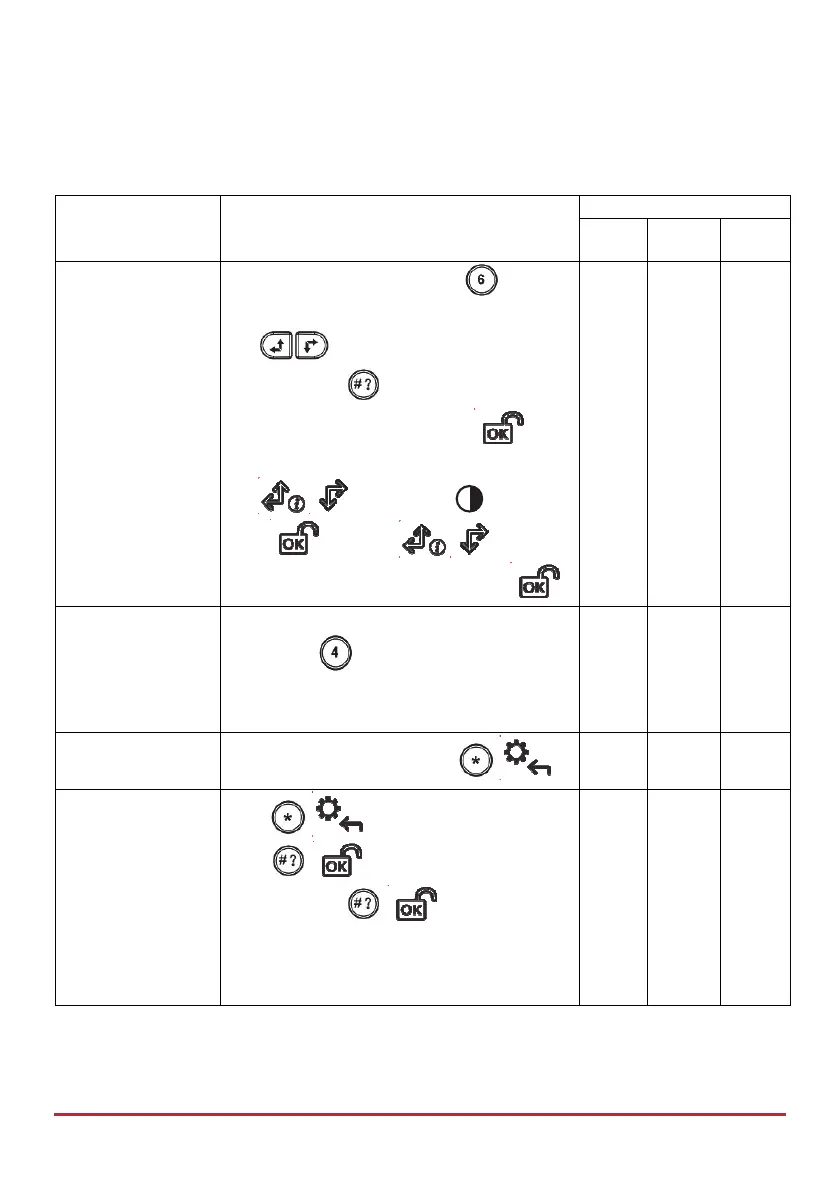
Keypad Operation
Procedure
Permissions
Grand
Master
User Installer
Set keypad
contrast
LCD Keypad: Press and hold
for 2
seconds.
Use to adjust the display contrast,
and then press
Panda Keypad: Press and hold for 2
seconds.
Use
to select the icon and
press
then use to adjust
the display contrast, and then press
System Chime
On/Off (Chime
indicates a zone
violation when
system is Unset)
LCD/Panda Keypad: Without entering
code, press for 2 seconds to toggle
between System Chime On and System Chime
Off.
Wake up keypad
Without entering code, press
/
Main Buzzer
On/Off
Press
/ , enter code, at Activities
press
/ , scroll to Buzzer On/Off,
and then press
/ ; keypad
displays “Buzzer On” or ”Buzzer Off”.
Repeat procedure to toggle between on &
off.



 To Next Page