2-21
Installation
Connect Pulse Output
Power Source
The Pulse Output function provides an isolated switch-closure
frequency output signal that is proportional to the flow through the
flowtube. The signal is normally used in conjunction with an external
totalizer or control system. The following requirements apply:
Supply Voltage: Up to 24 V ac or dc.
Load Resistance: 100 to 100 k ohms (typical
' 1 k).
Pulse Duration: 0.5 to 100 msec (adjustable).
Maximum Power: 5.75 watts.
Switch Closure: Bi-directional MOFSET.
If your application uses the pulse output option, complete the following
steps to connect the power source to the transmitter:
1. Ensure that the power source and connecting cable meet the
requirements outlined above.
2. Turn off the transmitter and pulse output power sources.
3. Run the power cable into the transmitter.
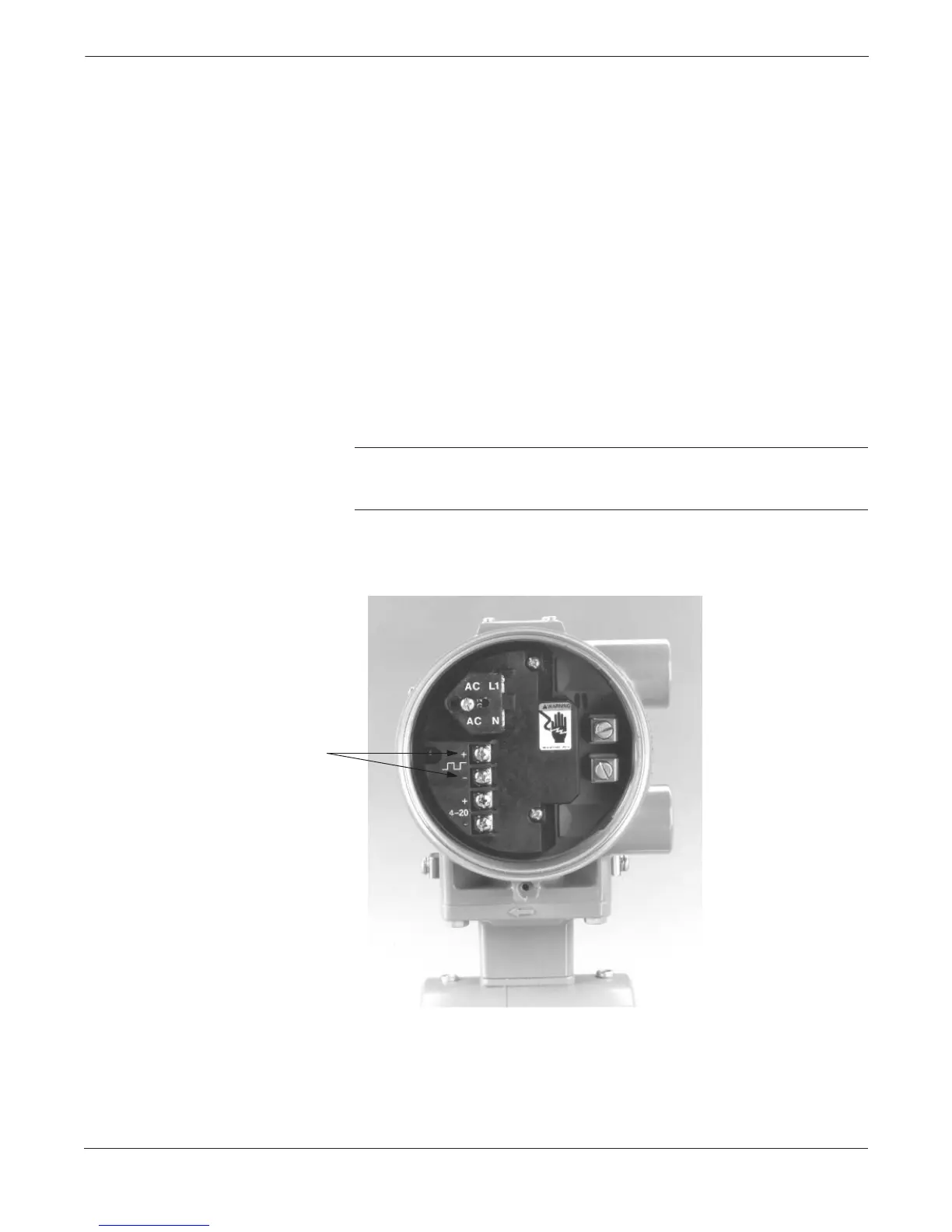
4. Connect the two wires that convey switch closure information
to the + and – terminals.
NOTE
If dc power is used, it is preferred to connect – dc to terminal – and + dc
to terminal +.
FIGURE 2-26. Pulse or
Digital Output Connections.
Digital Outputs
8732-005AB














 To Next Page