Wireless Router RNX-N150RT User Manual
The router in Client Router mode supports three popular ways to connect to the Internet. Please
select the one compatible with your ISP.
2. Click Next to enter the necessary network parameters.
a) If you choose "Dynamic IP", the router will automatically receive the IP parameters from your
ISP without needing to enter any parameters.
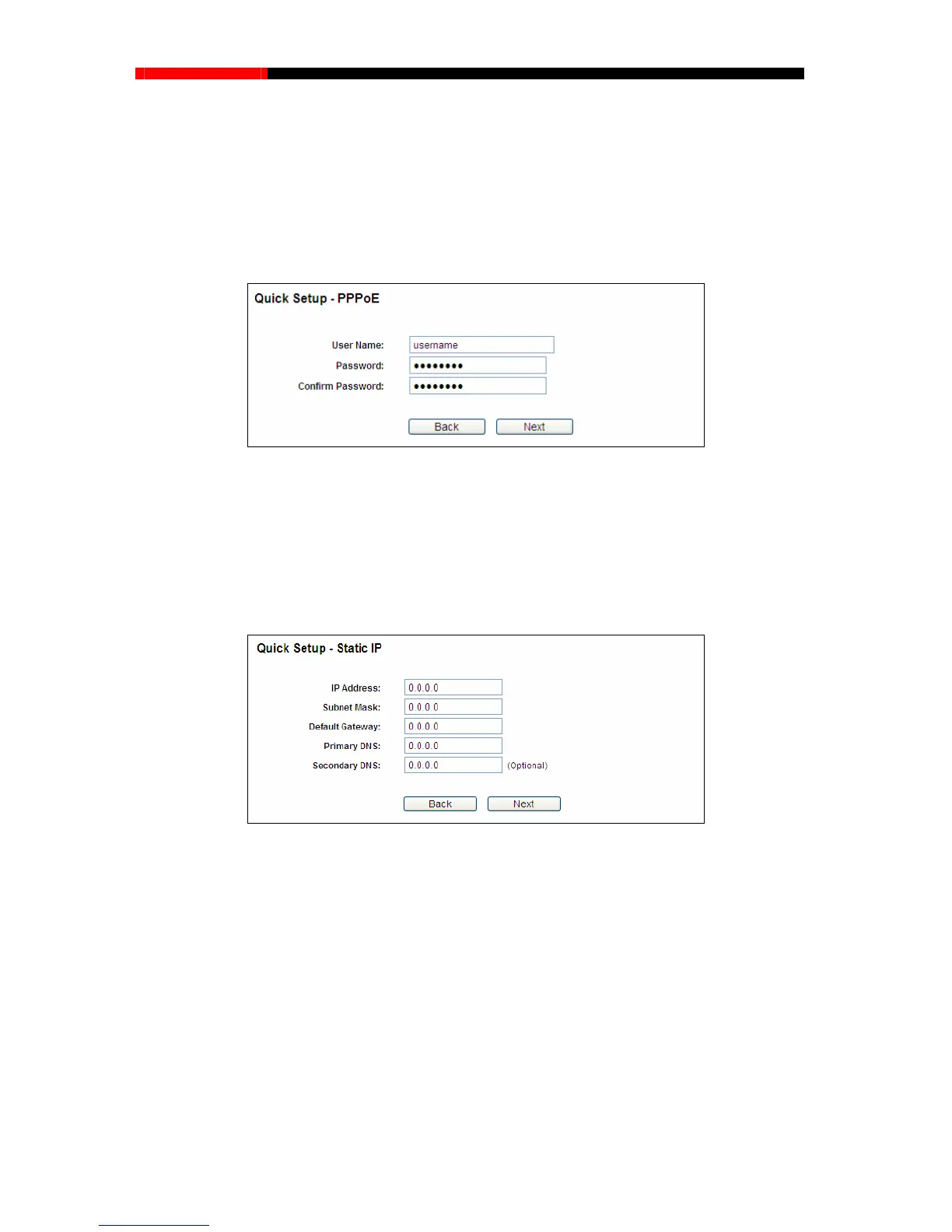
b) If you choose "PPPoE", you will see this page shown in Figure 3-8.
Figure 3-8 PPPoE
User Name and Password - Enter the User Name and Password provided by your ISP.
These fields are case-sensitive.
Confirm Password - Enter again the Password provided by your ISP to ensure the
password you entered is correct.
c) If you Choose "Static IP", the Static IP settings page will appear as shown in Figure 3-9.
Figure 3-9 Static IP
Note:
The IP parameters should have been provided by your ISP.
IP Address - This is the WAN IP address as seen by external users on the Internet (including
your ISP). Enter the IP address into the field.
Subnet Mask - The Subnet Mask is used for the WAN IP address, it is usually 255.255.255.0.
Default Gateway - Enter the gateway IP address into the box if required.
Primary DNS - Enter the DNS Server IP address into the boxes if required.
Secondary DNS - If your ISP provides another DNS server, enter it into this field.
- 13 -



 To Next Page