Wireless Router RNX-N150RT User Manual
Note:
Only when you have configured the system time on “System Tools → Time” page, will the
Time-based Connecting function can take effect.
Connect Manually - You can click the Connect/Disconnect button to connect/disconnect
immediately. This mode also supports the Max Idle Time function as Connect on Demand
mode. The Internet connection can be disconnected automatically after a specified inactivity
period and re-established when you attempt to access the Internet again.
Click the Connect button to connect immediately. Click the Disconnect button to disconnect
immediately.
Caution: Sometimes the connection cannot be terminated although you specify a time to Max Idle
Time because some applications are visiting the Internet continually in the background.
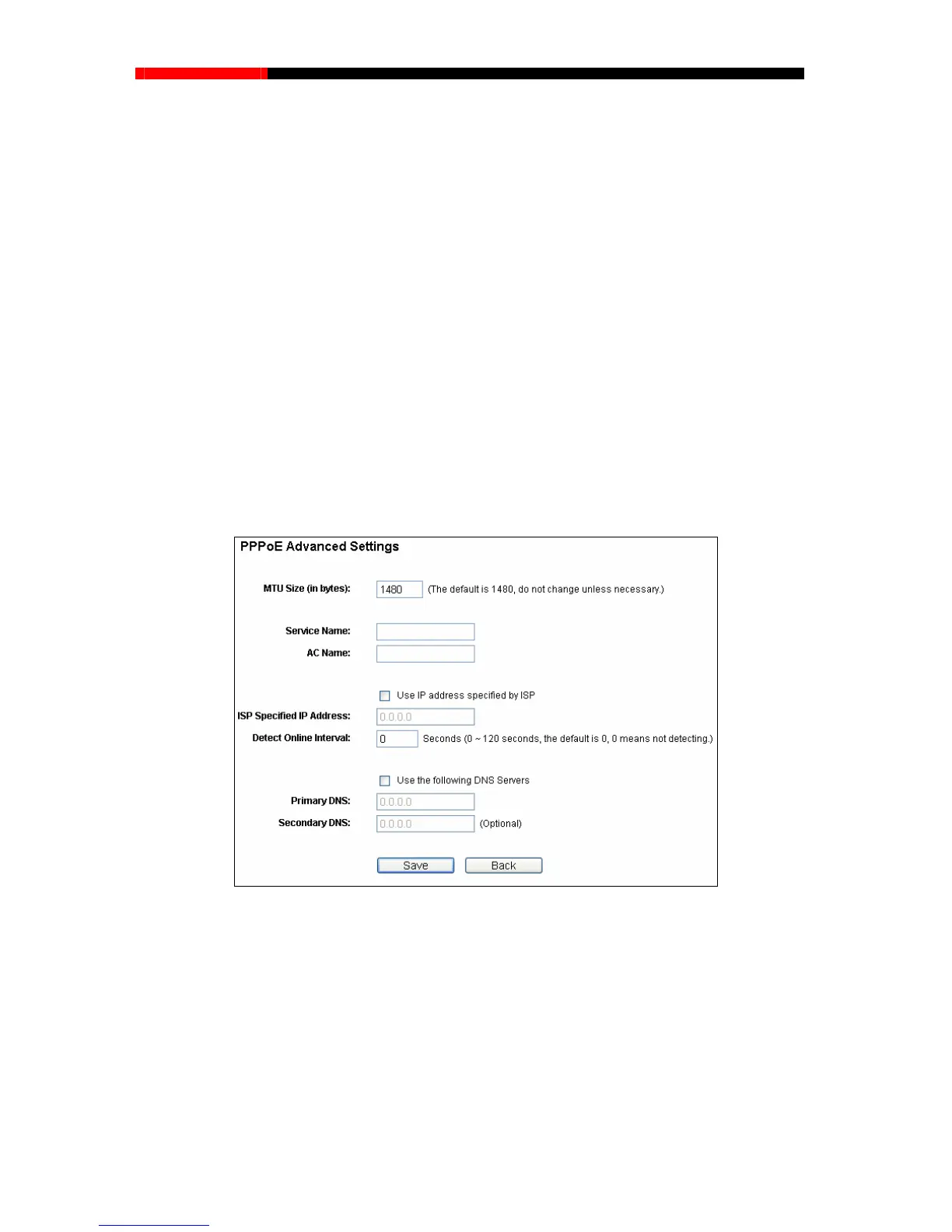
If you want to do some advanced configurations, please click the Advanced button, and the page
shown in Figure 4-12 will then appear:
Figure 4-12 PPPoE Advanced Settings
MTU Size - The default MTU size is “1480” bytes, which is usually fine. It is not recommended
that you change the default MTU Size unless required by your ISP.
Service Name/AC Name - The service name and AC (Access Concentrator) name should
not be configured unless you are sure it is necessary for your ISP. In most cases, leaving
these fields blank will work.
- 40 -



 To Next Page