Wireless Router RNX-N150RT User Manual
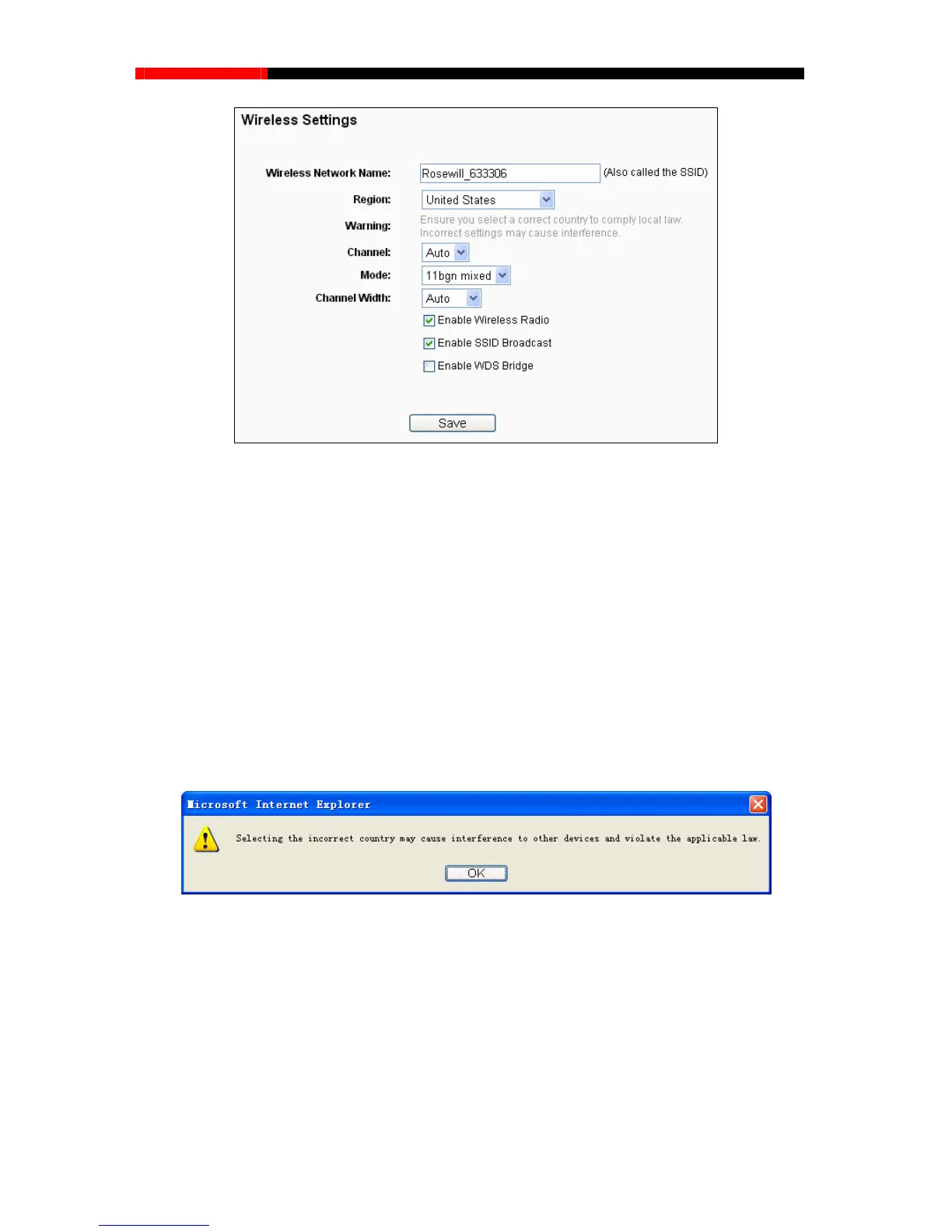
Figure 4-21 Wireless Settings
Wireless Network Name (Also called the SSID) - Enter a value of up to 32 characters. The
same name of SSID (Service Set Identification) must be assigned to all wireless devices in
your network. Considering your wireles urity, the default SSID is set to be
will_XXXXXX indicates the last unique six numbers of each router’s MAC address).
se contact your local gover
nment agency for assistance.
Save button, then the
Note Dialog appears. Click OK.
s network sec
(Rose
This value is case-sensitive. For example, TEST is NOT the same as test.
Region- Select your region from the pull-down list. This field specifies the region where the
wireless function of the router can be used. It may be illegal to use the wireless function of
the router in a region other than one of those specified in this field. If your country or region is
not listed, plea
When you select your local region from the pull-down list, click the
Note Dialog
N
Limi
wireless channel unless you notice interference pr
oblems with another nearby
access point.
ote:
ted by local law regul
ations, version for North America does not have region selection option.
Channel - This field determines which operating frequency will be used. The default
channel
is set to Auto so the AP will choose the best channel automatically. It is not necessary to
change the
- 50 -



 To Next Page