Wireless Router RNX-N150RT User Manual
Select if all of your wireless clients are 802.11g.
of 802.11b, 11g, and 11n wireless clients.
to
Channel Width - Select the channel width from the pull-down list. The default setting is
automatic, which can adjust the channel width for your clients automatically.
Note:
If 11b only, 11g only, or 11bg mixed is selected in the Mode field, the Channel Width
selecting field will turn grey and the value will become20M, which is unable to be changed.
Enable Wireless Router Radio - The wireless radio of this router can be enabled or
disabled to allow wireless stations access.
Enable SSID Broadcast - When wireless clients survey the local area for wireless networks
to associate with, they will detect the SSID broadcast by the router. If you select the Enable
SSID Broadcast checkbox, the Wireless router will broadcast its name (SSID) on the air.
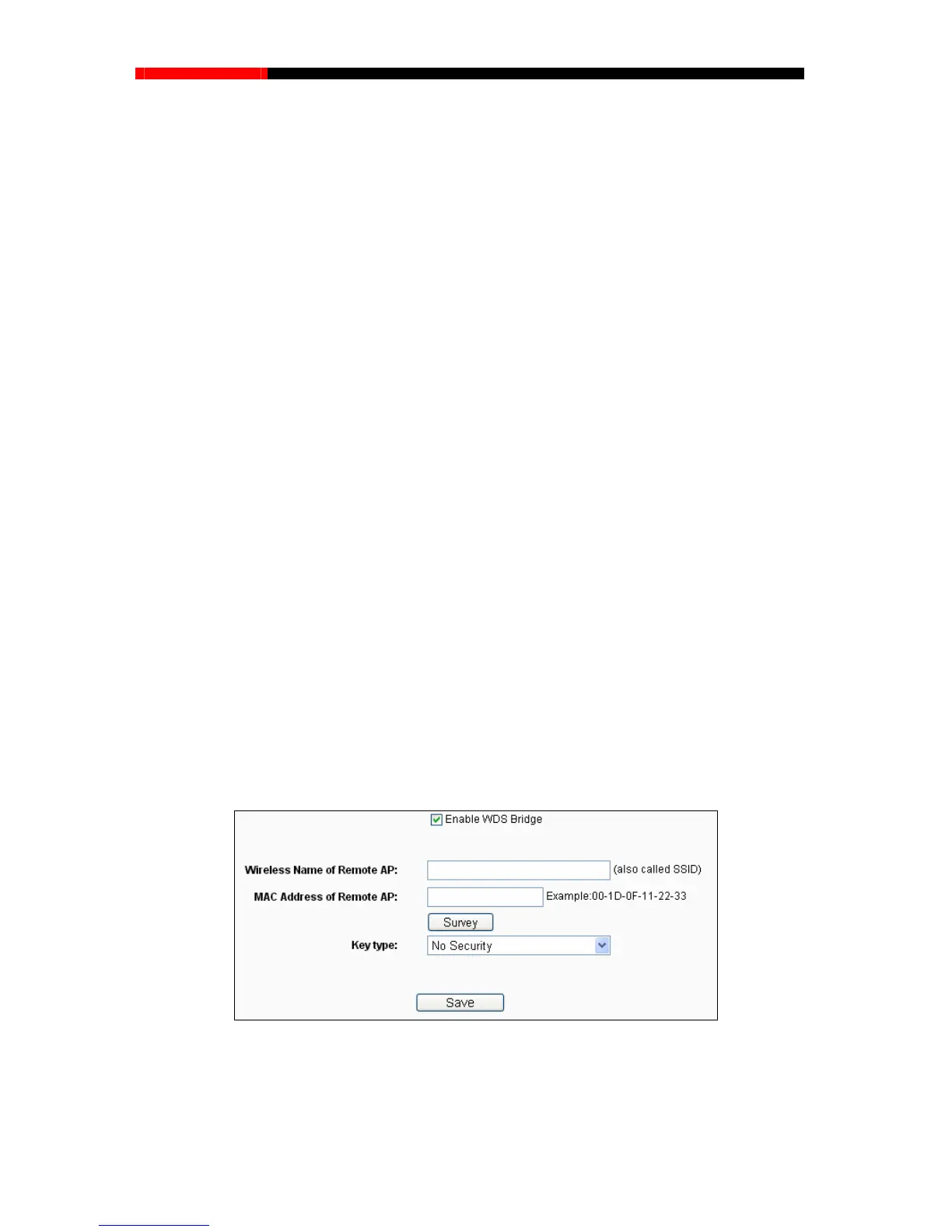
Enable WDS Bridge -Check this box to enable WDS. With this function, the router can bridge
Mode -Select the desired mode. The default setting is 11bgn mixed.
11b only - Select if all of your wireless clients are 802.11b.
11g only -
11n only- Select only if all of your wireless clients are 802.11n.
11bg mixed - Select if you are using both 802.11b and 802.11g wireless clients.
11bgn mixed - Select if you are using a mix
Select the desired wireless mode. When802.11g mode is selected, only 802.11g wireless
stations can connect to the router. When 802.11n mode is selected, only 802.11n wireless
stations can connect to the AP. It is strongly recommended that you set the Mode
802.11b&g&n, and all of 802.11b, 802.11g, and 802.11n wireless stations can connect to
the router.
two or more WLans. If
this checkbox is selected, you will have to set the following parameters
as shown in Figure 4-22. Make sure the following settings are correct.
Figure 4-22
ou can also use the search function to select the SSID to join.
Wireless Name of Remote AP (SSID) - The SSID of the AP your router is going to
connect to as a client. Y
- 51 -



 To Next Page