Wireless Router RNX-N150RT User Manual
0RT and manage the
access point.
4.7.1.4. Wireless Settings in Repeater Mode
Note:
If the LAN port of RNX-N150RT is not connected to a switch but directly to a PC,
1. The PC can directly log on to the Web management page of RNX-N15
2. Only the wireless STA with its VLAN ID set to 1 can communicate with the wired PC.
If you select Repeater mode in Figure 3-6 or R
epeater mode in Figure 4-3, the Wireless Settings
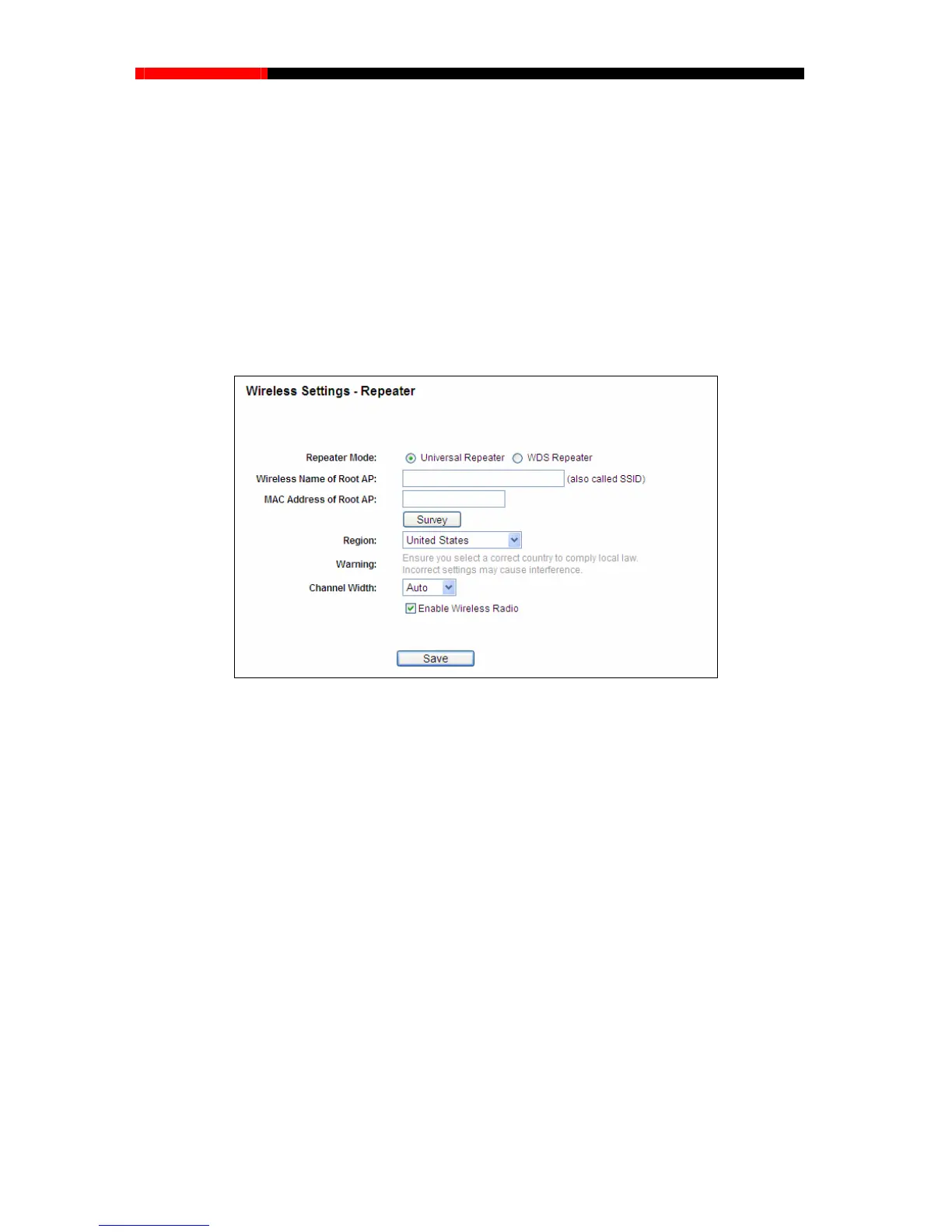
page will display as Figure 4-24.
Figure 4-24 Wireless Settings
e WDS, while choosing Universal
AP - The SSID of the AP your router is going to connect to as a
elect the SSID to join.
ID of the AP your router is going to
connect to as a
earch the AP which runs in the current channel.
. This field specifies the region where the
cified in this field. If your country or region is
not listed, please contact your local government agency for assistance.
Channel Width - The bandwidth of the wireless channel.
Repeater Mode - Choo
sing WDS Repeater is to enabl
Repeater is to disable WDS.
Wireless Name of Root
client.
You can also use the survey function to s
MAC Address of Root AP - The BSS
client. You can also use the survey function to select the BSSID to join.
Survey - Click this button, you can s
Region - Select your region from the pull-down list
wireless function of the router can be used. It may be illegal to use the wireless function of
the router in a region other than one of those spe
- 57 -



 To Next Page