Wireless Router RNX-N150RT User Manual
eless Name of the AP your router is going
so use the survey function to select the BSSID to join.
the current channel.
-
This option should be chosen according to the AP's security configuration. It is
SCII) or WEP (HEX). It
rovided here. Hexadecimal format
stands for any combination of hexadecimal digits (0-9, a-f, A-F) in the specified length. ASCII
WEP Index - This option should be chosen if the key type is WEP (ASCII) or WEP (HEX). It
ing to connect needs password, you need to fill the
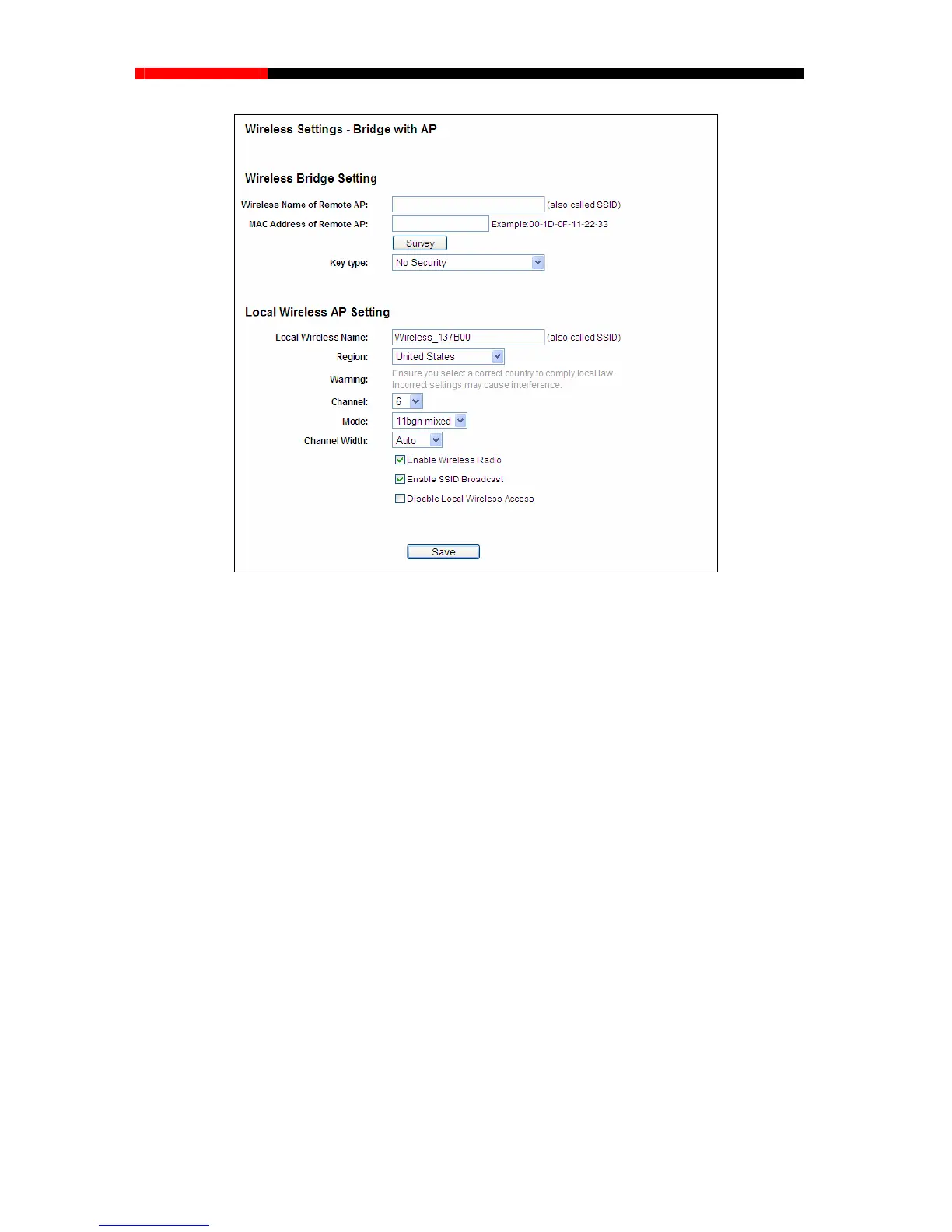
Figure 4-25 Wireless Settings
Wireless Name of Remote AP (SSID) - The Wir
to connect to as a client. You can also use the survey function to select the SSID to join.
MAC Address of Remote AP (BSSID) - The MAC Address of the AP your router is going to
connect to as a client. You can al
Survey - Click this button, you can search the AP which runs in
Key type
recommended that the security type is the same as your AP's security type.
Auth Type - This option should be chosen if the key type is WEP (A
indicates the authorization type of the Root AP.
Key Format - Hexadecimal and ASCII formats are p
format stands for any combination of keyboard characters in the specified length.
indicates the index of the WEP key.
Password - If the AP your router is go
password in this blank.
- 59 -



 To Next Page