6.5
Resetting the AX10RF Receiver
without Internet Connection
1. Using a small sti wire, press and hold the right
reset button until the red auto/manual backlight
LED ashes.
2. Using the same probe, press and hold the left reset button until the red auto/manual backlight
LED and the green on/o backlight LED ash alternately.
3. To complete the reset, cycle the power to the AX10RF Receiver o for 10 seconds.
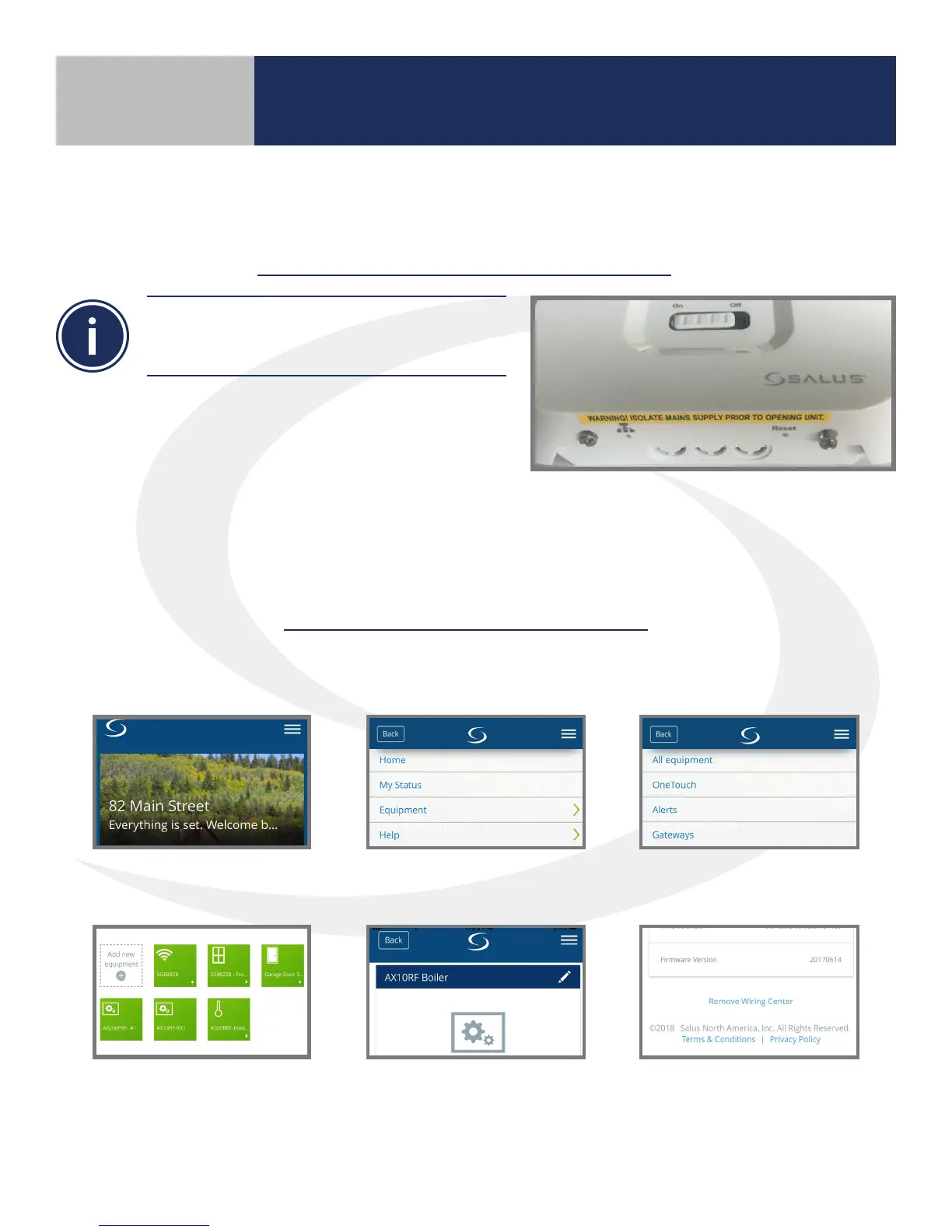
The AX10RF Receiver has 2 reset buttons on the
bottom surface of the unit cover. The right button
is for the receiver and the left is for the system.
with Internet Connection
To reset the AX10RF Receiver, delete the icon from the SALUS Smart Home mobile application in the
same way as the Wiring Centers:
7. Once the AKL Wiring Center is removed, be sure to cycle o the power for more than 10 seconds
to fully reset the unit.
1. Select the menu from the
upper right of the home screen.
2. Choose “Equipment” 3. Then choose, “All equipment”
4. Choose the appropriate
Wiring Center from the list.
5. Scroll to the bottom of
the screen.
6. Select “Remove Wiring Center”.
Resetting Factory Defaults
Section 6



 To Next Page