7.11
The following are a list of functions and parameters that can be accessed without the password. To
access more parameters the password must be entered. Instructions for entering the password to
access more parameters follow.
Function
Parameters
Description
Default Value
No Password Required
Do you want to change the lock
settings on your thermostat?
No
No No, Don’t Lock it (allow occupants to make changes)
Yes Yes, Lock it (prevent occupants from making changes)
Shut O LCD Display Turn On
Turn On Display is visible to occupants
Turn O Display is not visible to occupants
Frost Setpoint Temperature
41°F 41°F to 59°F
Minimum room temperature for frost protection and holiday mode. OFF or Value
range shown depending on units selection in 1°F [0.5°C] increments
5°C 5°F to 15°F
Hour Format 12:00
12:00 12 Hour Time Format (eg. 5:00 pm)
24:00 24 Hour Time Format (eg. 17:00)
Fahrenheit or Celsius Celsius
Celsius SI Metric Units - °C
Fahrenheit US Customary Units - °F
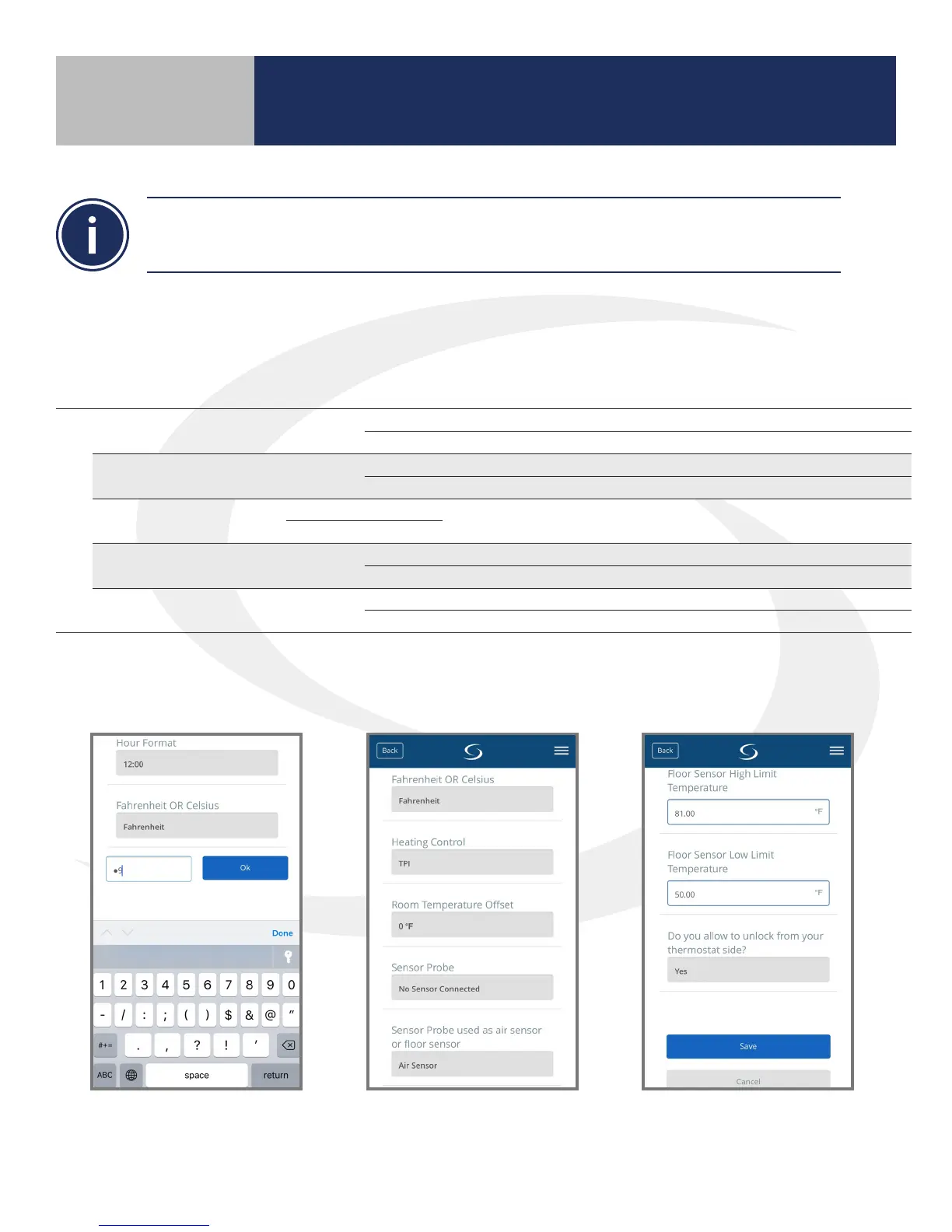
1. Enter “49” in the password
eld and press, “Ok”.
2. Scroll down to nd desired
functions and change
parameters as required.
3. Press “Save” when nished.
AS20WRF/BRF Thermostat – Parameter Access
Instructions with Internet Connection
AS20WRF/BRF Thermostat – SALUS Smart Home
Application - Functions & Parameters
Section 7
Setting Device Parameters



 To Next Page