7.4
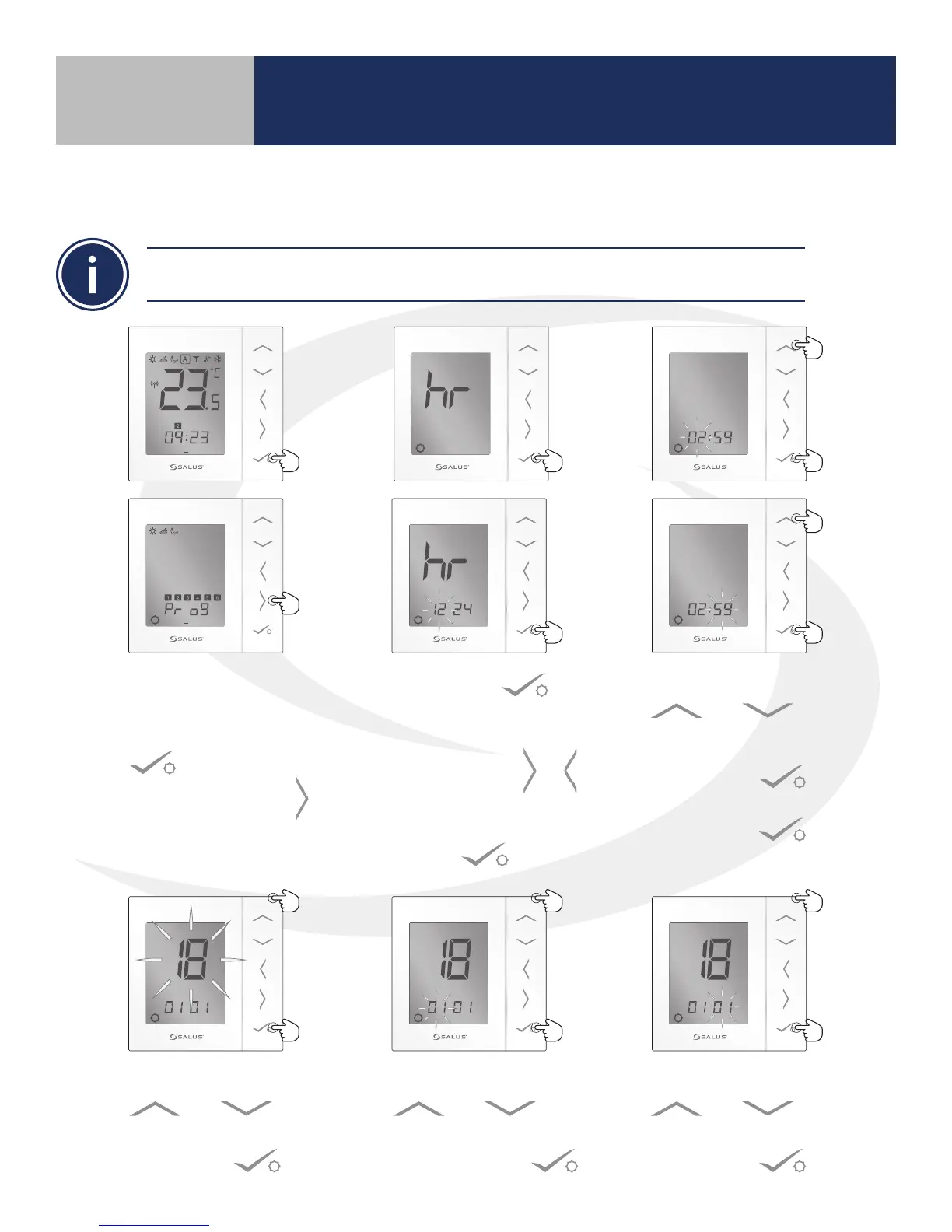
AS20WRF/BRF Thermostat – Setting the Time
The time can be set directly on the AS20WRF/BRF User Interface or on the SALUS Smart Home
application, provided a SG888ZB Gateway is used and connected to the internet.
1 2 3 4 5 6 7
PM
1 2 3 4 5 6 7
1. To set the time on the
AS20WRF/BRF Thermostat,
press & hold the conrm
button.
2. Press the right arrow
to enter the time
format mode.
3. Press conrm to
accept. The 12/24 selection
is shown on the display.
4. Use the right/left &
arrows to select either
12 or 24 hours. Press
conrm .
5. Use the Up/Down Arrows
& to set
the ashing hour value.
6. Press conrm and
repeat to set the min. Then
Press conrm again.
7. Use the Up/Down Arrows
& to set
the ashing year value and
Press conrm .
8. Use the Up/Down Arrows
& to set
the ashing month value
and Press conrm .
9. Use the Up/Down Arrows
& to set
the ashing day value and
Press conrm .
Section 7
Setting Device Parameters



 To Next Page