7.1
Section 7
Setting Device Parameters
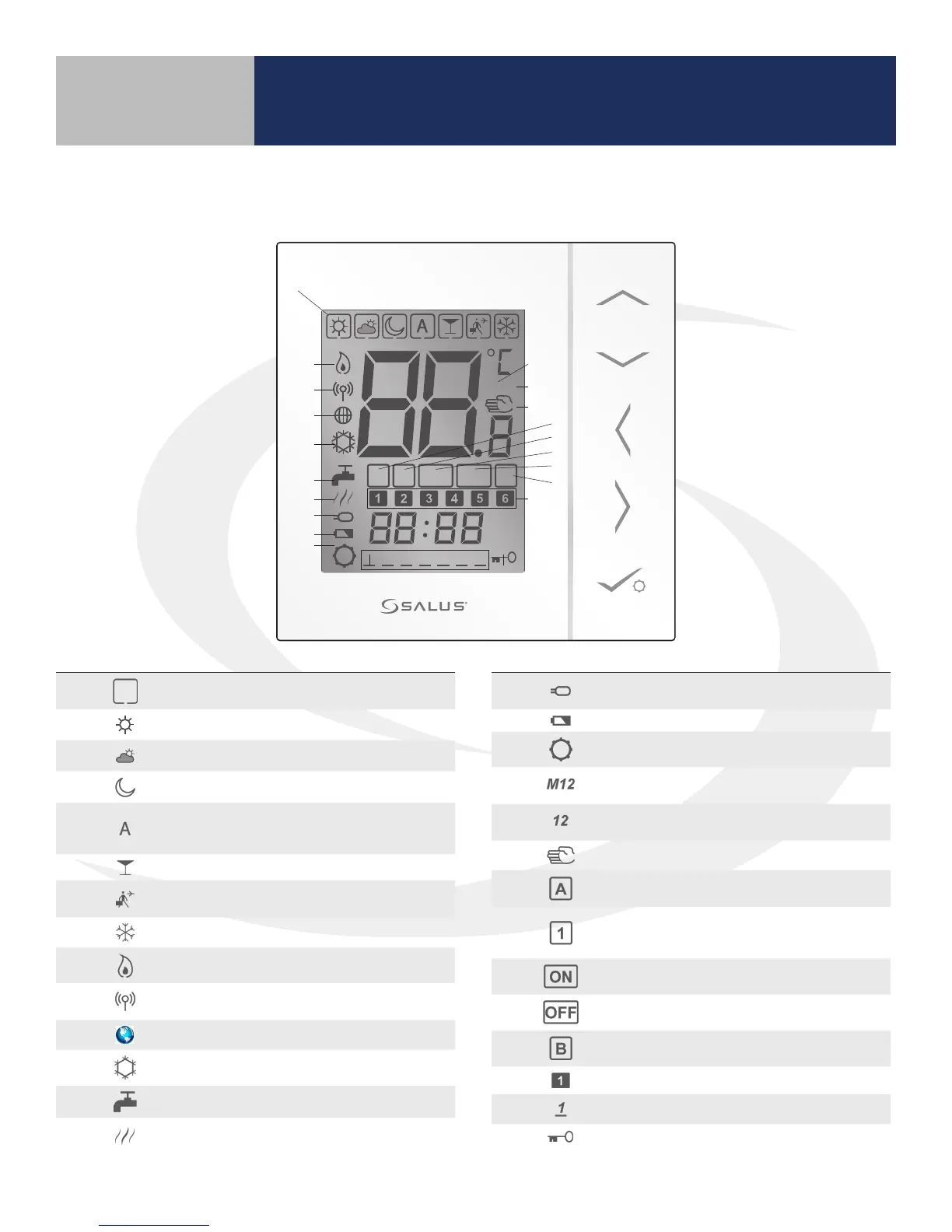
AS20WRF/BRF Thermostat User Interface Key
M12
AM
PM
1 2 3 4 5 6 7
A B1 ON OFF
AM
1 2 3 4 5 6 7
1
2 3 4 5 6 8
9
10
11
12
13
14
15
16
17
18
19
20
21
22
23
24
25
26
27
28
7
# Icon Function
1 Indicates active heating mode.
2 Sun: high comfortable temperature
3 Cloudy: middle comfortable temperature
4 Moon: low comfortable temperature
5
Programmable thermostat Program mode (Auto)
indicator: Indicates program is running, Auto On or Auto
O.
6 Party mode indicator
7 Vacation temperature indicator
8 Defrost temperature mode indicator
9 Heating is on
10
Wi/network indicator: unit is connected to Zigbee
network
11 Internet indicator: unit is linked to the Internet
12 Cooling mode; ashes when cooling is running
13 Hot water indicator - thermostat is in Hot Water mode
14
Hot water indicator - ashes when hot water is
running(?)
# Icon Function
15
Floor sensor is connected, ashes when high limit is
reached
16 Low Battery indicator
17 Gear - indicates user setting mode is active
18
Group 1 or Group 2 indicator identies Group number
for Managing Thermostats.
19
Group 1 or Group 2 indicator identies Group number
for Dependent Thermostats.
20 Temporary manual override
21
HW Program mode(Auto) indicator: Indicates program is
running, Auto On or Auto O.
22
HW Mode indicator: Indicates turn on for 1 period a day,
from Program 1 ON (start time) to Program 3 OFF (start
time).
23 HW Mode indicator: Indicates Continuously On.
24 HW Mode indicator: Indicates Continuously O.
25 HW Mode indicator: Indicates Boost +1hr override.
26 Active schedule block
27 Current day of the week (1=Monday, 2=Tuesday, etc.)
28 Key lock indicator: Indicates the pressed key is locked.



 To Next Page