7.2
AS20WRF/BRF Thermostat – Installer Parameter Setup
Installers can set up the AS20WRF/BRF parameters using the SALUS Smart Home application if an SG888ZB
Gateway is used and connected to the internet. Alternatively, the parameters can be entered directly on
the AS20WRF/BRF Thermostat. The following procedure illustrates the oine setup. Changes made on the
application or on the thermostat may take a few minutes to go into eect.
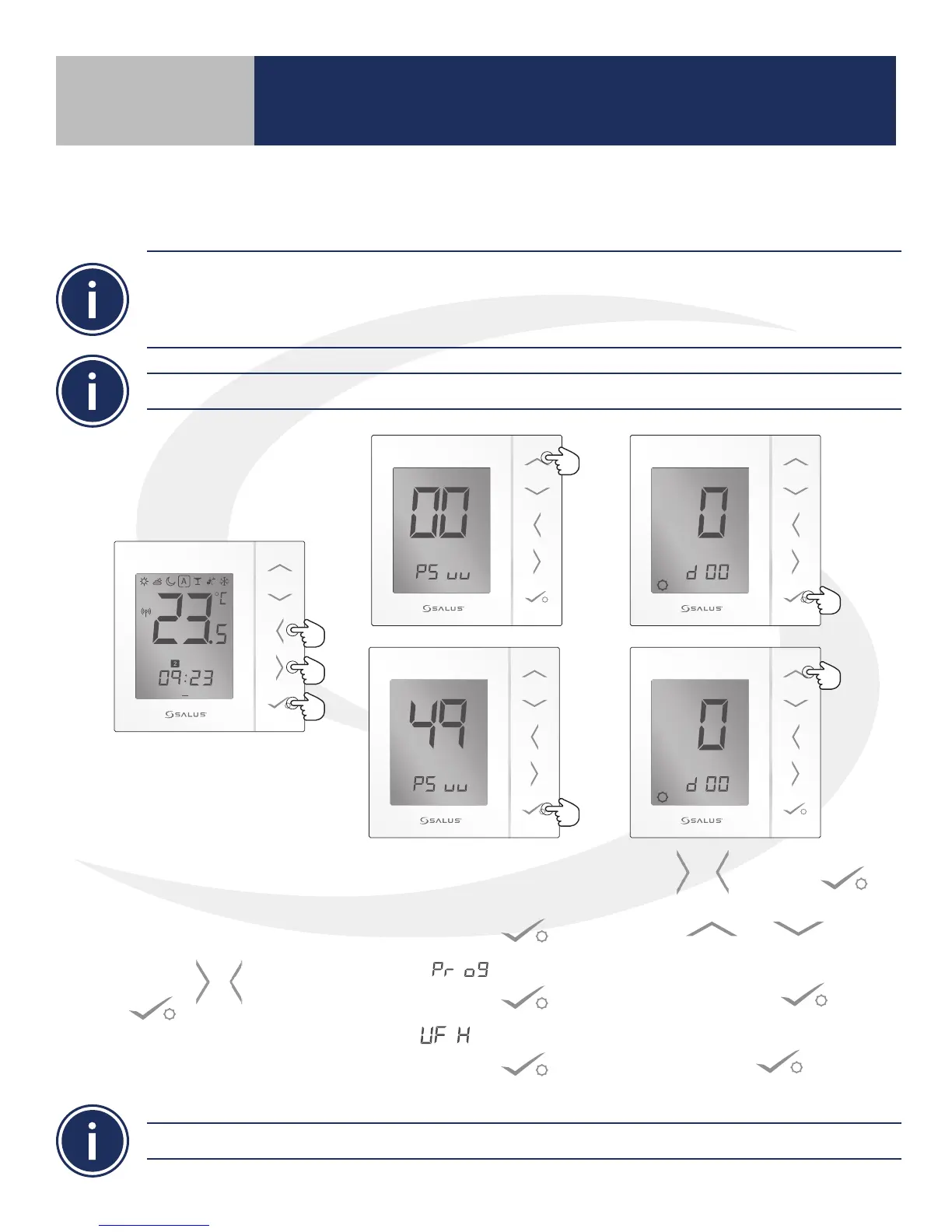
1. To set up installation
parameters on the
AS20WRF/BRF Thermostat,
simultaneously press &
hold the , &
buttons.
2. Press the up arrow
for menu #49.
Press conrm .
3. SEL –
Press conrm .
4. US
E
Press conrm .
5. Use & or conrm key
to change the parameter id (d##).
Use & to change
the parameter value.
6. Pressing conrm advances
to the next function.
7. Press conrm on function
d19 to return to main screen.
1 2 3 4 5 6 7
PM
Descriptions, default values and value ranges for each thermostat function are listed on the following page.
Section 7
Setting Device Parameters
Before starting set up procedures, press any key to light the display and prepare the Thermostat for input.



 To Next Page