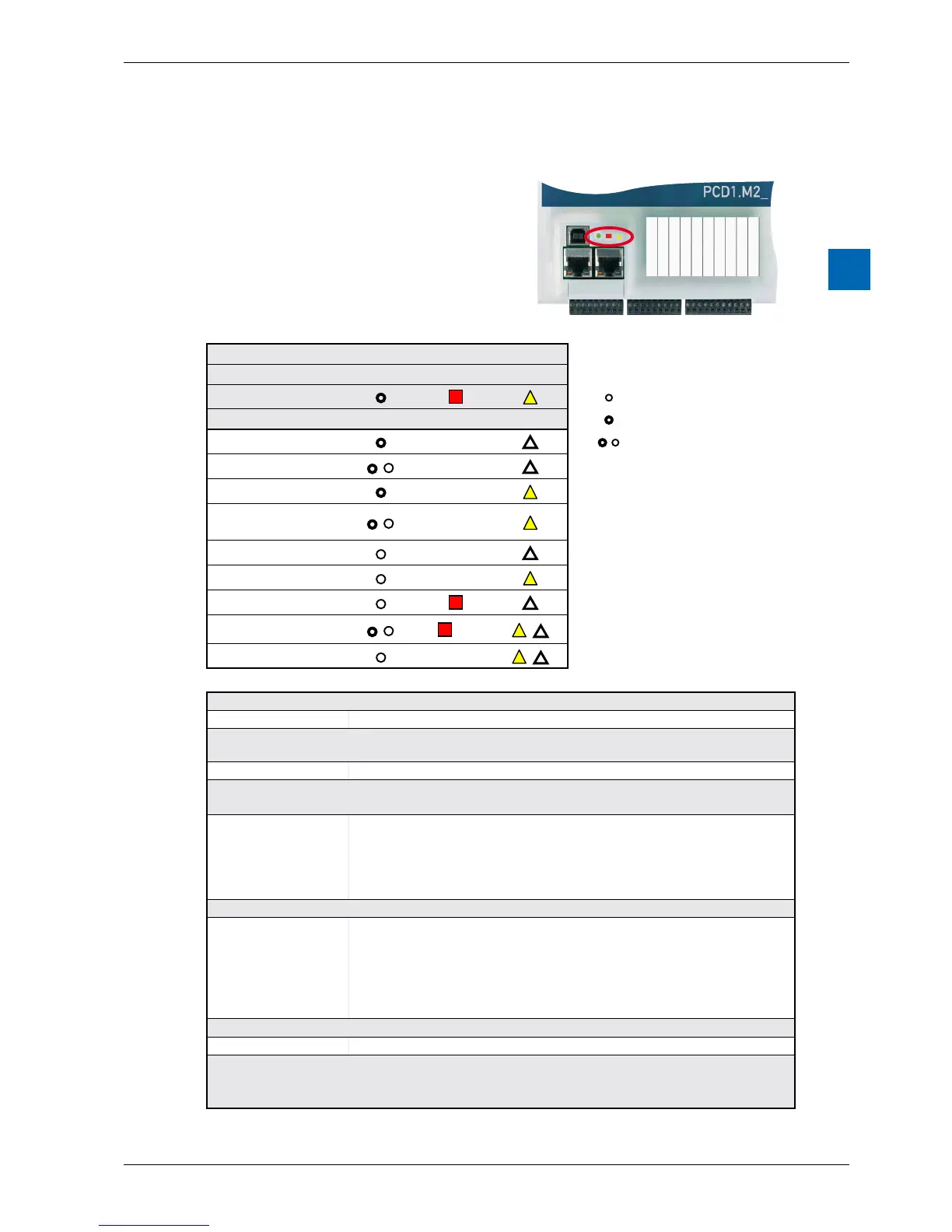
3.7 OperatingStatusesandtheirLEDs
Three LEDs (green, red and yellow) show
the possible operating statuses of the CPU
as set out in the following table.
LEDs PCD1.M2110R1
Meaning Run Stop Error(s)
Key:
Form
●
/
Start Self-diagnosisforapprox.1sec.afterswitchonorrestart
Run Normal processing of the user program after start-up.
Run conditional
Conditional Run status A condition was set in the debugger (Run until...),
whichhasnotbeenfullledyet
Run with error The same as Run, but with an error message
Run conditional
with error
The same as Run conditional, but with an error message
Stop The status Stop occurs in the following cases:
- Programming unit connected in PGU mode while the CPU was switched
on
- PGU stopped by programming unit
- ConditionforBED.RUNwasfullled
Stop with error The same as Stop, but with an error message
Halt The status Halt occurs in the following cases:
- Stop instruction processed
- Serious error in the user program
- Hardware fault
- No program loaded
- No communications mode on the S-bus PGU or Gateway Master Port
Systemdiagnostics
Battery fault Flashes at interval of 500 ms
Reset The RESET status has the following causes:
- Supply voltage too low
- Firmware not started



 To Next Page