① Basic Working Mode: Fitness, Count, Face, Orient, Issue, Dispense, OCR Mode
② User Define Mode: User can set up Max 8 modes for his/her usual or specific purpose.
[3] Can select the ‘Working Mode’ by touching the icon.
[4] The screen will change into initial screen of wokring mode selected
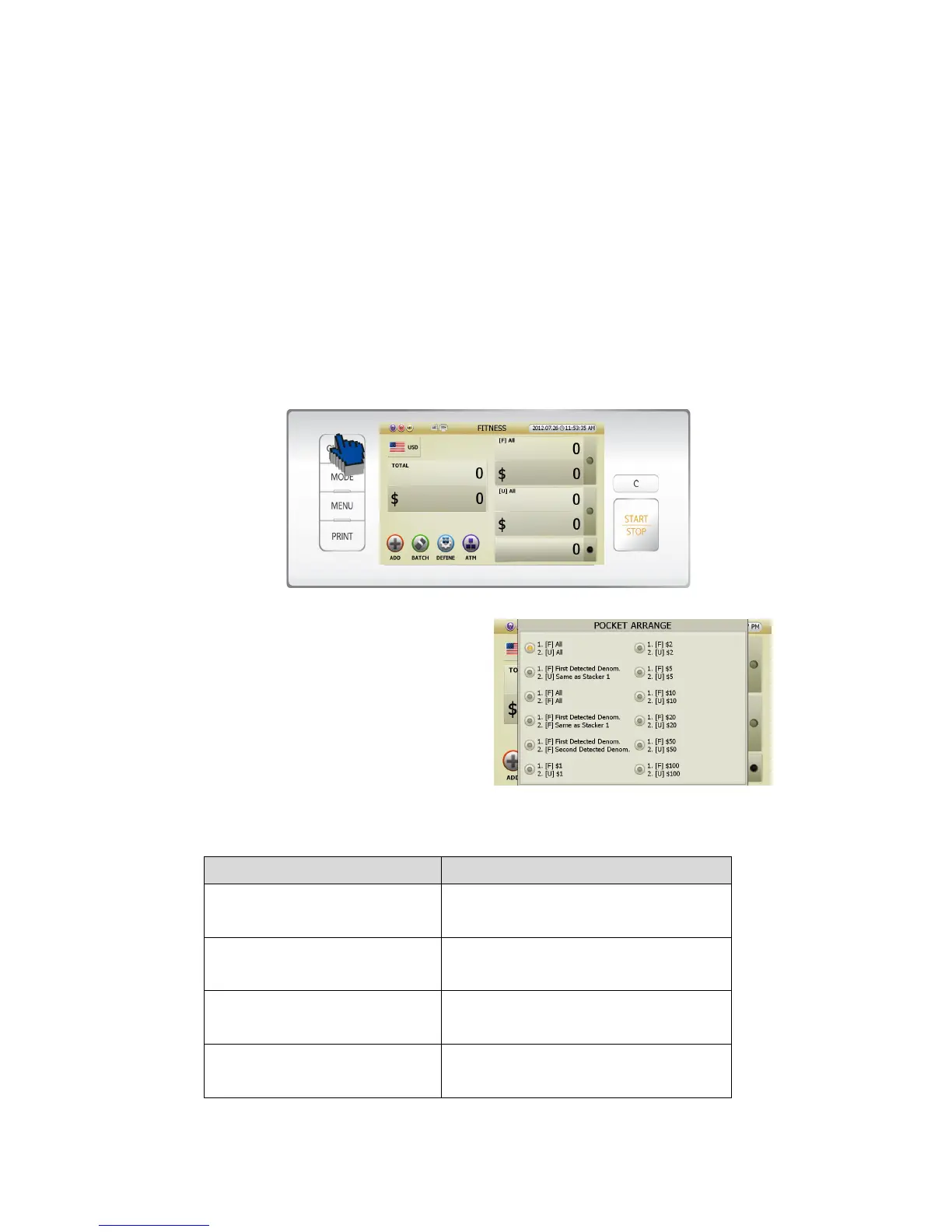
Can allocate stacker and reject pockets in Basic Working Mode like below.
[1] If user press [CHANGE] button in initial screen (FIG 5-01), the display will change like below (FIG 5-04).
[2] Can select the pocket allocation in ‘POCKET
ARRANGE’ list by touching the title
[3] The screen will change into initial screen
[4] Pocket Arrange list explanation
Pocket Arrange indication Stacker 1, Stacker 2 explanations
1. [F] All
2. [U] All
Stacker 1: All the Fit notes
Stacker 2: All the Unfit notes
1. [F] First Detected Denom.
2. [U] Same as Stacker 1
Stacker 1: First detected Fit Denom. notes
Stacker 2: Same as Stacker 1 notes but Unfit
1. [F] All
2. [F] All
Stacker 1: All the Fit notes
Stacker 2: All the Fit notes
1. [F] First Detected Denom.
2. [F] Same as Stacker 1
Stacker 1: First detected Fit Denom. notes
Stacker 2: Same as Stacker 1
(FIG 5-04)



 To Next Page