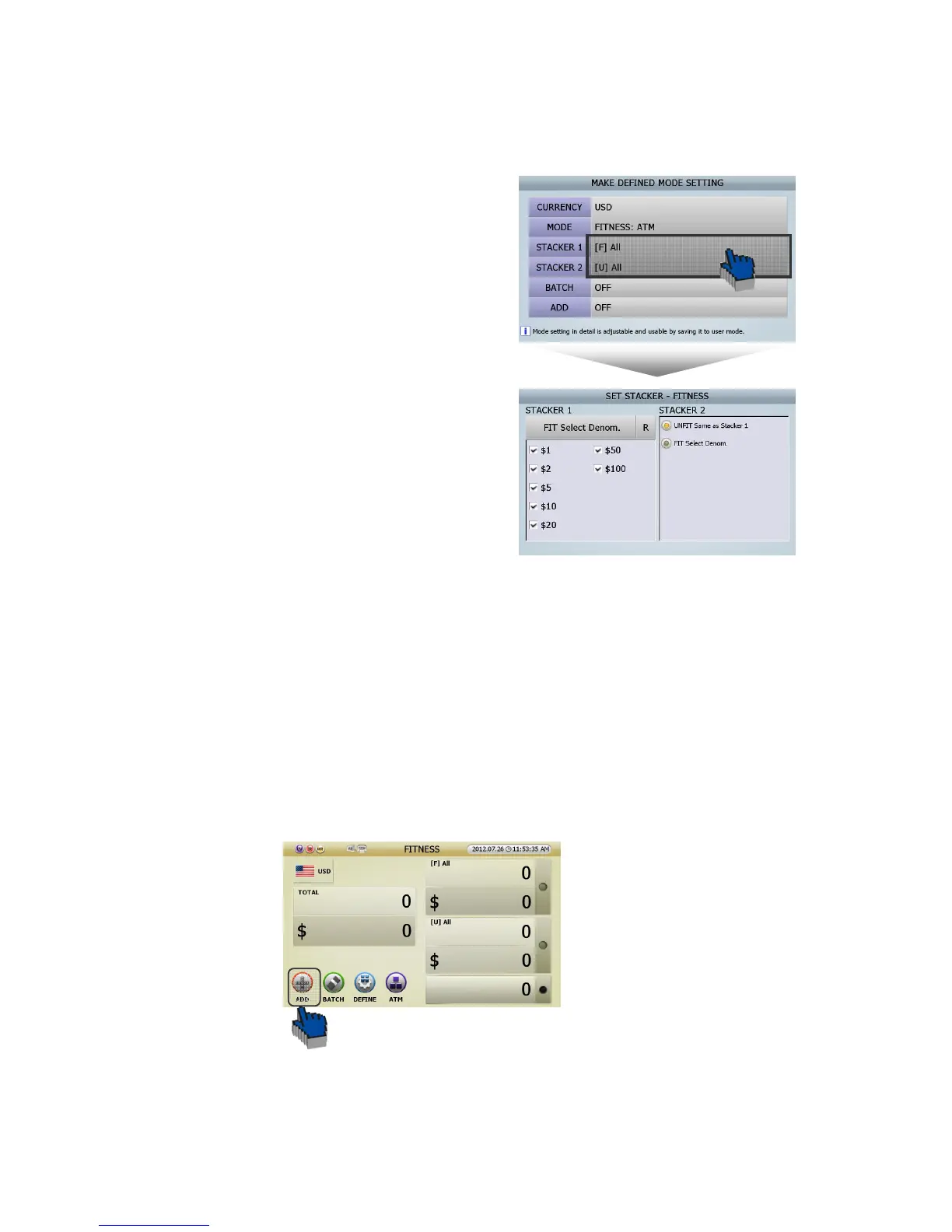
● Can change the stacker pockets like below in User Define Mode.
[1] In order to activate ‘MAKE DEFINED MODE
SETTING(FIG 5-05),’ User can touch [DEFINE] icon in
initial screen (FIG 5-01).
[2] Press [Stacker 1]/[Stacker 2], then user can see ‘SET
STACKER-FITNESS(FIG5-09)’ like the picture on the
right.
[3] Can select the notes in ‘FIT Select Denom.’ list in
‘Set Stacker-Fitness(FIG 5-09)’ stage.
[4] Save in ‘User Define Mode’ and user can start to work.
5.2.4. Functions
■ ADD Function
In general situation, counting result initialize when pocket empty, but if ADD button was activated, counting
result is displayed by automatically added from the previous counting result even if pocket is empty.
Caution) ACCEPT function is not available when ADD is set.
● ADD is activated by touching ADD button on the screen of each mode.
(FIG 5-09)



 To Next Page