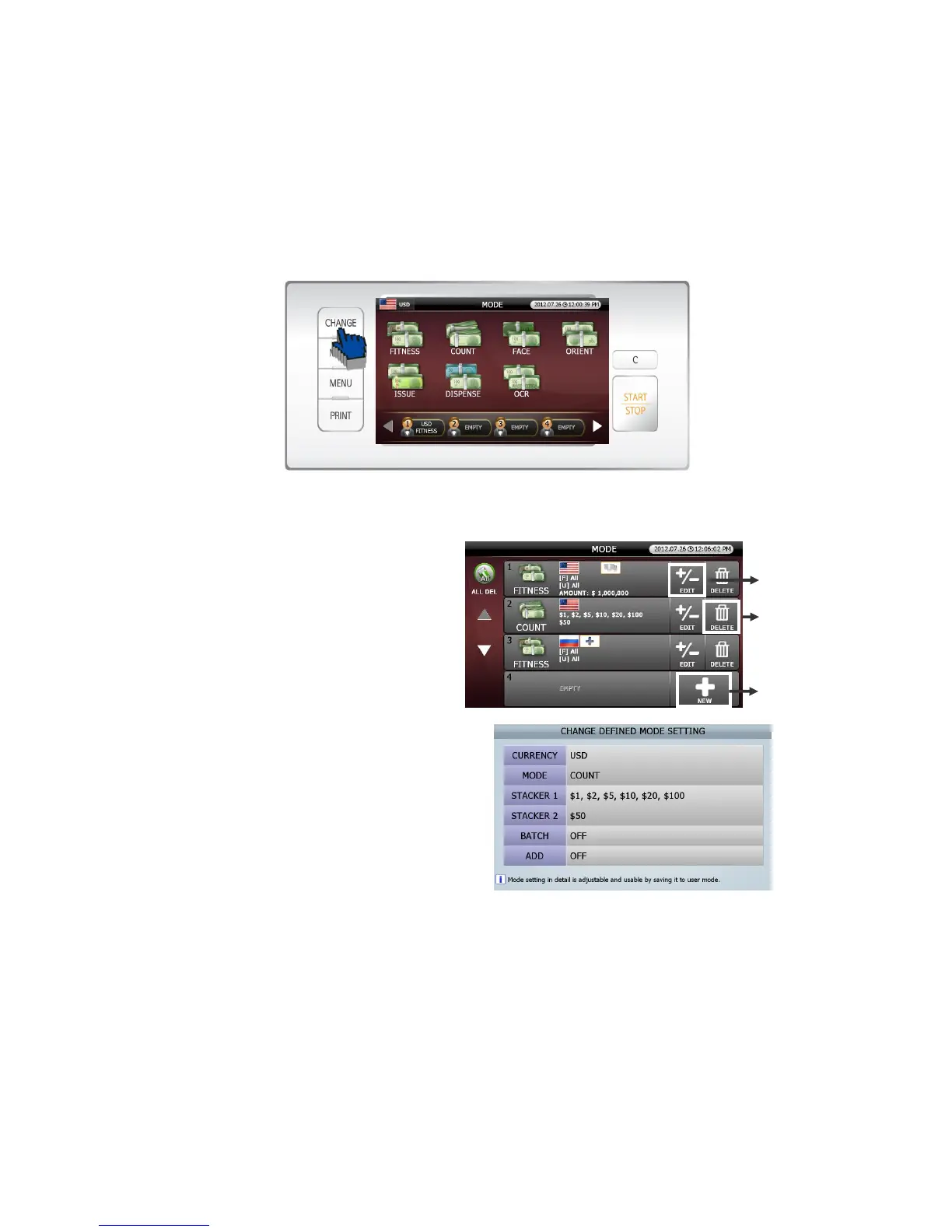
2 In order to set in ‘User Define Mode’
[1] Pressing [MODE] button in initial screen (FIG 5-01), the screen will be will changed into’MODE
selection.’(FIG 5-03).
[2] Pressing [CHANGE] button in ‘MODE selection’(FIG 5-03), the screen will be changed into ‘User
Define Mode’ (FIG 5-07).
[3] Can set details in this ‘Mode’.
① In order to set up new User Mode, touch
[New] icon and activate ‘MAKE DEFINED
MODE SETTING.’ stage(FIG 5-05)
② In order to edit previous User
Mode, touch [EDIT] icon and activate ‘CHANGE
DEFINED MODE SETTING.’(FIG 5-
08) Change and save the details.
③ In order to delete the previous User Mode,
touch [DELETE] icon.
(FIG 5-07)
(FIG 5-08)
①
②



 To Next Page