Page 147
STAT
IM
2000/2000S Service Guide
96-106775 Rev 5.0
7. Electrical and Electronic Components
Page 29
STATIM 5000 G4 Service Guide
Removing and Replacing the USB port
To remove the USB port, first remove the cover to access the inside of the fascia and
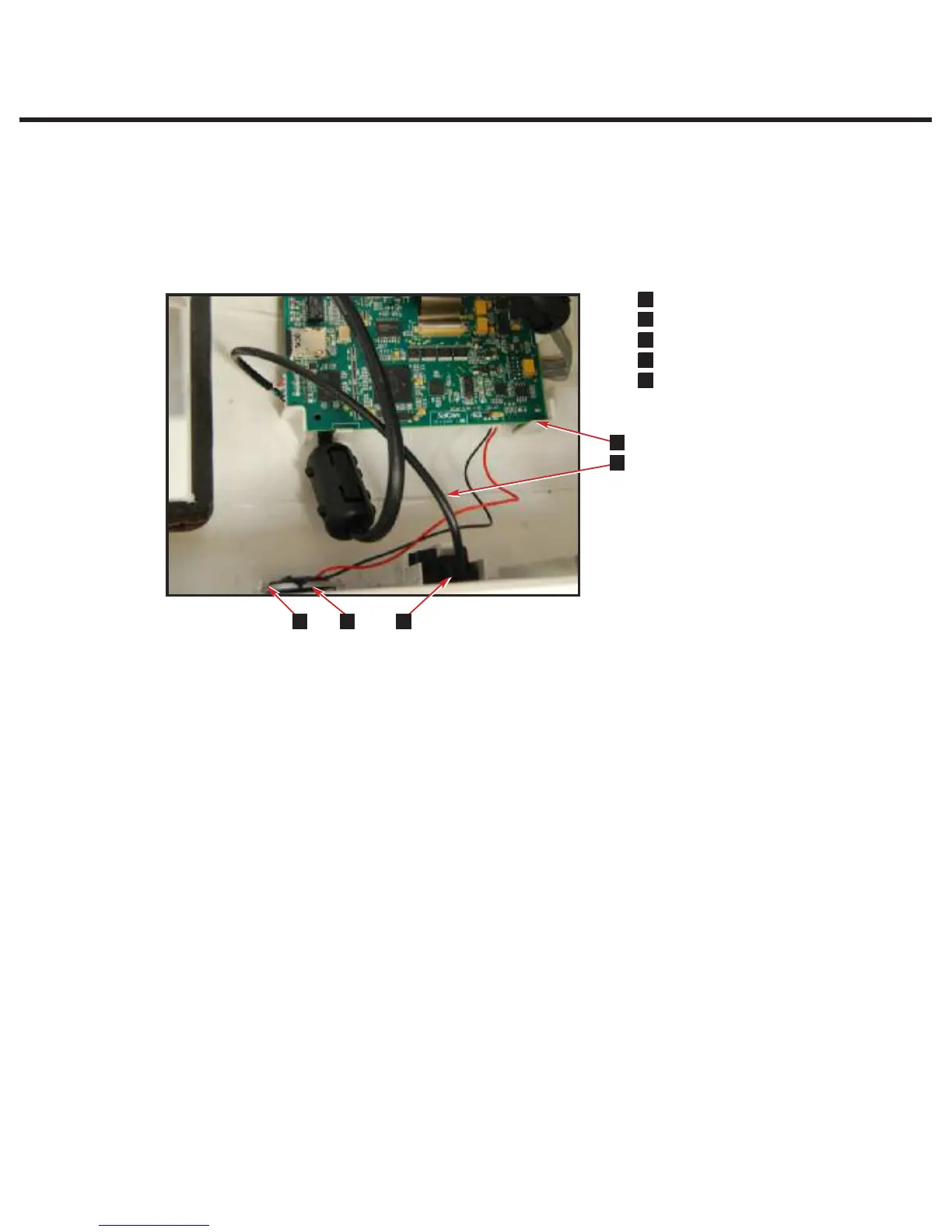
remove the LCD controller board.Then follow these steps (see Figure 6):
1. Disconnect the USB port cable (1) from the LCD controller board (2).
2. Lift the tab holding the USB port assembly (3) and pull the assembly out.
To replace the speaker, reverse the removal instructions.
Removing and Replacing the Speaker
To remove the speaker, first remove the cover. Remove the LCD controller board and place
the cover upside down on a worksurface. Then follow these steps (see Figure 6):
1. Disconnect the speaker (4) from the LCD controller board (2).
2. The speaker is hot-glued into the tabs. You will have to remove the glue to pull it out.
To replace the USB port, reverse the removal instructions (use hot glue to secure speaker).
Cover Assembly
Figure 6
n
1
USB port cable
n
3
LCD controller board
n
3
USB port assembly
n
3
Speaker
n
3
Tabs
1
2
3
4
5
1
2
4
3
5
STATIM 5000/5000S/5000 G4 Service Guide
Removing and Replacing the STAT
IM
5000 G4 USB Port
To remove the USB port, first remove the cover to access the inside of the fascia and
remove the LCD controller board.Then follow these steps (see Figure 13):
1. Disconnect the USB port cable (1) from the LCD controller board (2).
2. Lift the tab holding the USB port assembly (3) and pull the assembly out.
To replace the speaker, reverse the removal instructions.
Removing and Replacing the STAT
IM
5000 G4 Speaker
To remove the speaker, first remove the cover. Remove the LCD controller board and place
the cover upside down on a worksurface. Then follow these steps (see Figure 13):
1. Disconnect the speaker (4) from the LCD controller board (2).
2. The speaker is hot-glued into the tabs. You will have to remove the glue to pull it out. To
replace the USB port, reverse the removal instructions (use hot glue to secure speaker).
Figure 13



 To Next Page