Page 223
STAT
IM
2000/2000S Service Guide
96-106775 Rev 5.0
11. Steam Generator, Check Valve, Thermal Fuse and Pressure Relief Valve
STATIM 5000/5000S/5000 G4 Service Guide
Removing the Aluminium Steam Generator
(for both 1st generation and Alex versions)
CAUTION: The steam generator may be hot if the unit has been operating. Guard against burns.
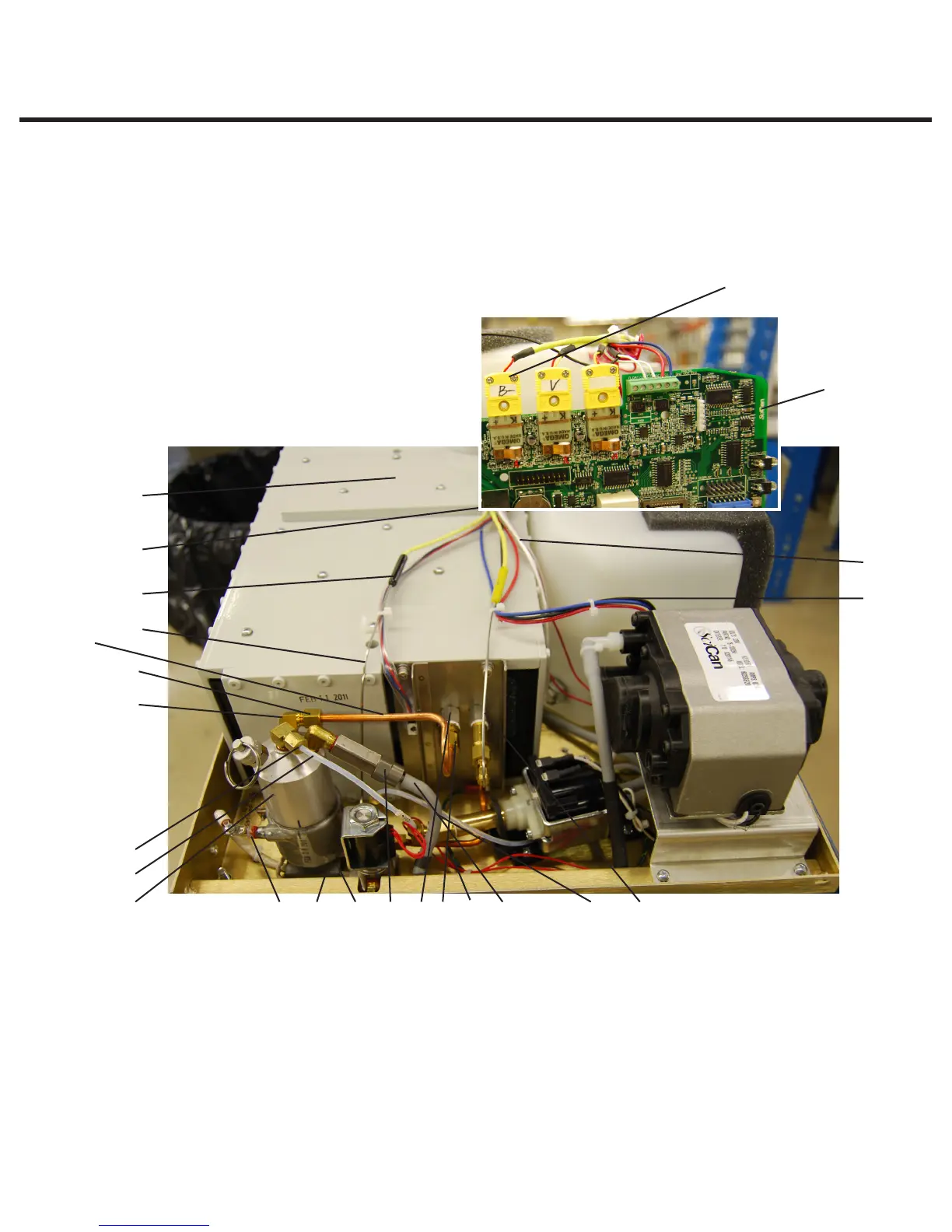
To remove the steam generator, proceed as follows (see Figure 2):
1. steam generator
thermocouple wires
2. controller board
3. flag terminal (on Rev 6 and
earlier boards)
4. black thermal fuse wire
5. aluminum steam generator
6. cable ties
7. chamber thermocouple lead
8. steam generator
thermocouple lead
9. microswitch leads
10. reservoir sensor leads
11. armature
12. white wire
13. high temperature
rated cable tie
14. compressor tube
15. check valve inlet
16. compression nut
17. Teflon™ tube
18. compression nut
19. steam generator outlet tube
20. steam generator outlet fitting
21. compression nut
22. probe bracket inlet fitting
23. screws
24. steam generator bracket
assembly
25. transducer leads (if present)
Figure 2
10
25
714134212215242312
5
17
16
8
9
6
11
20
18
19
1
2



 To Next Page