Page 181
STAT
IM
2000/2000S Service Guide
96-106775 Rev 5.0
8. Water Pumps, Reservoir, and Compressor
STATIM 5000/5000S/5000 G4 Service Guide
1. Remove the pump as described in the section above “Removing the SciCan or Ulka Pump
Assembly”.
2. Insert the grounding spring on the inlet side of the pump as per picture one in figure 10 above.
3. Re-install the pump as described in the section above “Installing/reinstalling the SciCan or
Ulka Pump Assembly”. The spring positioning should appear as per picture two in figure 10
above.
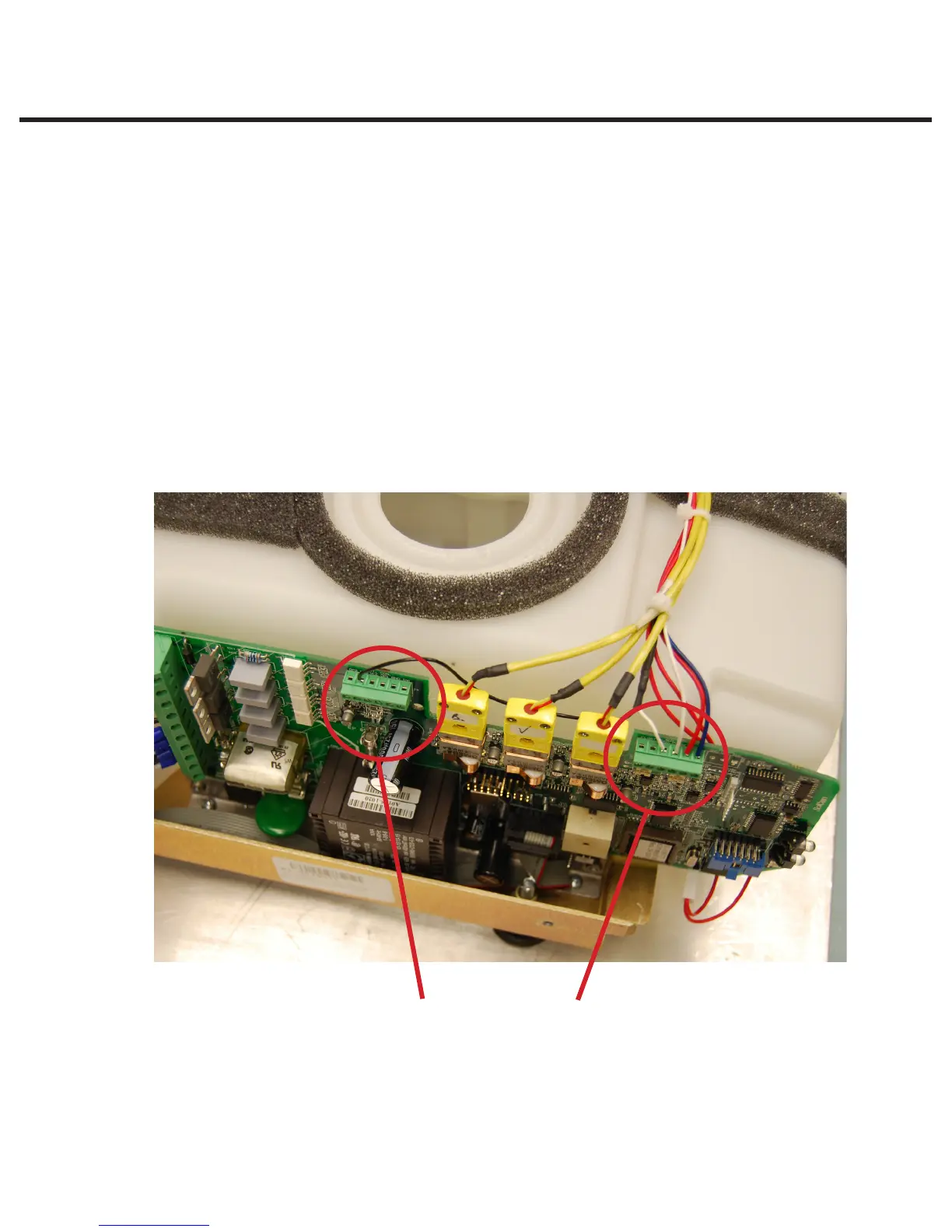
Option 3. Upgrade the water quality sensor to the later type (01-103571S).
The original water quality sensor had two wires coming from it whereas the upgraded part has
three wires that require attaching as per the configuration below.
• single white wire to J4 pin#3,
• second white wire (sheathed with the black wire) to J4 pin#4, and
• black wire to J3 pin#5.
J3 J4
Figure 22



 To Next Page